Track High Impact Email Follow Ups in One Sitting for Busy Pros

The fastest way to stop losing follow-ups is to build a consequence-focused system: track replies (not opens), pair every sent message with one reminder rule, and route anything overdue into a task before it goes cold. That combination catches missed deadlines and lost opportunities that generic “check your inbox more” advice never fixes. The next sections break down three systems, the tracking signals worth trusting, and templates you can send today.
TL;DR:
- Automated reply tracking based on message headers provides more reliable signals than open tracking, which can be triggered by privacy features.
- Setting up a simple workflow that combines one inbox rule with a reminder and reply detection can be implemented in under 30 minutes and effectively manages follow-ups.
- Relying on consequence-driven signals helps prioritize high-stakes emails over volume, reducing inbox clutter and missed deadlines.
- Regular daily micro-habits, like a two-minute review of flagged threads and immediate replies, make follow-up systems sustainable for busy professionals.
- TheNeedle offers a consequence-focused tool that surfaces only the most urgent follow-up threads, reducing noise and improving response efficiency.
Table of Contents
- Three Practical Systems to Track Email Follow-Ups
- How Reply Tracking Actually Works
- Set Up a Reliable Follow-Up Workflow Today
- Timing, Cadence, and Templates That Actually Get Replies
- Why Consequence-Focused Tracking Beats Volume-Driven Habits
- A Realistic Daily Habit for Busy Professionals
- Try theNeedle for Consequence-Focused Follow-Up Tracking
- Sources
- FAQ
Three Practical Systems to Track Email Follow-Ups
Not every follow-up situation calls for the same tool. Match the system to your volume and stakes, and you will save yourself hours of setup you never use.
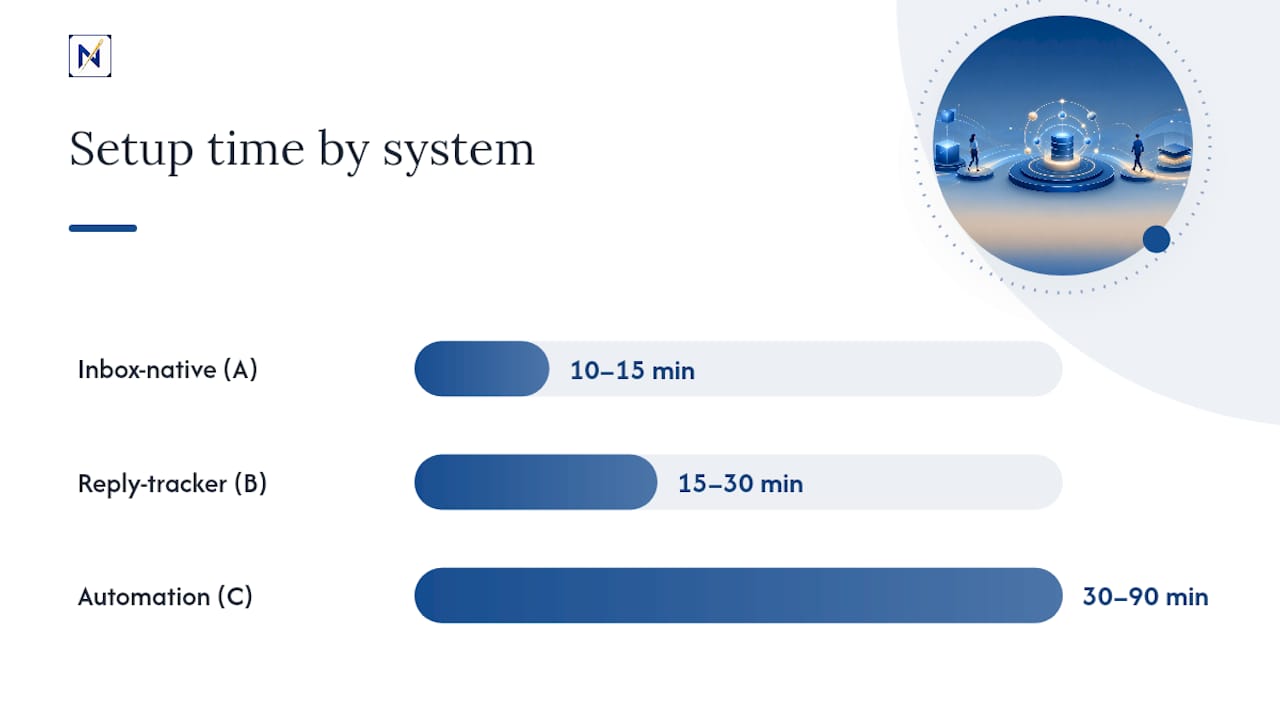
- System A, inbox-native tools: Snooze, flags, and send-later features built into Gmail or Outlook. Best when you manage a single inbox with low volume and want zero new software. Setup time: 10 to 15 minutes.
- System B, lightweight reply-trackers: Standalone email-reminder services that watch a thread and ping you when someone replies or when a deadline passes. Best for solo professionals and freelancers who want passive monitoring without the overhead of a full CRM. Setup time: 15 to 30 minutes.
- System C, thread-to-task automation: Tie sent messages to a CRM record or task manager using the thread’s Message-ID, so a reply automatically updates a pipeline stage or closes a task. Best for sales teams or anyone juggling a pipeline where a missed reply has a real financial cost. Setup time: 30 to 90 minutes, mostly spent connecting accounts and testing rules.
If you are managing a job search or a batch of applications rather than a sales pipeline, the same logic applies. Tracking job applications with dated reminders works on the same principle: know what you sent, know when to chase it, and don’t rely on memory.
The tradeoff is consistent across all three: the less setup time a system demands, the less it tells you automatically. Inbox-native tools require you to remember to snooze in the first place. Automation requires an hour of setup but then runs without you.
How Reply Tracking Actually Works
Most follow-up tools sell you on open tracking. It’s the least reliable signal available, and worth understanding why before you build a workflow around it.
Reply detection works by matching a message’s original Message-ID against the In-Reply-To and References headers of anything that lands back in your inbox. When those headers line up, the tracking system can confirm a genuine reply instead of guessing. This method is immune to image-blocking privacy settings, because it never depends on a pixel loading at all.
Open tracking, by contrast, depends on a tracking pixel firing when a recipient’s email client renders an image. Apple Mail Privacy Protection and Gmail’s own image proxying can trigger that pixel automatically, whether or not a human ever looked at the message. Security scanners do the same thing. An open count can tell you a server touched your email. It cannot reliably tell you a person did.
Before adopting any tracker, run through this checklist:
- Does it confirm replies through headers, or only through opens?
- How does it handle replies sent from an alias or a different address than the original recipient?
- Does it filter out auto-responses (out-of-office, vacation replies) so they don’t register as real engagement?
- Does it require you to connect your live inbox, or does it only work on messages sent through its own platform?
Set Up a Reliable Follow-Up Workflow Today
You don’t need a week to build this. Most of it fits into one sitting if you follow the steps in order.
- Pick your primary signal. Decide whether you’re tracking for a reply or for the absence of one, and decide the action each triggers. A reply might snooze the thread for review. Silence after five days might create a task or trigger an escalation email.
- Build one inbox rule and one reminder. A simple template: filter by sender or subject keyword, apply a label like “Awaiting Reply,” then set a reminder for three business days out. That single rule handles the majority of routine follow-ups without any new software.
- Automate the edge cases. Configure the rule to auto-cancel the reminder the moment a real reply lands, using the Message-ID matching Mailmodo describes for linking replies back to their source thread. Add a filter to ignore auto-responses so an out-of-office message doesn’t quietly cancel a reminder you still need.
- Test before you trust it. Send yourself a test thread, reply from a different address you sometimes use, and confirm the rule still catches it. Forwarded replies are the most common failure point: if a colleague forwards a client’s response instead of hitting reply, most header-matching tools will miss it.
Pro Tip: Run your test with an alias or secondary address you actually use, not just your primary one. That’s where most reply-tracking rules quietly fail, and you’ll never notice until a real client reply slips through.
Timing, Cadence, and Templates That Actually Get Replies
Timing matters as much as the tracking system behind it. Send too soon and you look anxious. Wait too long and the thread goes cold.
A reasonable default: send your first follow-up two to three business days after the original message, space subsequent follow-ups five to seven days apart, and stop after three attempts unless the stakes justify a fourth. Beyond that point, silence is usually an answer.
Three templates cover most situations:
- The brief check-in: “Wanted to make sure this didn’t get buried. Any thoughts on the proposal I sent Tuesday?” Works for low-stakes, low-urgency threads.
- The value-reminder: “Following up in case this slipped through. Happy to hop on a quick call if it’s easier than email.” Works when you want to lower the effort required to respond.
- The deadline nudge: “The offer expires Friday. Let me know if you need anything else to make a decision before then.” Works when there’s a real consequence attached to inaction, and it should only be used when that consequence is genuine.
Match your tone to the relationship. A colleague gets a short, casual nudge. A client with a contract deadline gets a direct call-to-action with the stakes stated plainly.
Why Consequence-Focused Tracking Beats Volume-Driven Habits
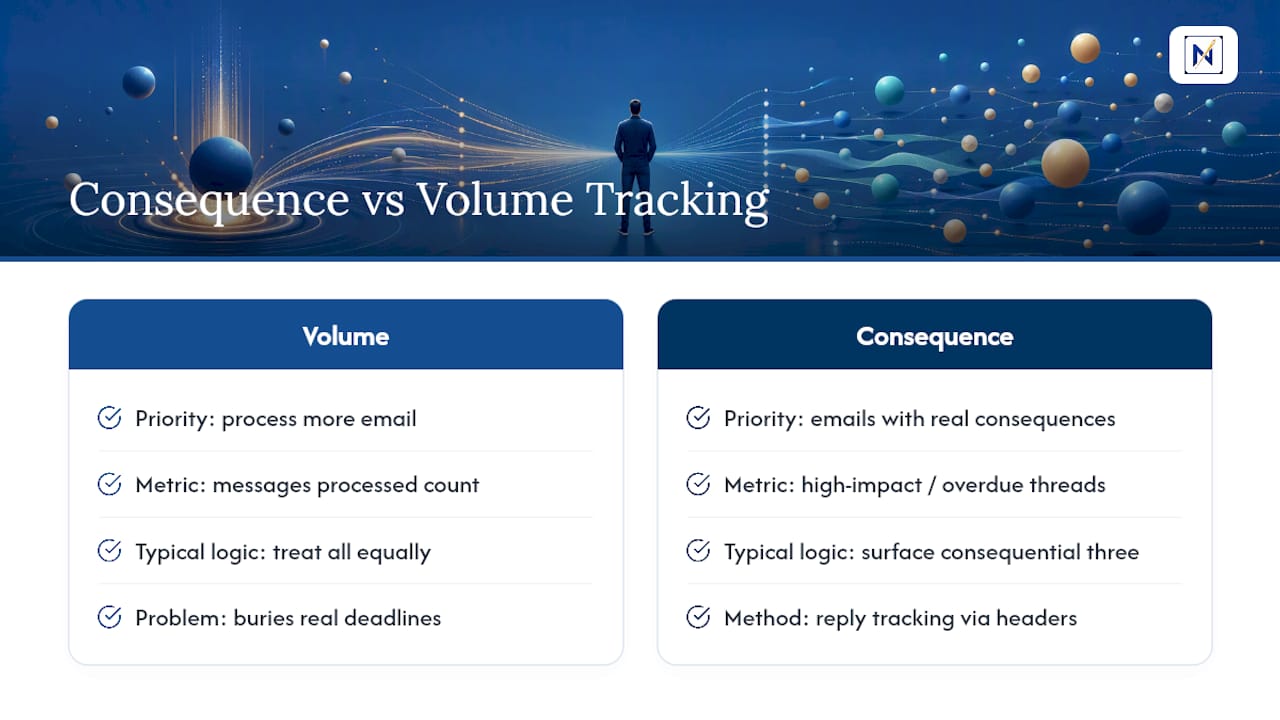
Most inbox advice tells you to process more email, faster. That’s backward. The average worker receives 117 emails a day, and treating all of them with equal urgency is exactly how the one message with a real deadline gets buried under forty newsletters.
Industry guidance backs the shift toward consequence over volume. Sales platforms increasingly design engagement tracking around surfacing overdue or high-impact threads instead of counting how many messages got opened. The logic transfers directly to personal inbox management: you don’t need to see every email today. You need to see the three that carry actual consequences if ignored.
The technical detail that makes this work is unglamorous but reliable: a reply-tracking system scans incoming messages for In-Reply-To and References headers, checks them against the original Message-ID, and treats a match as a confirmed reply. No pixel, no guesswork, no dependence on whether a recipient’s mail client blocks images.
That header-matching approach is why reply detection holds up even as privacy protections make open tracking less trustworthy every year. The cost of missing a consequential email compounds quietly, one overlooked deadline at a time, and a system built on real signals is the only defense that scales.
A Realistic Daily Habit for Busy Professionals
The habit that sticks is boring on purpose: end each day with a two-minute scan of only the threads flagged as awaiting reply or overdue. Skip everything else.
Three micro-habits make this sustainable. First, a single-scan triage: one pass through flagged threads, no re-reading the whole inbox. Second, immediate quick-action: if a reply takes under thirty seconds, send it right then instead of re-flagging it. Third, schedule every remaining follow-up in that same sitting rather than leaving it as a mental note for later.
— Glen Bover
Try theNeedle for Consequence-Focused Follow-Up Tracking
theNeedle is the alternative to juggling snooze folders and open-tracking dashboards. Instead of scanning every message for signs of a reply, it connects to major email providers and does the consequence-ranking for you.

Here’s what maps directly to the workflow above:
- Unhandled-reply detection surfaces threads waiting on you, without you hunting through labels.
- Consequence-based ranking pushes deadline emails and financial alerts to the top, ahead of anything with no real stakes attached.
- Built-in unsubscribe cuts down the noise from persistent senders competing for the same attention.
On your first day, expect less noise and a shorter list of what actually needs a response. Try theNeedle live and see which threads have been waiting on you longer than you realized.
Sources
- Use email engagement to view message interactions | Microsoft Learn
- Tracking Email Replies | EmailEngine docs
- How to Track Replies from Email Recipients | Mailmodo
FAQ
How Do I Write a Follow-Up to a Follow-Up Email?
Keep it shorter than the first one. Reference the original request briefly, add any new information or urgency, and close with a single clear question or call to action.
How Can I Automate Email Follow-Ups?
Set up an inbox rule that flags unanswered threads after a set number of days, then connect that rule to an automatic reminder or task using Message-ID matching so it cancels itself the moment a real reply arrives, as described in EmailEngine’s reply-tracking documentation. Tools like theNeedle handle this automatically by surfacing unhandled replies without manual rule-building.
How Can I Politely Ask for a Follow-Up Reply?
Acknowledge that the recipient is busy, restate the original ask in one line, and offer an easy way to respond, such as a yes/no question or a short call. Avoid guilt-based language; it reduces response rates rather than improving them.
Why Is My Email Showing “Follow-Up” Status?
Most email clients and CRMs flag a message as “follow-up” when a reminder rule triggers, typically because no reply header matched the original Message-ID within your set time window. Check whether the recipient replied from an alias, which can cause a genuine response to go undetected.