Reply Tracking Email: Stop Missing Deadlines Among 117 Daily Emails

A reply tracking email system detects and surfaces the handful of replies that actually carry consequences, deadlines, refunds, client commitments, so they never slip past you unanswered. Start today with one small move: build a small VIP sender list with a limited number of people and turn on follow-up alerts for those threads. Everything else, the automated signals, the daily workflow, the privacy tradeoffs, builds from that first step.
TL;DR:
- Building a small VIP sender list of fewer than 20 contacts and setting immediate alerts for their replies significantly reduces critical message overload.
- Automated reply detection relies on contextual clues like deadlines, language, or keywords, but human review remains essential to avoid misclassification.
- A consistent daily triage routine, including quick initial checks and scheduled batching, improves response speed and lowers stress without increasing alert volume.
- Connecting inbox tools requires permission safeguards, emphasizing read-only access and quarterly permission audits to mitigate security risks.
- Focusing inbox management on high-stakes replies grounded in consequences rather than volume enhances productivity and prevents overlooked critical messages.
Table of Contents
- Why Reply Tracking Matters More Than Inbox Zero
- How Do You Set Up Reply Tracking Manually?
- What Signals Do Automated Tools Use to Detect Unhandled Replies?
- Building a Weekly Rhythm for Reply Tracking
- Is It Safe to Connect Your Inbox to a Reply Tracking Tool?
- Why We Built Reply Tracking Around Consequences, Not Volume
- Try theNeedle for Reply Tracking That Actually Catches What Matters
- Sources
Why Reply Tracking Matters More Than Inbox Zero
The problem isn’t the number of emails hitting your inbox. It’s which ones you’re missing while you scroll past the noise to find them. A 2024 study on email load found that communication-related messages, group updates, newsletters, cc chains, drive stress and overload far more than task-related emails do when researchers isolated the two categories. In other words, the emails making you feel buried aren’t the ones that matter. They’re crowding out the ones that do.
That distinction matters for how you build a system. If you treat every unread message as equally urgent, you end up triaging noise with the same energy you should spend on a client waiting for a signed contract. Researchers who logged real email behavior found something worth sitting with: participants checked email very frequently throughout the day, and longer email sessions correlated with higher stress, not more productivity.
Missed replies have real costs, not abstract ones:
- A client offer expires because the reply sat three days unread in a crowded inbox.
- A refund window closes because the confirmation email got buried under promotional noise.
- A vendor contract stalls because the “just following up” message read like every other cc’d update.
Reply tracking flips the priority. Instead of asking “what’s unread,” you ask “what’s unhandled and expensive to ignore.”
How Do You Set Up Reply Tracking Manually?
Before you touch any software, build the scaffolding by hand. Most inbox chaos comes down to three fixable gaps: no sender hierarchy, no domain filtering, and cc mail sitting in the same pile as direct requests.
Start here:
- Build a VIP list of fewer than 20 senders. Include your top clients, your direct manager, anyone tied to active contracts, and recurring billing contacts. Skip anyone you’d classify as “nice to hear from” rather than “expensive to ignore.”
- Set a rule that flags or highlights VIP replies immediately. In Gmail, use a filter with “star and mark important.” In Outlook, use a Rule with a category color and a desktop alert.
- Create domain filters for recurring noise. Newsletters, SaaS notification emails, and internal broadcast lists should route to a labeled folder, not your primary view.
- Build a separate cc folder. Move anything where you’re cc’d, not addressed directly, into its own view. Practitioner guidance on inbox structure backs this specific move: filing cc’d messages away reduces the scanning fatigue that comes from treating every message like it needs the same attention.
- Review the VIP list monthly. People change roles, contracts end, and a stale VIP list dilutes the one signal you built it to protect.
Pro Tip: Resist the urge to add “just in case” names to your VIP list. A list of 40 names behaves exactly like no list at all. It stops meaning anything.
This manual setup alone typically removes a large share of the noise that makes inbox triage feel impossible. It won’t catch everything, though, and that’s where automated detection earns its place.
What Signals Do Automated Tools Use to Detect Unhandled Replies?
A reply tracking tool worth using looks past the subject line and reads for context clues that suggest a message needs action, not just attention. The strongest signals overlap in most systems:
- Reply-expected language, phrases like “let me know,” “can you confirm,” or a direct question mark near the end of a thread.
- Dates and deadlines embedded in the text, whether that’s “by Friday” or a specific calendar date.
- Billing and invoice keywords, since financial threads carry outsized consequences relative to their volume.
- Attachments or contract language, which flag threads where a human should read before anything gets marked resolved.
- Sender history, meaning how that person has behaved in past threads, and whether they typically expect a fast turnaround.
Good systems then sort flagged threads into a few operational buckets: Act Now, Act Later, Delegate, or Archive. That three or four tier model works better in practice than trying to run every message through a full priority matrix, since matching each thread against multiple weighted criteria takes longer than the reply itself.
Automation has real limits, though. Systems misread dates, over-trust vague language as a green light, or let too many messages default into “Action” until the label stops meaning anything.
The two most common failure modes in inbox automation are over-trust, where a system references the wrong date or deadline, and label rot, where every message eventually gets tagged as urgent because the categories were never refined. Guardrails that require human review before auto-resolving legal or contractual threads catch both problems before they cost you something.
Treat automated tracking as a filter that shrinks your Action queue, not a replacement for reading the five emails that actually matter.
Building a Weekly Rhythm for Reply Tracking
A tool only works if you run it the same way every day. The goal isn’t more alerts. It’s fewer, better ones, checked on a schedule you can actually stick to.
- Start with a VIP check. Two minutes, first thing, before you open anything else. Confirm nothing from your top 20 senders needs an immediate response.
- Set a few scheduled triage windows daily, not constant checking. Batching correlates with lower stress than checking email continuously throughout the day, though the benefit shrinks if you still let sessions run long once you’re in there.
- Apply the two-minute rule inside each window. If a reply takes under two minutes, send it immediately. If it needs more, flag it for a dedicated batch later.
- Use Pomodoro-style batching for longer replies. Twenty-five minutes of focused response writing beats an hour of half-attention spread across a dozen half-finished drafts.
- Set a follow-up SLA and stick to it. Same-day for VIP senders, 24 hours for active project threads, 48 hours for everything else that still warrants a reply.
- Escalate instead of re-snoozing. Snoozing a message twice without action is usually a sign it needs delegation, not another delay.
Pro Tip: Snoozing feels like progress because the message disappears. It isn’t progress until someone actually answers it. Set a rule: after two snoozes, the thread gets delegated or answered, no third snooze allowed.
A systematic review covering 25 years of workplace email research found regular triage and clear access boundaries among the practices most consistently linked to better performance and lower stress. The specific tools matter less than the discipline of running this rhythm every single day.
Is It Safe to Connect Your Inbox to a Reply Tracking Tool?
Connecting any third-party tool to Gmail, Outlook, or iCloud means handing over some level of access, and not every integration asks for the same amount. The safest tools request read or metadata access only. Anything asking for send permissions when it only needs to detect and flag replies is asking for more than the job requires.
A few practices worth insisting on before you connect anything:
- Confirm the tool’s permission scope covers reading, not sending, unless you specifically need auto-reply features.
- Ask whether message bodies are stored long-term or processed and discarded. Ephemeral handling limits your exposure if the vendor ever has a breach.
- Require manual approval for any high-stakes reply, contracts, financial commitments, legal language, rather than letting automation resolve those threads on its own.
- Audit connected app permissions quarterly. Old integrations you forgot about are a common, avoidable risk.
None of this means avoid automation. It means treat inbox access the way you’d treat access to your bank account: useful, but worth checking on a schedule.
Why We Built Reply Tracking Around Consequences, Not Volume
Most inbox tools chase the wrong metric. They help you process more email faster, when the real problem is that a handful of replies carry disproportionate weight and get lost anyway. theNeedle’s own research points to why: the average worker receives 117 emails a day, and drowning that volume in speed doesn’t fix the fact that one unanswered reply about a contract deadline matters more than a hundred newsletters combined.
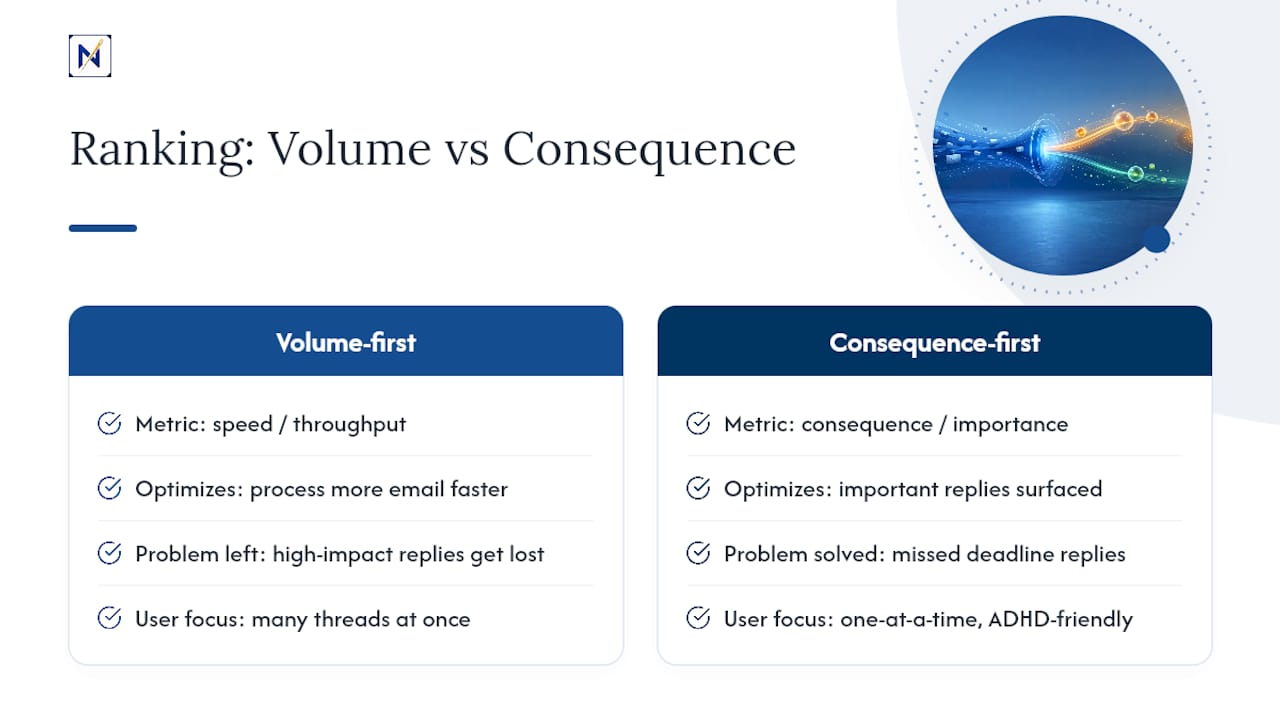
We built theNeedle around consequence-first ranking instead, and around a one-at-a-time focus that works well for people who find switching between dozens of open threads genuinely exhausting, including many with ADHD. The goal was never fewer emails. It was fewer replies you regret missing.
If that framing matches how you already think about your inbox, you’ll likely find organizing around it changes more than your stress level.
— Glen Bover
Try theNeedle for Reply Tracking That Actually Catches What Matters
theNeedle connects to Gmail, Outlook, Microsoft, Yahoo, and iCloud and does the one thing generic inbox tools skip: it surfaces unhandled replies tied to deadlines, refunds, and financial or contractual consequences, instead of just sorting mail by sender or date. You still get the noise filtered out. You just also get a flag on the one reply that was about to cost you something.

If you’re tired of building VIP rules and domain filters by hand every time your inbox shifts, see theNeedle live and watch how consequence-based ranking works on a real inbox. There’s a free trial to start with, and if urgent alerts matter more to you as texts than as another email notification, you can also preview SMS alerts for the replies that can’t wait.
Sources
- Email duration, batching, and self-interruption patterns of email use on productivity and stress — CHI 2016
- Getting on top of work‑email: A systematic review of 25 years of research (2023 DOI)
- Why ‘Inbox Zero’ Isn’t the Goal Anymore — Psychology Today (2025-06-04)