Manage Email Notifications Without Missing What Matters

Stop tuning notification volume and start tuning for consequence. The fastest fix for inbox chaos is a triage system that flags deadlines, refunds, and unhandled replies, paired with two to four scheduled sweeps instead of constant alerts. This prevents the real damage of email overload: missed deadlines, forfeited refunds, and replies that quietly die in a crowded inbox.
Here’s the one-minute action to take right now:
- Create a temporary filter for “deadline,” “refund,” or “invoice” in the subject or body.
- Route matches to a single label.
- Turn off notifications for everything else, and turn them on only for that label.
That’s it. You’ve just built the skeleton of a consequence-first system.
Key Takeaways
Consequence-first triage, paired with scheduled sweeps instead of constant alerts, is the most reliable way to stop missing deadlines, refunds, and unanswered replies.
| Point | Details |
|---|---|
| Triage before you filter | Sort every message into do now, defer, delegate, or delete before building automated rules. |
| Batch in 2 to 4 sweeps | Fixed-time checking beats constant alertness and cuts costly context switching. |
| Prioritize by consequence, not volume | Flag deadlines, financial alerts, and unhandled replies rather than just reducing notification counts. |
| Track precision, not just inbox zero | Measure missed high-consequence items and false positives, then tune keyword rules weekly. |
| theNeedle automates the detection | It connects to major providers and surfaces deadline, refund, and unhandled-reply messages without manual rule-building. |
Table of Contents
- How Do You Manage Email Notifications the Right Way?
- How Do You Set Up Filters, Rules, and Labels for High-Priority Mail?
- What Does a Realistic Daily Sweep Schedule Look Like?
- How Do You Know the System Is Actually Working?
- How Does theNeedle Put Consequence-First Triage Into Practice?
- What Actually Happens Once You Turn This On
- Try theNeedle’s Approach to Priority Email
- Authoritative Research and Resources
- Sources
How Do You Manage Email Notifications the Right Way?
Most advice on this topic treats every unread message as equally worth an alert. It isn’t. A newsletter and a client’s overdue invoice do not deserve the same buzz on your phone, yet default settings treat them identically. The fix starts with triage: a one-pass sort that assigns every incoming message a quick verdict of do now, defer, delegate, or delete/archive. This mirrors the logic of the Eisenhower matrix, and it works because it removes the need to re-read and re-decide on the same message three times a day.
- Do now — anything with a deadline inside 24 hours, a financial consequence, or a reply someone is actively waiting on.
- Defer — real work, but not urgent; move it to a labeled folder and revisit during a scheduled block.
- Delegate — forward it, tag a colleague, and get it off your plate immediately.
- Delete or archive — no action needed, ever.
Batching is the second half of the equation. Checking email in two to four fixed sweeps a day, rather than reacting to every alert, cuts the context-switching cost that constant checking creates. Each interruption costs you re-orientation time, and that adds up fast across a workday.
Research on strategy comparisons backs a specific approach here: using the inbox as a to-do list and keeping it near zero both raise email management performance, largely by relieving working memory. The tradeoff is real, though. A to-do-list inbox can quietly balloon into 400 unread messages if you never triage it, which defeats the purpose. Consequence-based prioritization solves this by asking a different question than volume-based notification settings ever could: not “how many emails do I have,” but “which ones actually carry a deadline, a dollar amount, or an unanswered obligation.”
For anyone who finds folder complexity itself exhausting, particularly readers managing ADHD, the fewer categories the better. One priority label and one inbox view, reviewed one item at a time, beats a nested filing system every time.
Pro Tip: If you only build one rule this week, make it the “unhandled reply” rule. A thread that goes quiet for three days is often more costly than a new message that just arrived.
How Do You Set Up Filters, Rules, and Labels for High-Priority Mail?
Building the rule set that surfaces consequential email takes about 20 minutes, and it works the same way across Gmail, Outlook, Yahoo, and iCloud, even though the menus look different.
- Define consequence keywords. Watch for “deadline,” “due,” “refund,” “invoice,” “final notice,” and “response needed,” in both subject and body.
- Flag senders that matter. Banks, clients, landlords, and payroll systems go on an always-priority sender list regardless of subject line.
- Check attachments. A message with a PDF invoice or a contract attachment often outranks a plain-text note, even from the same sender.
- Route matches to one label. Call it “Priority” or “Act Now.” Simplicity beats a color-coded taxonomy nobody maintains.
- Enable notifications only for that label. Everything else stays silent until your next scheduled sweep.
Once the priority label exists, turn attention to the noise side. Persistent low-value senders (retail newsletters, event blasts, automated digests) are, according to Frontiers research, the actual drivers of high email load, not the task-related messages you’re worried about missing. Bulk-unsubscribe from these rather than filing them one at a time. Most clients support automated unsubscribe or a “block sender” rule that prevents the message from reaching your inbox at all.
Last, build a rule that catches what triage naturally misses: replies you sent that never got an answer. A filter that flags any thread with no response after three business days turns an invisible problem into a visible one, sitting in your priority label right where you’ll see it.
Pro Tip: Test your rules for a week before trusting them completely. A keyword filter that’s too broad will bury your priority label in false alarms just as effectively as no filter at all.
What Does a Realistic Daily Sweep Schedule Look Like?
A workable rhythm for most professionals runs three sweeps a day, spaced to match natural attention dips.
- Morning sweep (first 30 minutes). Clear the priority label, action anything time-sensitive, defer the rest into labeled blocks.
- Midday sweep (after lunch). Check the priority label again, handle new arrivals, and glance at the unhandled-reply flag.
- End-of-day sweep (last 20 minutes). Final priority check, delegate anything that needs someone else’s morning, and confirm nothing deadline-sensitive slipped through.
If your role runs heavier, four sweeps with built-in delegation checkpoints works better, adding a late-morning pass specifically to reassign items that don’t need your hands. Shared inboxes change this model: ownership needs to be explicit, with one person accountable for the priority label at any given time, or consequential messages get missed because everyone assumed someone else saw it.
Between sweeps, turn notifications off entirely except for the priority label. That silence is what protects the deferred-work blocks you scheduled, and it’s the discipline that makes batching actually work instead of becoming just another good intention.

How Do You Know the System Is Actually Working?
Three numbers tell you whether your setup is doing its job: missed high-consequence items per month, average time-to-first-action on priority messages, and how many fewer times per day you’re context-switching into your inbox. If missed items aren’t dropping, your keyword rules likely need tuning, and that’s a precision-versus-recall balance worth checking weekly.
- Track false positives (noise wrongly flagged as priority) and false negatives (real deadlines that slipped through).
- Tighten keywords when priority is too noisy; broaden them when something important got missed.
- Watch for alertness burnout. Evidence on constant email checking is mixed, and for many professionals, always-on alertness correlates with higher job stress rather than better outcomes.
A 2024 study links reduced email overload directly to higher job and life satisfaction. When a single inbox affects multiple people, that’s the signal to move rules from personal habit to shared policy.
How Does theNeedle Put Consequence-First Triage Into Practice?
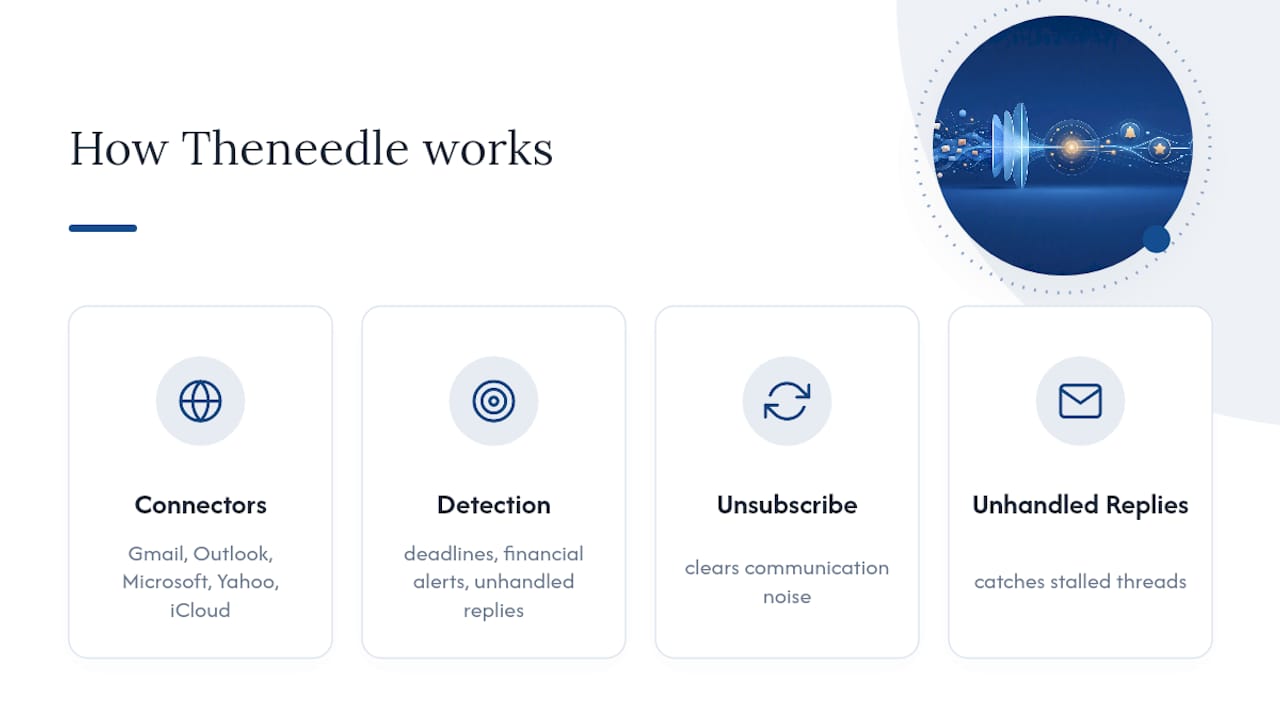
Everything above describes a system you can build manually with filters and discipline. Theneedle exists because most people won’t finish building it, or won’t maintain it once the initial motivation fades.
Theneedle connects to Gmail, Outlook, Microsoft, Yahoo, and iCloud and applies consequence detection automatically: deadlines, financial alerts, and unhandled replies get surfaced without you writing a single keyword rule. The scale problem is real. Many workers receive a high volume of emails daily, and sorting that volume by hand, even with good habits, breaks down under pressure. Built-in unsubscribe automation clears the communication-driven noise, while unhandled-reply tracking catches the threads that quietly stall.
The value isn’t in seeing more email faster. It’s in seeing the one message, out of 117, that actually has a deadline attached to it.
What Actually Happens Once You Turn This On
The friction shows up in week one: your first keyword rules will be too broad, catching things that don’t matter. That’s normal, not a failure. I found that trimming just two or three overly generic terms, “update” and “reminder” were the worst offenders, cut false positives sharply within days. Measure what slips through, adjust weekly, and the precision improves faster than you’d expect.
— Glen
Try theNeedle’s Approach to Priority Email
Theneedle is built specifically around what this article argues for: surfacing the one email that has real consequences instead of adding another layer of alerts to ignore. Rather than asking you to build and maintain your own keyword rules across multiple providers, it connects directly to Gmail, Outlook, Microsoft, Yahoo, and iCloud and applies deadline and financial-alert detection automatically, including tracking for refunds, credits, and replies that never got answered.

In a first week using theNeedle, expect fewer missed deadlines and a shorter list of threads that went quiet without you noticing. The one-at-a-time focus view is especially useful if constant inbox switching wears you down, since it presents a single consequential item rather than a stacked list demanding attention all at once. You can also enroll in SMS previews for prioritized messages if you want a second channel for anything urgent. Start with the live demo to see how it flags a real inbox, or visit theNeedle’s main page to begin a trial.
Authoritative Research and Resources
A few studies shaped the reasoning behind this approach and are worth reading directly if you want the underlying data.
- Letmathe & Noll’s analysis of email management strategies compares zero-inbox and to-do-list approaches and their effect on management performance.
- Frontiers’ 2024 study on email classes and work stressors distinguishes communication-related from task-related email load.
- The ResearchGate study on email overload and subjective well-being links overload to reduced job and life satisfaction.
Sources
- Analysis of email management strategies and their effects on email management performance
- Drowning in emails: investigating email classes and work stressors as antecedents of high email load and implications for well-being
- E-mail overload: Exploring employees’ experiences using e-mail during worktime and leisure time and consequences for their subjective well-being