117 Emails a Day? Inbox Zero vs Prioritization for Busy Professionals

Prioritization beats Inbox Zero as the default for most busy professionals, because the goal was never an empty inbox. “Zero” refers to unresolved decisions and attention drain, not message count, and Monday confirms it. With the average knowledge worker facing 117 emails a day, chasing a literal zero is a losing game. Tools like theNeedle exist because consequence, not volume, is what actually matters.
TL;DR:
- Prioritization is better suited than Inbox Zero for high-volume roles, as it focuses on acting only on messages with real consequences rather than clearing everything.
- Automated filtering and tagging tools like theNeedle help surface urgent messages by detecting deadlines, financial alerts, and approval requests automatically.
- Processing email in scheduled sessions and using a triage system with clear labels prevents constant distractions and decision fatigue during busy workdays.
- Setting up filters to divert low-value messages and batching responses reduces context switching and maintains focus on critical communications.
- Viewing inbox management as a consequence filter rather than a clearance race aligns better with modern work demands and prevents obsessive compulsive checking.
Table of Contents
- Inbox Zero Vs Priority: Comparing the Two Mental Models
- How to Set Up Inbox Zero Without the Common Traps
- How to Build a Prioritization-First Email Workflow
- Which Method Fits You? A Decision Checklist
- What the Evidence Says About Prioritizing Over Processing
- Why Attention, Not Volume, Should Drive Your Inbox
- Let theNeedle Handle the Sorting for You
- Sources
Inbox Zero Vs Priority: Comparing the Two Mental Models
Inbox Zero is a maintenance ritual. You touch every email once, make a call on it, and clear the queue on a schedule. Prioritization is a triage system. You skip most messages entirely and act only on the ones with real stakes attached, like a missed deadline or a refund window closing.
The difference shows up fastest in how each method treats your attention. Inbox Zero asks you to process everything, which works fine when your volume is low and predictable. Prioritization asks you to ignore almost everything, which works better when your volume is high and unpredictable, the more common case for people juggling client threads, internal requests, and vendor noise at once.
Here’s how the two stack up on the factors that actually change your day:
- Mental load: Inbox Zero demands a decision on every item; prioritization demands attention only on flagged items, cutting decision volume dramatically.
- Time cost: Inbox Zero typically needs two or three dedicated sessions daily to stay current; prioritization can run on a few short checks once filters are set.
- Best for: Inbox Zero suits roles with low, steady volume (solo consultants, early-career staff); prioritization suits high-volume, multi-thread roles (managers, founders, client-facing sales).
- Urgent vs. important: Inbox Zero treats all messages equally until you sort them; prioritization surfaces urgent and consequential items automatically.
- Tooling: Inbox Zero leans on folders, labels, and manual sorting; prioritization leans on rules, flags, and detection tools like theNeedle.
A support rep answering 40 tickets a day might thrive on Inbox Zero. A regional sales director fielding 200 emails from five different deal stages will drown in it. That’s not a discipline problem. It’s a volume problem that no amount of folder architecture fixes.
How to Set Up Inbox Zero Without the Common Traps
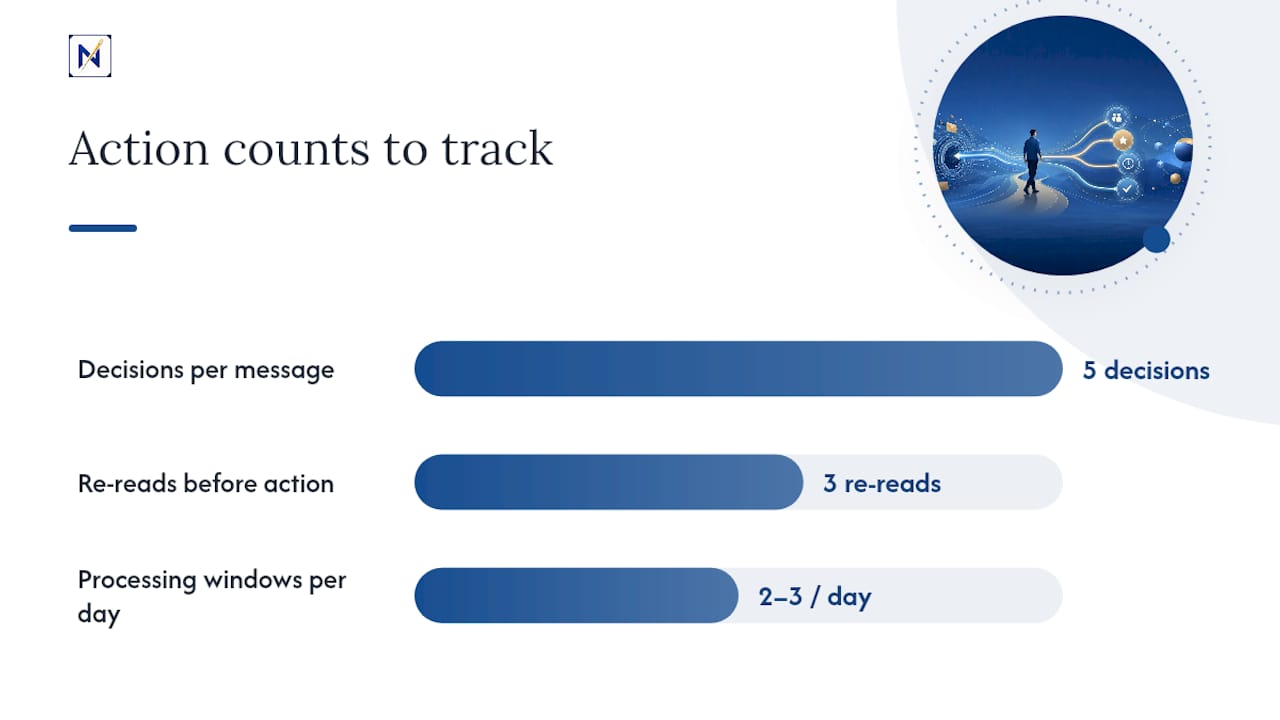
Inbox Zero runs on five decisions per message, a structure monday.com and Asana both describe the same way:
- Delete or archive anything with no action or future reference value.
- Delegate items that belong to someone else, forwarding with a clear ask.
- Reply immediately if the response takes under two minutes.
- Defer anything bigger by scheduling it as a task, not leaving it to reread later.
- Do the rare item you can finish in the same sitting you opened it.
Before any of that works, build the scaffolding. Set up filters that route newsletters, receipts, and low-priority senders straight to labeled folders, so your primary inbox only shows messages a human actually needs to judge. The FTC’s guidance on stopping junk mail is a solid starting point for cutting sender volume before you ever open your inbox. Pair that with two or three fixed processing windows a day instead of constant checking, which Indeed’s email management research backs as a way to cut context switching.
The common trap is trying to keep the inbox at zero constantly instead of at scheduled checkpoints. That turns a maintenance system into a compulsion. Set a folder structure once, batch your processing, and resist the urge to peek between sessions.
Pro Tip: If you find yourself re-reading the same email three times without deciding anything, that’s a sign you need a “defer” folder with a task link attached, not more willpower.
How to Build a Prioritization-First Email Workflow
Start with a triage rule set instead of a folder system. Every incoming message gets one of four labels: handle now, schedule, delegate, or ignore. That single sort takes seconds and prevents the slow bleed of rereading messages you’ve already seen.
Borrow from established frameworks rather than inventing your own. The Eisenhower matrix sorts by urgency and importance, which maps directly onto email triage. The Ivy Lee method has you name your six most important tasks the night before, so incoming email gets judged against that list rather than against an arbitrary inbox count. MoSCoW (must, should, could, won’t) works well for teams juggling requests from multiple stakeholders who all think their ask is urgent.
- Flag deadline language, financial terms (invoice, refund, payment due), and approval requests as automatic “handle now” candidates.
- Push newsletters and FYI threads into a batch folder checked once daily.
- Sync anything deferred straight into your calendar or task manager instead of leaving it as an unread email.
- Review flagged items every two to three hours instead of continuously.
This is where automation earns its keep. Filters and rules that route low-value senders out of view mean your attention only lands on messages that could actually cost you money, time, or a relationship if missed. That’s the same detection logic behind theNeedle’s approach to inbox organization, surfacing consequence instead of clearing a queue.
Pro Tip: Batch your “schedule” emails into a single 20-minute block at the end of the day. Answering them one by one as they arrive is what turns email into your default task manager.
Which Method Fits You? A Decision Checklist
Run through these questions before committing to either system for more than a week:
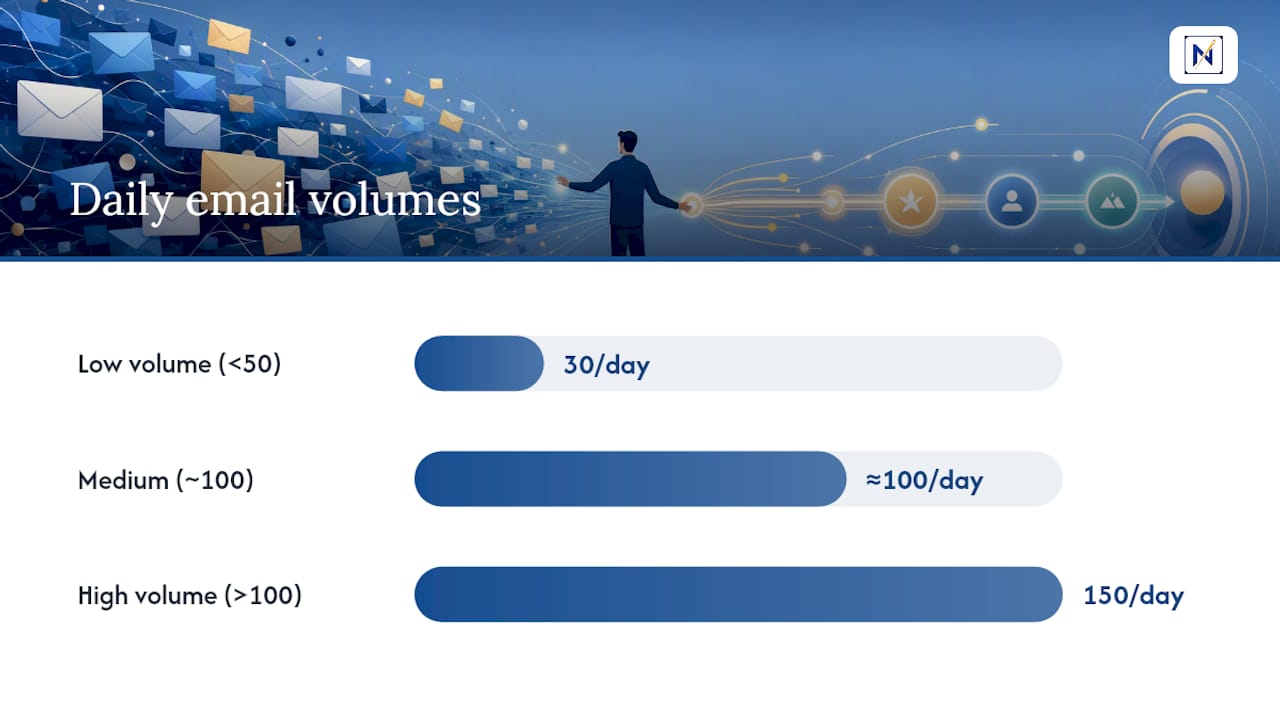
- Volume: Are you under 50 emails a day, or well past 100?
- Response expectations: Does your role carry hard SLAs, or is same-day response acceptable?
- Collaboration pattern: Do you mostly work solo threads, or juggle multiple live deal and project threads simultaneously?
- Cognitive style: Do you find satisfaction in clearing a list, or does an empty inbox feel like a chore you resent?
Two quick scenarios make the split concrete. A freelance designer with 30 emails a day, mostly client check-ins and invoices, benefits from Inbox Zero. Low volume means the five-decision process takes minutes, and the sense of closure supports focus. A regional operations manager fielding vendor escalations, internal approvals, and client emergencies across 150 daily messages needs prioritization. Processing every message in order guarantees the urgent one arrives late.
Ask your manager directly what response time is actually expected on internal requests, and whether delegation is welcome or discouraged on your team. Those answers often matter more than any productivity framework.
The red flag to watch for is treating an empty inbox as a personal scorecard. If you’re clearing messages at 11 p.m. to hit zero, or feel anxious at an unread count that has zero bearing on anything urgent, you’ve turned a tool into a perfectionist habit, and it’s costing you more attention than the emails themselves ever would.
What the Evidence Says About Prioritizing Over Processing
Microsoft’s Work Trend Index describes an “infinite workday,” where blurred boundaries push email processing into hours that should be protected, raising the attention cost of every additional message. A Forbes piece on abandoning literal Inbox Zero makes a similar case, reframing the goal as “Zero Decision,” meaning every message gets a call made on it, even if that call is “later,” rather than demanding a literal empty screen.
The infinite workday means the boundary between “checking email” and “working” has effectively disappeared for many knowledge workers, according to Microsoft’s WorkLab research.
With the average worker facing 117 emails daily, a volume-based goal like zero unread stops being realistic for most roles. That’s the gap theNeedle was built to close: surfacing the handful of messages with real consequences instead of asking you to judge all 117 yourself.
Why Attention, Not Volume, Should Drive Your Inbox
Most advice on email still treats the inbox as a chore list to clear, when it’s really a filter for consequence. The professionals who handle email well aren’t the ones who reach zero unread. They’re the ones who never miss the message with a deadline attached. That distinction is what shaped theNeedle from the start, and it’s why the next step is worth trying for yourself.
— Glen Bover
Let theNeedle Handle the Sorting for You
theNeedle is built for exactly the prioritization-first workflow this article recommends, minus the manual triage. Instead of you building filters and reviewing flagged folders by hand, theNeedle scans your inbox and surfaces the messages that actually carry consequences.

- Consequence detection: identifies deadlines, financial alerts, and approval requests automatically instead of relying on you to catch them.
- Overdue and unhandled surfacing: flags replies you never sent and opportunities like credits or refunds you might otherwise lose.
- One-at-a-time focus: shows a single priority message at a time, built with ADHD-friendly design in mind, instead of a wall of unread counts.
- Built-in unsubscribe: clears persistent low-value senders so your attention only lands where it matters.
It connects to major email providers, so the switch takes minutes, not a weekend project. If you’re tired of treating every email as equally urgent, start your free trial on theNeedle’s live page and see which messages were actually worth your attention all along.
Sources
- How to stop junk mail — FTC
- Breaking down the infinite workday — Microsoft WorkLab
- Giving Up On Inbox Zero Helped Me Take Back Control — Forbes
- Monday