Consequence First: One Pass to Stop Missing High Impact Emails at Work

A high-impact email is any message with a real consequence attached to it: a deadline, a refund window, a contract clause, or a reply someone is still waiting on. The fix is a one-pass triage that moves each of those messages into a named “Handle now” slot the moment you spot it, rather than letting them sink under a high volume of daily arrivals. Research from MIT Sloan and a growing category of consequence-aware tools like theNeedle both point to the same lesson: sorting by stakes beats sorting by time received.
TL;DR:
- A consequence-aware email triage system identifies high-impact messages by specific markers, such as deadlines, money at risk, or contractual time limits.
- Filters and verification checks are essential to distinguish genuine urgent requests from phishing attempts or manufactured urgency.
- Scheduling fixed email sweep times reduces interruptions and increases focus on deep work, rather than constant checking.
- Effective subject lines clearly state the stakes upfront with specific deadlines, dollar amounts, or actions, and avoid vague or overly urgent language.
- AI-assisted tools that rank emails by consequence enhance responsiveness to critical messages, especially across multiple email accounts.
Table of Contents
- What Is a High-Impact Email Triage System?
- How Do You Spot a Dangerous or Fake Urgent Request?
- How Should You Schedule Email Checks Without Missing Deadlines?
- Which Email Features Actually Catch High-Impact Messages?
- What Makes an Email Subject Line and Message Actually Land?
- How Do Formatting and Visual Emphasis Affect High-Impact Emails?
- Why Do Certain Emails Get Opened First?
- What Mistakes Ruin an Otherwise Important Email?
- How Should a Follow-Up Email Reinforce the Original Message?
- What Do Successful High-Impact Emails Look Like in Practice?
- Why Prioritizing Consequence Changes How You Work
- Try theNeedle for a Consequence-First Inbox
- Sources
What Is a High-Impact Email Triage System?
Most people read email the way they read a magazine: top to bottom, reacting to whatever catches the eye first. That habit is exactly backward for a high-impact inbox. The fix is “read to sort, not read to reply.” On your first look at any message, you are not answering it. You are deciding what it deserves.
This single-pass rule works because it separates two mental tasks that usually collide. Sorting takes seconds; replying takes minutes or hours. Mixing them means you spend your best focus on whichever email happened to arrive first, not the one with the most riding on it.
Give every message one of four verdicts:
- Handle now. True consequence: a deadline inside 24 hours, money at risk, a legal or contract window closing, or a refund claim with an expiration date.
- Defer. Real but not urgent. Schedule it into a specific sweep, not a vague “later.”
- Delegate or route. Someone else owns this. Forward it immediately, before it clutters your own queue.
- Archive or delete. No deadline, no money, no unanswered question. It can leave your sight.
Consequence has four reliable markers: a stated deadline, dollars at risk, a legal or contractual clock, or a time-limited refund or claim. If a message hits none of those, it is not high-impact, no matter how the subject line reads.
Picture two emails landing back to back. One is from your bank, flagging a fraud hold that clears automatically in 48 hours unless you respond. The other is a vendor newsletter with “URGENT: Limited Time Offer” in the subject. The first is Handle now. The second is Archive, regardless of the capital letters. An email triage system built around this kind of single pass is what keeps busy professionals from treating both messages the same way.
Pro Tip: Run your triage pass with your reply function closed. If you can’t hit “reply,” you can’t get pulled into a five-minute answer that turns into a 20-minute detour.
How Do You Spot a Dangerous or Fake Urgent Request?
Manufactured urgency is the oldest trick in phishing, and it works because it mimics the exact signals you’re trained to prioritize: deadlines, money, and account threats. Before you act on any high-pressure email, run it through a short verification pass.
Start with the filters that do the sorting for you:
- Keyword rules for “deadline,” “invoice,” “refund,” and “due date” pull real financial and time-sensitive mail into one view.
- Envelope-sender rules catch mismatches between the “From” name and the actual sending domain.
- Thread-owner rules keep ongoing negotiations or client work grouped instead of scattered.
- Sender-priority lists let known clients, your bank, and key vendors bypass the noise automatically.
Filters catch volume. Verification catches fraud. A short VERIFY-style check does the second job in about a minute: view the sender’s full address, examine what action is being requested, review link destinations before clicking anything, independently verify the sender through a separate channel, flag any artificial pressure, and only then choose a safe action, according to a 60-second phishing test built for exactly this scenario.
Display names and HTTPS padlocks tell you nothing reliable anymore. Modern phishing kits render convincingly, but attackers still struggle to fake header authentication results, which is why checking the Return-Path and Received chain against SPF, DKIM, and DMARC status remains one of the more dependable defenses available to a non-technical reader.
Subject lines that reference specific account numbers, order IDs, or named deadlines tend to be genuine. Subject lines built entirely around adjectives, “URGENT,” “FINAL NOTICE,” “ACT NOW,” carry far less signal. Automate filters that sort by keyword or sender, but never automate anything that deletes or archives a message without a human glance first. Test new rules on a copied folder before applying them inbox-wide.
How Should You Schedule Email Checks Without Missing Deadlines?
Checking email constantly feels productive and does the opposite. Batching cuts the mental cost of switching tasks, and it still catches anything genuinely time-sensitive if the sweep windows are placed correctly.
Several fixed sweeps spaced throughout the day, such as a morning sweep before deep work starts, a midday sweep after lunch, and a late-afternoon sweep to close tasks, optimize catching urgent messages without constant checking. Additionally, a quick glance at known urgent channels can further reduce disruptions.
Protect the blocks between sweeps as real deep-work time. Turn off notifications entirely rather than muting them, since a visible badge count still pulls attention even when silent. The one exception worth allowing: a pre-approved sender list (your biggest client, your accountant during tax season) that can break through regardless of the sweep schedule.
Scheduled checking two to three times daily can cut context switches by roughly half, according to email productivity research, which is the real payoff here: not fewer emails, but fewer interruptions to whatever you were actually doing.
Which Email Features Actually Catch High-Impact Messages?
Native filters get you partway there. What most inboxes lack is a way to rank consequence rather than just sort by sender or keyword. That gap is exactly why the productivity research also flags AI-assisted triage as a meaningful time recovery tool for people juggling multiple accounts and high unread counts, according to the same email productivity data.
Look for a handful of features when evaluating any inbox tool:
- Consequence detection: does it distinguish a refund deadline from a promotional blast?
- Overdue surfacing: does it resurface something you missed instead of burying it further?
- Unhandled-reply tracking: does it flag a thread where someone is still waiting on you?
- Multi-account support: can it watch Gmail, Outlook, Microsoft, Yahoo, and iCloud in one place?
Some email management tools build around exactly this checklist; they connect across those five providers, rank incoming mail by consequence rather than recency, and surface overdue items and unanswered threads automatically, as explained in The Ultimate Guide to AI for Educators. Some also track credits and refunds that carry an expiration date, which is precisely the kind of message a keyword filter alone tends to miss because the subject line rarely says “refund” outright.
Pair it with your native sender-priority rules and calendar deadline alerts for a layered setup, rather than replacing one with the other. For deeper configuration steps, the guide on organizing your inbox walks through folder and filter setup that complements a consequence-first tool.
Pro Tip: If you’re managing triage from your phone, look for one-tap sorting and an SMS preview for your Handle-now items. A two-second glance at a text is often faster than opening the mail app at all.
What Makes an Email Subject Line and Message Actually Land?
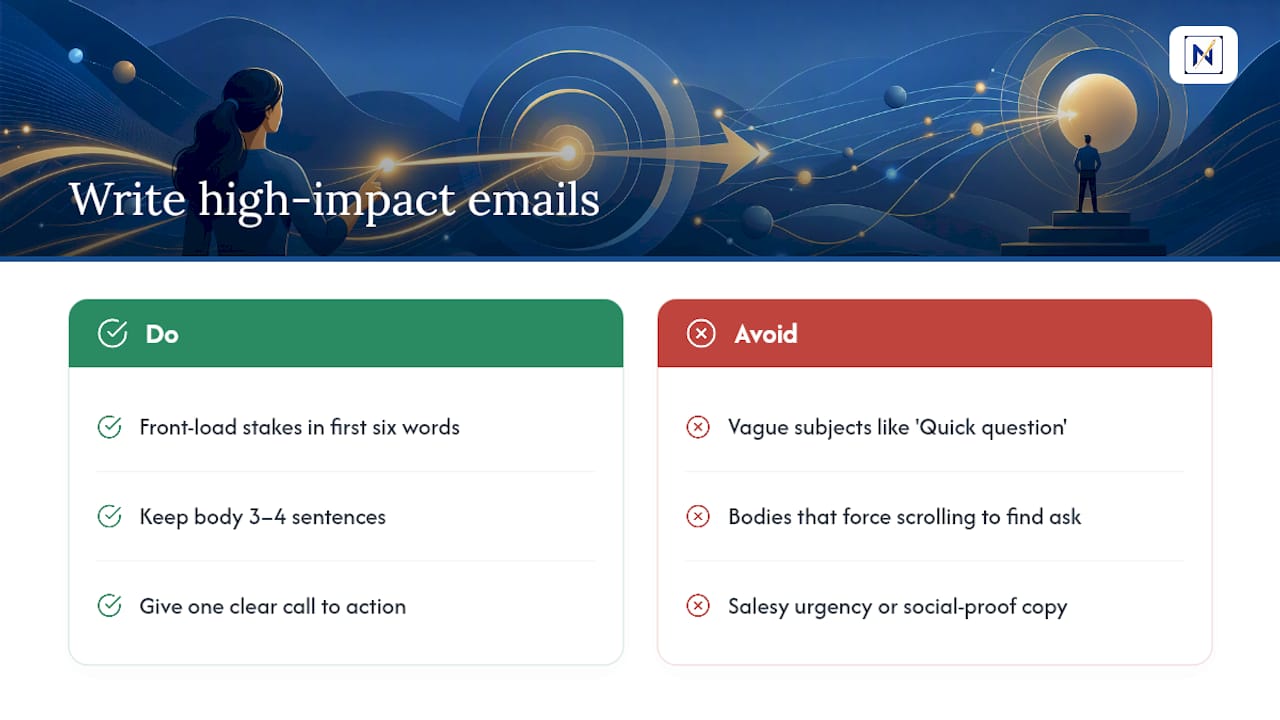
A high-impact email lives or dies in its subject line. Vague subjects like “Quick question” or “Following up” get buried in a triage pass because they carry no consequence signal. A subject like “Contract expires Friday: signature needed” tells the reader exactly what verdict to assign before they even open it.
Three rules cover most of what separates a message that gets acted on from one that gets deferred indefinitely:
Front-load the stakes. Put the deadline, dollar amount, or required action in the first six words of the subject line. Email clients truncate long subjects on mobile, and the reader’s triage pass happens in that truncated space.
Keep the body short enough to act on without scrolling. Three or four sentences that state what’s needed, by when, and what happens if it isn’t done. A message that requires scrolling to find the actual ask gets deferred by default, because deferring is easier than hunting.
One call to action, stated plainly. “Reply by Thursday to confirm” beats “Let me know your thoughts when you get a chance.” The second version has no deadline and no consequence, so it reads as low priority even if it isn’t.
Persuasive copywriting techniques that work for marketing, urgency framing, social proof, scarcity language, actively hurt high-impact email. A refund notice dressed up like a sales pitch gets filtered as noise. The goal isn’t to make the reader want to open it. It’s to make the consequence unmistakable in under three seconds.
How Do Formatting and Visual Emphasis Affect High-Impact Emails?
Plain-text emails with a wall of unbroken sentences are the easiest messages to skip, even when they contain something urgent. Formatting isn’t decoration here. It’s how a reader confirms a verdict without rereading the whole message.
Bold the single most important fact, once. A deadline date, a dollar figure, or the specific action required. Bolding every other phrase defeats the purpose; if everything is emphasized, nothing is.
Break the message into short paragraphs of two or three sentences each. A recipient scanning during a midday sweep should be able to grasp the ask from the first line alone, then confirm the details in the lines that follow.
Use a single line item or short list only when there are multiple discrete actions required, for example, “sign the attached form” and “wire the deposit by Friday.” Two separate asks buried in one paragraph often result in only one getting done.
Place the deadline or dollar amount near the top of the message, not the bottom. Readers doing a triage pass often stop reading once they’ve confirmed the verdict, so anything critical placed at the end risks being missed entirely.
Avoid colored text, multiple fonts, or exclamation points as emphasis tools. They read as manufactured urgency, the same red flag covered earlier for phishing detection, and they train recipients to discount your genuinely urgent messages over time.
Why Do Certain Emails Get Opened First?
Consequence is a psychological trigger before it’s a logistical one. Readers respond faster to loss framing than gain framing: “You’ll lose your deposit if this isn’t signed by Friday” moves people faster than “Sign by Friday to keep your deposit,” even though both sentences describe the same outcome.
Specificity builds trust in a way vague language can’t. A message that says “the deadline is May 3rd” reads as more credible than one that says “please respond soon,” because specificity signals the sender actually knows the details rather than applying generic pressure.
Named personal relevance also matters more than most senders realize. An email addressed to “Valued Customer” gets triaged differently than one that opens with your actual name and references your specific account or order number. The MIT Sloan research on email and daily performance found that messages congruent with a person’s actual work, the ones directly tied to what they’re already doing, improve performance, while irrelevant or generic messages actively hurt it.
That’s worth sitting with: it’s not the volume of email that damages a workday, it’s the ratio of relevant to irrelevant messages competing for the same attention. A high-impact email that reads as personally relevant gets triaged into Handle-now almost instinctively. One that reads as mass-sent, however important the actual content, gets deferred or ignored, sometimes at real financial cost to the sender.
What Mistakes Ruin an Otherwise Important Email?
The single most common mistake is burying the ask. Senders write three paragraphs of context before stating what they actually need, and by the time the reader reaches the request, they’ve already decided the message can wait.
Vague deadlines rank close behind. “As soon as possible” gives the recipient permission to deprioritize indefinitely. A specific date and time removes that ambiguity entirely.
Overusing urgency markers backfires in a way senders rarely anticipate. Marking every message “URGENT” trains recipients to filter your name the same way they filter spam, so when something genuinely critical arrives, it gets the same skeptical glance as the last ten false alarms.
Sending during obvious dead zones, late Friday afternoon or the last hour before a holiday break, means a message that needed same-day attention instead sits untouched for days.
Multiple asks buried in one email is another frequent failure. When a message asks for a signature, a payment, and a scheduling decision all in one block of text, recipients tend to act on the easiest item and quietly skip the rest.
Finally, omitting a clear consequence statement leaves the reader to guess how serious the situation is. “Please review the attached” tells them nothing. “Review and sign by Tuesday or the offer expires” tells them everything they need to triage correctly.
How Should a Follow-Up Email Reinforce the Original Message?
A follow-up exists to clarify, not repeat. Resending the identical message with “Just following up!” at the top adds no new information and often reads as pressure rather than clarification.
Reference the original consequence directly and update the timeline. “The signature deadline from Monday’s email is now 48 hours away” carries more weight than a generic nudge, because it restates the stakes with a fresh, more urgent number attached.
Space follow-ups according to the actual deadline, not a fixed rule. A refund claim expiring in two weeks might warrant one follow-up at the one-week mark. A contract deadline 48 hours out might warrant a same-day follow-up if there’s been no response.
Change the channel when email follow-ups go unanswered. A second or third email rarely lands better than the first two did. A text message or phone call signals genuine urgency in a way that another email in the same thread cannot.
Keep every follow-up shorter than the original. If the first email was three sentences, the follow-up should be one or two. Length in a follow-up reads as anxiety, not authority, and undercuts the very urgency it’s meant to reinforce.
What Do Successful High-Impact Emails Look Like in Practice?
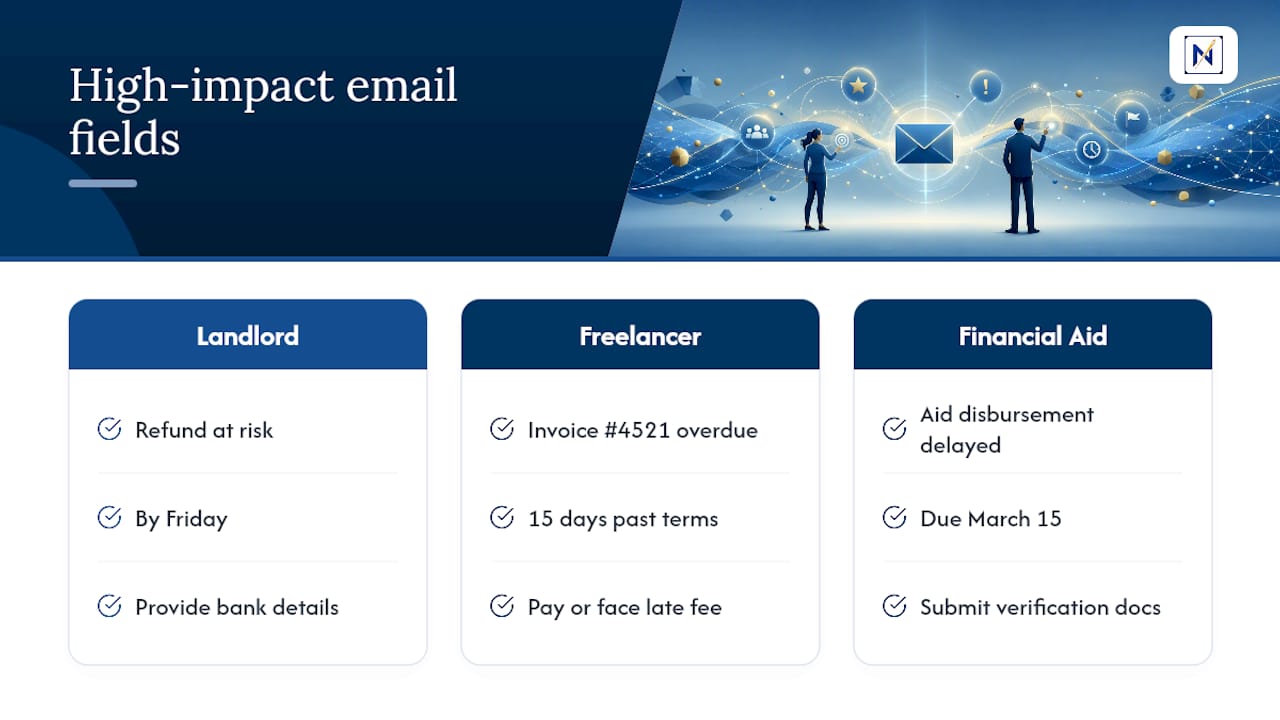
A landlord’s email reading “Security deposit refund: bank details needed by Friday or payment defaults to mailed check” gets acted on almost immediately, because it names the deadline, the consequence, and the required action in a single line. Compare that to the same request framed as “Hi, when you get a chance, could you send your banking info so we can process things?” The second version, despite carrying the same underlying stakes, reads as optional.
A freelancer chasing an overdue invoice sees dramatically different results between “Hope you’re doing well! Just checking in on that invoice” and “Invoice #4521 is 15 days past terms; late fee applies after day 30 per our agreement.” The second cites a specific reference number, a specific timeline, and a contractual consequence, all things that move a payment request out of someone’s “later” pile.
A university financial aid office sending “FAFSA verification documents due March 15 or aid disbursement will be delayed” outperforms a generic reminder blast precisely because it names the exact document, the exact date, and the exact consequence of missing it. Each of these examples shares the same skeleton: name the stakes, name the deadline, name the action. Everything else is secondary.
Why Prioritizing Consequence Changes How You Work
Most productivity advice treats every unread email as equal friction to clear. That framing misses the actual risk, which isn’t clutter, it’s the one message buried in that clutter that costs you money or a relationship. The MIT Sloan finding that congruent emails improve performance while irrelevant ones actively harm it should reframe how you think about inbox zero entirely. The goal was never an empty inbox. It was never missing the message that mattered.
I’ve watched the same pattern play out across freelancers and salaried professionals alike: the missed refund window, the unanswered client email that quietly became a lost contract, the deadline that arrived attached to a subject line nobody opened in time. A consequence-first inbox catches exactly that pattern before it becomes a loss, which is the entire premise behind theNeedle’s approach to surfacing overdue and unhandled messages automatically.
— Glen Bover
Try theNeedle for a Consequence-First Inbox
Everything covered here, the triage verdicts, the sweep schedule, the filters, works better when a tool is doing the consequence detection for you instead of you scanning 117 emails by hand every day. theNeedle connects to Gmail, Outlook, Microsoft, Yahoo, and iCloud, then ranks what lands by what it actually costs you to ignore: deadlines, refunds, overdue replies, and contract windows, not who sent it or when it arrived.

If you’re managing more than one inbox or you’ve missed a refund window before, the fastest way to see the difference is to watch it sort a real inbox. Start with the live product preview to see consequence ranking in action, or turn on SMS preview so your Handle-now items reach you even when you’re away from your desk. Either way, the next step is the same: stop reading every email in order, and start reading the ones that actually matter first.
Sources
- Converting email from drain to gain — MIT Sloan Management Review
- An Email Triage System for Busy Professionals
- How to detect phishing emails by reading headers — OpSec Insider
- How to check if an email is phishing: 60-Second VERIFY Test