HEY Alternatives: Find the 3 Consequential Emails in Your 117 Daily

If you use HEY but want automatic prioritization of consequential emails, try theNeedle first. Instead of leaning on manual Screener rituals every time a new sender lands in your inbox, it surfaces deadlines, financial alerts, and unhandled replies on its own. This matters because manual triage systems ask you to make hundreds of small decisions daily, and theNeedle removes most of them while still connecting to your calendar and task list.
TL;DR:
- Automated consequence detection helps surface urgent emails, deadlines, and important replies across multiple accounts without manual sorting.
- TheNeedle supports Gmail, Outlook, iCloud, and Yahoo, ranking emails based on importance rather than sender rules or recency.
- Features like calendar integration and unsubscribe handling work automatically, reducing manual work and inbox noise at scale.
- A one-at-a-time presentation style decreases cognitive load and inbox fatigue compared to scrolling through large unread lists.
- During trial, focus on priority accuracy, deadline surfacing, newsletter handling, and view reduction to assess automation effectiveness.
Table of Contents
- Why Users Search for HEY Alternatives
- What to Look for in a HEY Replacement
- Alternatives by Category (And When to Pick Each One)
- How to Migrate From HEY Without Losing Important Messages
- Pricing Considerations and Trial Options
- Security and Privacy Features Compared Across Alternatives
- What Makes the Strongest HEY Replacements Stand Out
- Customer Support Quality Across Alternative Tools
- Device and Operating System Compatibility
- Publisher Perspective: Why Consequence-Based Prioritization Matters
- How to Try theNeedle: What to Test During Your Trial
Why Users Search for HEY Alternatives
HEY’s core pitch was always the Screener: you decide, once, whether a new sender ever reaches your Imbox. That single decision point felt refreshing in 2020. Five years later, it’s the thing that sends people looking for a replacement.
The friction isn’t imaginary. Every new sender, every mailing list variant, every one-off newsletter still routes through you first. HEY’s Imbox, Paper Trail, and The Feed sort mail into buckets, but a bucket isn’t the same as a ranking. Nothing inside HEY tells you which of the twenty messages in your Imbox actually has a consequence attached to it, like a contract deadline or an invoice due tomorrow.
That gap becomes expensive at scale. Research cited by theNeedle puts the average worker’s email volume at roughly 117 messages a day. At that volume, a purely manual sorting system, however elegant, still leaves the hardest part of the job (deciding what’s urgent) sitting on your shoulders.
Three specific complaints tend to drive the search for something else:
- No native task creation. Spotting a deadline in an email doesn’t turn it into a tracked task; you have to copy it elsewhere.
- Thin calendar integration. HEY doesn’t read a message and flag a date conflict or an approaching due date on its own.
- Manual work at every price tier. Subscribers paying a monthly fee often expect some automation of the sorting labor, not just better folders.
None of this makes HEY a bad email client. It makes it a manual one, and manual systems buckle first when volume climbs.
What to Look for in a HEY Replacement
Before you commit to any tool, run it against a short checklist built around the thing that actually matters: whether it catches the emails that carry real consequences.
- Prioritization model. Does it rank messages by AI-driven urgency and consequence, or does it just apply the folder rules you set up once and forget?
- Calendar and task integration. Can it detect a deadline in the body of an email and push it into your calendar or task manager without you retyping it?
- Cross-account support. If you run Gmail for work and iCloud personally, does the tool connect to both, or does it force you into a single provider?
- Newsletter and bulk-sender handling. Look for built-in unsubscribe tools that work on persistent senders, not just a filter that hides the noise.
- Pricing shape and trial length. Understand what you pay for after the trial ends, not just the entry price.
- ADHD-friendly usability. A one-at-a-time presentation style, rather than a wall of unread counts, changes how sustainable the tool feels after week one.
Pro Tip: Before switching, spend two days tracking how many emails you handle purely because they’re new, versus how many you handle because they actually have a deadline or dollar amount attached. That ratio tells you how much a prioritization-first tool would actually save you.
theNeedle answers most of these directly: it connects across Gmail, Outlook, iCloud, and Yahoo, ranks by consequence rather than sender rules, and surfaces unhandled replies and financial alerts automatically.
Alternatives by Category (And When to Pick Each One)
Not every HEY user needs the same replacement. Your workload shape decides which category fits.
AI-first triage platforms automate the decision HEY makes you make manually: is this email worth my attention right now? These tools score incoming mail by urgency signals, sender history, and content patterns, then rank your inbox instead of just filtering it. The trade-off is trust. You’re handing a machine the first pass at judgment calls that used to be yours, which takes a week or two to feel comfortable.
Deadline and follow-up assistants focus narrowly on two failure modes: due dates buried in email text, and messages you meant to answer but never did. They’re excellent at catching a contract deadline mentioned in paragraph three of a client email, or flagging that you never replied to a vendor from ten days ago. Their weakness is scope; they generally don’t touch newsletter management or broader inbox organization.
Integrated workspace tools bundle email, calendar, and task management into one interface so nothing gets lost in translation between apps. If your real problem is context switching (jumping from inbox to calendar to a separate to-do app all day) this category solves it structurally. The cost is usually a steeper setup process and a learning curve that touches three tools at once instead of one.
Simple reminder and snooze tools are the lowest-friction option on this list. According to background research on reminder-based email tools, these services let you preserve a message and have it resurface at a chosen time, often without ever changing your primary inbox provider. They’re the easiest to try because they layer on top of what you already use. They’re also the least automated: nothing about them detects consequence, they just delay.
Here’s the practical mapping:
- Want automatic consequence detection with minimal setup? Start with an AI-first triage platform.
- Mostly worried about missed deadlines and ghosted replies? A deadline and follow-up assistant covers that narrow job well.
- Living across email, calendar, and tasks all day? An integrated workspace tool reduces the app-switching tax.
- Just need breathing room on a few dozen emails? A reminder or snooze tool buys time without a real migration.
For most people leaving HEY specifically because they want consequence surfacing without babysitting a Screener, the first category is the right starting point, and theNeedle is built for exactly that use case: multi-account support plus automatic ranking of what’s actually urgent.
How to Migrate From HEY Without Losing Important Messages
Switching email tools always carries one real risk: something important slips through during the changeover. A structured migration keeps that risk low.
- Export your contacts and list your important senders. Before you disconnect anything, pull a list of the senders whose emails you can’t afford to miss (banks, clients, your accountant).
- Back up saved threads and attachments. Anything sitting in HEY’s Paper Trail that you’d need later should be archived locally first.
- Choose your connection method. Most replacements let you forward mail, connect accounts directly through your provider, or import older messages where the platform supports it.
- Train the priority detection. Feed the new tool a handful of your most important past threads so it learns what “urgent” looks like for your specific inbox.
- Set newsletter and receipt rules early. Handle bulk senders in the first session so they don’t crowd out the messages you’re trying to prioritize.
- Confirm calendar and task syncing works before you rely on it for a real deadline.
- Run a 7 to 14 day parallel period. Keep HEY active in the background while the new tool takes over primary duty, and compare what each one flags.
Give yourself two checkpoints: one at the one week mark, where you’re just confirming nothing critical got missed, and one at 30 days, where you decide whether the new prioritization actually matches how you think about urgency.
Pricing Considerations and Trial Options
Sticker price rarely tells the whole story with email tools. The real number is total cost of ownership: what you pay monthly, plus what it costs you in time if the tool undershoots on automation and leaves you doing manual triage anyway.
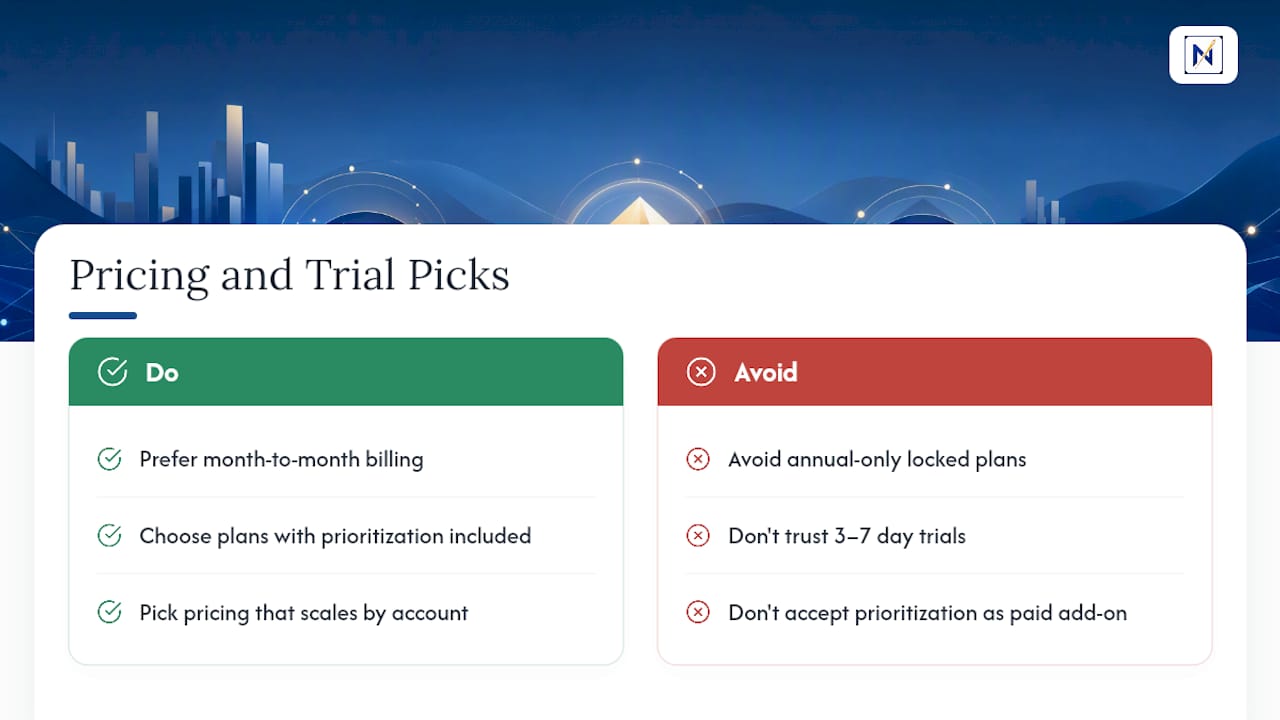
Most credible alternatives to HEY offer some form of free trial, and that period is where the real evaluation happens. A short trial (three to seven days) barely gives an AI-driven prioritization system time to learn your senders. A longer trial, closer to two weeks, lets you see whether the tool’s ranking logic actually lines up with what you consider urgent.
When comparing plans, weigh three things directly: whether pricing scales with the number of connected accounts, whether premium prioritization features sit behind a paywall or come standard, and whether there’s a real month-to-month option versus an annual-only commitment. A tool that’s cheaper per month but locks you into a year is a worse deal than a slightly pricier one you can cancel after the trial if it doesn’t earn its keep.
Some email management tools position prioritization and multi-account support as core offerings rather than upsells layered on top of a stripped-down free tier, which matters if the entire reason you’re switching is to get automation HEY doesn’t provide at any price point.
Security and Privacy Features Compared Across Alternatives
Handing a third-party tool access to your inbox is not a small decision, especially when that inbox contains financial alerts and legal deadlines. Two questions matter more than any marketing copy: what does the tool actually do with your data, and how does it connect to your existing accounts?
Connection method is the first checkpoint. Tools that use standard OAuth connections to Gmail, Outlook, iCloud, or Yahoo generally don’t store your password directly, which is safer than tools requiring you to hand over raw credentials. Ask specifically how a prospective replacement authenticates before you connect a real account, not just a test one.
Data handling is the second. Does the tool read your email content to rank it (necessary for genuine prioritization) or does it just apply metadata rules like sender and subject line? The former requires more trust but delivers the deeper triage that manual systems like HEY’s Screener can’t match. The latter is safer in theory but closer to what you’re trying to leave behind.
Retention policy is worth a direct question too: how long does the tool keep processed email data, and can you request deletion. A tool that’s vague on this in its documentation is a tool you should be cautious about connecting a work account to.
What Makes the Strongest HEY Replacements Stand Out
The alternatives worth your time tend to share one trait: they automate a decision instead of just organizing the aftermath of one.
Consequence-based ranking is the clearest example. Instead of sorting mail by sender or date, a tool that flags financial alerts, deadlines, and unhandled replies is answering the actual question you ask yourself fifty times a day: does this one matter? theNeedle builds its entire approach around that question, surfacing the emails tied to real consequences rather than the ones that simply arrived most recently.
One-at-a-time presentation is the second standout pattern. Rather than a scrolling list of forty unread messages competing for attention, some tools show you a single priority item at a time. This isn’t just a visual preference; it changes the cognitive load of the task. theNeedle’s own design documentation argues that reducing simultaneous decision points is what actually cuts inbox fatigue, not just faster scrolling.
Built-in unsubscribe handling that works against persistent senders (the ones who ignore standard unsubscribe links) is a smaller but genuinely useful feature. Combined with automatic newsletter classification, it keeps bulk mail from crowding out the handful of messages that carry real weight.
Customer Support Quality Across Alternative Tools
Support quality varies more between HEY alternatives than most comparison articles admit, largely because these tools sit at different company sizes and maturity levels.
Smaller, newer platforms tend to run support through email or in-app chat rather than phone lines, with response windows measured in hours rather than minutes. That’s not necessarily a downgrade. For a tool you’re using to triage your own inbox, asynchronous support that actually resolves your issue on the first reply beats a phone queue that wastes twenty minutes to reach a first-tier agent.
What’s worth checking before you commit: does the provider publish a real support email or ticketing system, or is help buried behind a generic contact form with no visibility into response times? Look also at whether the product has active documentation or a blog addressing common setup questions, since that often signals how seriously a company treats the onboarding experience versus treating support as an afterthought.
Device and Operating System Compatibility
A prioritization tool only works if it’s available where you actually read email, which for most professionals means at least a laptop and a phone, often across two different operating systems.
Web-based tools have the broadest reach by default since they run in any browser regardless of whether you’re on Windows, macOS, or Chrome OS. Native mobile apps matter more than they get credit for, because push notifications for a genuinely urgent, consequence-flagged email are far more useful than a badge count you check on your own schedule.
Before switching, confirm three things directly: whether the tool has a dedicated iOS and Android app or relies on a mobile browser experience, whether notifications distinguish between a flagged urgent email and routine mail, and whether your existing email provider’s mobile app conflicts with the new tool’s syncing. Cross-account support across Gmail, Outlook, iCloud, and Yahoo, the same set theNeedle connects to, matters here too. It determines whether you’re managing one unified priority list or juggling separate apps per provider.
Publisher Perspective: Why Consequence-Based Prioritization Matters
We built theNeedle around one observation: inbox overload isn’t a volume problem, it’s a ranking problem. At roughly 117 emails a day, most professionals don’t need more folders. They need to know, in one glance, which three messages carry real consequences.
Our ADHD Awareness research found that scattered focus on unranked inboxes quietly costs people money and missed opportunities, a pattern we call the ADHD tax. One-at-a-time surfacing isn’t a gimmick; it’s a direct response to that tax.
— Glen Bover
How to Try theNeedle: What to Test During Your Trial
theNeedle fits the reader who’s leaving HEY specifically because manual Screener decisions have stopped scaling. It connects across Gmail, Outlook, iCloud, and Yahoo, ranks by consequence instead of recency, and presents one priority item at a time rather than a scrolling wall of unread mail.

During a trial, focus your testing on four things: how accurately priority detection flags your genuinely urgent senders in the first few days, whether deadlines mentioned in email bodies actually surface on your calendar, how the unsubscribe flow handles your most persistent newsletter senders, and whether the one-at-a-time view actually reduces the number of times you open the app just to check for something new. Those four checks tell you more in a week than any feature list.
Start your trial on the live product page, connect the account you actually rely on for deadlines and financial alerts, and give it the same seven to fourteen day parallel window you’d give any serious inbox change.