Stop Missing Essential Communications in 30 Days for Professionals

Essential communications are consequential emails, the ones tied to deadlines, financial alerts, or unhandled replies, and missing them costs you money or trust, not just time. The single best habit is a one-pass triage sweep combined with a short VIP sender list so urgent messages surface before the noise does. Everything else, including automation, builds on that foundation.
TL;DR:
- Most essential emails are those with clear consequences, such as deadlines, financial alerts, or urgent requests, while non-actionable messages increase overload.
- Running a quick triage sweep with a strict one-pass method ensures urgent messages are handled promptly, and non-essential emails are archived or deleted.
- Configuring your inbox with a VIP list, filters, and focus mode minimizes interruptions, making urgent messages easier to surface and prioritize.
- Using AI tools is effective only after setting up sender rules and a VIP list; they assist in classification but do not replace disciplined triage habits.
- A deliberate 30-day setup plan can instill this system, emphasizing consequence detection over inbox emptiness as the true measure of email management success.
Table of Contents
- What Makes an Email Essential?
- How Do You Triage an Inbox in 10 Minutes?
- Which Inbox Settings Actually Surface Urgent Messages?
- How AI Changes What “Manageable” Looks Like
- Your 30-Day Plan to Stop Missing What Matters
- The Real Ceiling Isn’t Volume, It’s Attention
- theNeedle Turns Triage Into a Background Process
- Selected Research and Practical Resources
- Sources
What Makes an Email Essential?
An email earns “essential” status when ignoring it has a consequence. That’s the whole test. A deadline, a financial alert, an unresolved request sitting in your court, a contract clause, a client waiting on your answer, a time-limited offer that expires Friday. If nothing bad happens when you skip it, it isn’t essential, no matter how urgent the subject line pretends to be.
The trap is that most inboxes mix these consequential messages with high-volume, low-stakes communication, and that mix is what actually wears you down. Peer-reviewed research on email load found that communication-related messages, things like newsletters and broad informational updates, are the primary driver of overload and strain, while task-related emails rarely cause the same damage on their own, according to a study published in Frontiers in Psychology. In other words, it’s not the important emails burying you. It’s everything competing with them for your attention.
You can judge consequence in about two seconds if you know what to scan for:
- A specific date or time mentioned in the subject or preview line
- Dollar figures, invoice numbers, or the words “refund,” “credit,” or “overdue”
- A question addressed directly to you that’s been sitting unanswered
- Sender names tied to active contracts, clients, or legal matters
- Phrases like “final notice,” “response needed,” or “by end of day”
Train your eye to look for these markers before you open anything. Reading to judge, not to respond, is the entire skill.
How Do You Triage an Inbox in 10 Minutes?
Triage borrows its logic from emergency medicine: sort first, treat second. Applied to email, that means one pass through your inbox where you assign every message exactly one verdict, and you don’t respond yet, according to a practical triage framework built for busy professionals. Here’s how the sweep works.
- Do now. Anything that takes under two minutes to answer, and matters, gets handled immediately. This is the classic two-minute rule, and it prevents small essential replies from aging into overdue ones.
- Defer. Anything that matters but needs more than two minutes gets a calendar block or a task entry, not a mental note. “I’ll get to it” is how essential communications get lost.
- Delegate. If someone else owns this thread, forward it with one clear line stating what you need from them and by when.
- Delete (or archive). Everything else, no action required, gets out of your line of sight so it stops competing for attention.
Run this sweep two to four times a day, not continuously. Constant checking is what turns a 10-minute task into a background hum of stress that lasts all day. Protect at least one deep-work block where the inbox stays closed entirely.
For delegation, keep your script short: “Can you take this? Client needs an answer by Thursday.” For deferral, don’t just star the message, put a real time slot on your calendar or a line in your task manager. A star with no follow-up plan is just a prettier way of ignoring something.
Pro Tip: Cap your Do Now queue at around 15 items. Once it grows past that, you’re not triaging anymore, you’re just building a second inbox inside your inbox.
Which Inbox Settings Actually Surface Urgent Messages?
Triage works faster when your inbox is already fighting for you instead of against you. A handful of configuration changes, done once, keep paying off every day after.
Start with a VIP list under 20 senders, people whose messages should never get buried: your biggest clients, your accountant, your landlord if rent matters to your cash flow, key collaborators on active projects. Anyone outside that list competing for “urgent” status probably isn’t.
From there:
- Build domain and sender filters that auto-archive newsletters, marketing platforms, and automated status alerts you don’t need in real time.
- Route CCs into a separate folder. If your name isn’t in the “To” line, it’s rarely something requiring your immediate action.
- Turn off push notifications entirely and replace them with fixed check-in windows. Every alert you allow through is a small tax on your attention, whether or not the message deserves it.
- Use a focus mode during deep-work blocks so nothing visual pulls your eyes back to the inbox tab.
These aren’t cosmetic changes. Batching, sender-specific rules, and filter hygiene measurably cut interruptions and reclaim hours of focus that would otherwise go to re-reading the same newsletter three times before deleting it. Combined with the earlier triage habit, the effect compounds: less noise reaching you, faster sorting of what does.
If you want a deeper walkthrough of client-specific settings, organizing your inbox for calm covers the setup step by step across major providers.
How AI Changes What “Manageable” Looks Like
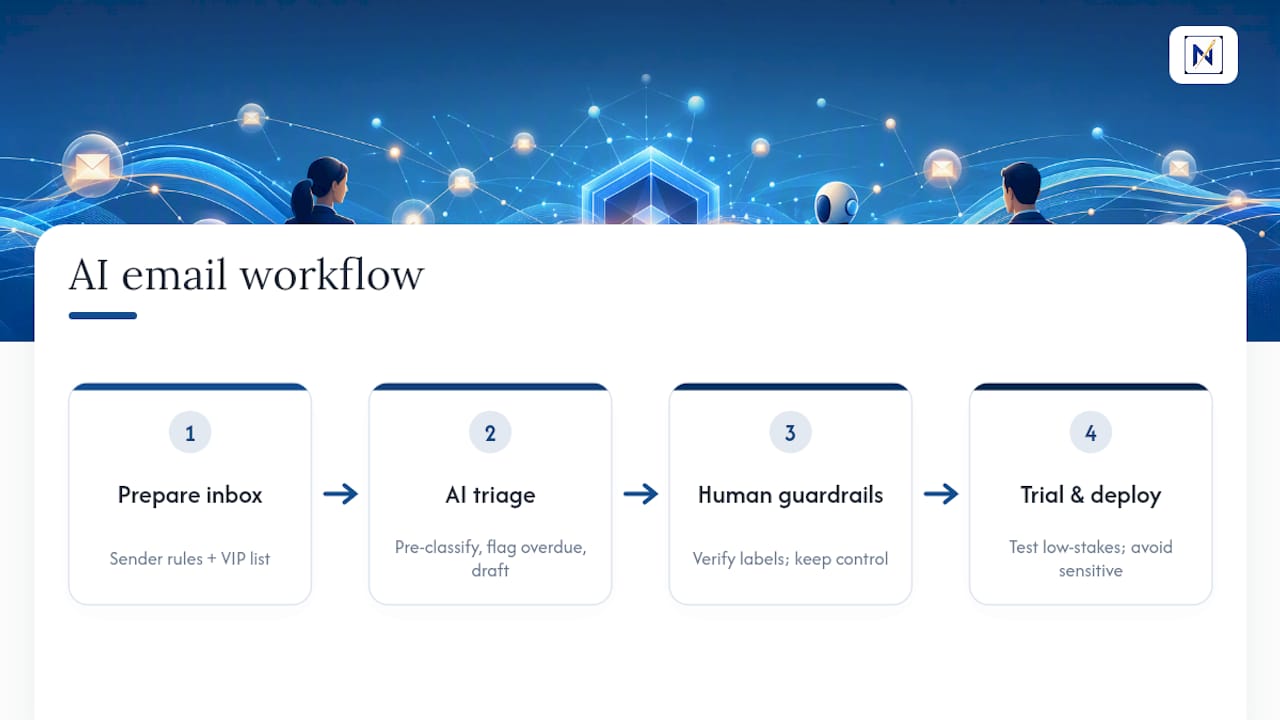
AI triage and drafting tools don’t replace the discipline above, they extend it, as explained in this practical guide to AI tools for researchers. What they actually do is pre-classify incoming messages, flag overdue threads you haven’t answered, and draft replies you can edit rather than write from scratch. That combination raises the volume of email a single person can handle without falling behind, but only when your filters and VIP list are already in place, according to research on triage frameworks and sender rules.
Skip the manual hygiene and add AI on top of a messy inbox, and you’ve just automated the confusion. The tool has nothing clean to sort. Set up sender rules and a VIP list first, then let automation compound the gains rather than paper over the gaps.
Guardrails matter here. Verify how a tool classifies your messages before trusting it blindly, especially for financial or legal threads where a missed flag has real consequences. Keep your VIP list intact even after adopting AI assistance. Trial any new system on low-stakes threads, a mailing list, a low-priority client, before letting it touch anything with a deadline attached. When you evaluate a tool, look at how transparent its classification logic is and how much control you retain over data access. The mental model of triage, decide once, act with intention, doesn’t change. AI just helps you apply it faster and across more accounts than you could manually.
Your 30-Day Plan to Stop Missing What Matters
You don’t need to overhaul your entire system in one sitting. Spread it across a month and the habit sticks.
- Week 1: Audit your senders, build your VIP list, set up core domain filters, and schedule two to three triage sweeps a day on your calendar.
- Week 2: Practice the one-pass triage habit daily. Keep your Do Now queue under 15 items and add real deferral slots to your calendar instead of relying on memory.
- Week 3: Review your notification settings and CC rules. Unsubscribe from bulk senders that survived week one, and tighten filters based on what actually slipped through.
- Week 4 (optional): Trial an AI triage or drafting tool on noncritical threads only. Track how much time it saves and whether anything essential still slips past.
Once the system is running, a short daily checklist keeps it from decaying back into chaos:
- Run one full triage sweep, morning or midday
- Clear anything sitting in your Do Now queue
- Glance at deferred items to confirm none have quietly become urgent
- Update your VIP list if a new client or deadline enters the picture
- Adjust one filter if a new noise source appeared that day
The average professional receives a high volume of email daily, which is exactly why a system beats willpower. You can’t out-hustle 100-plus messages a day by reading faster. You can out-organize them.
The Real Ceiling Isn’t Volume, It’s Attention
Most advice on email treats the problem as one of speed: answer faster, type faster, check more often. That’s backward. The research on email load is clear that volume alone doesn’t wreck your day, communication-related noise does, the newsletters and status pings competing for the same attention your actual deadlines need. Fix the noise problem and the volume problem mostly solves itself.
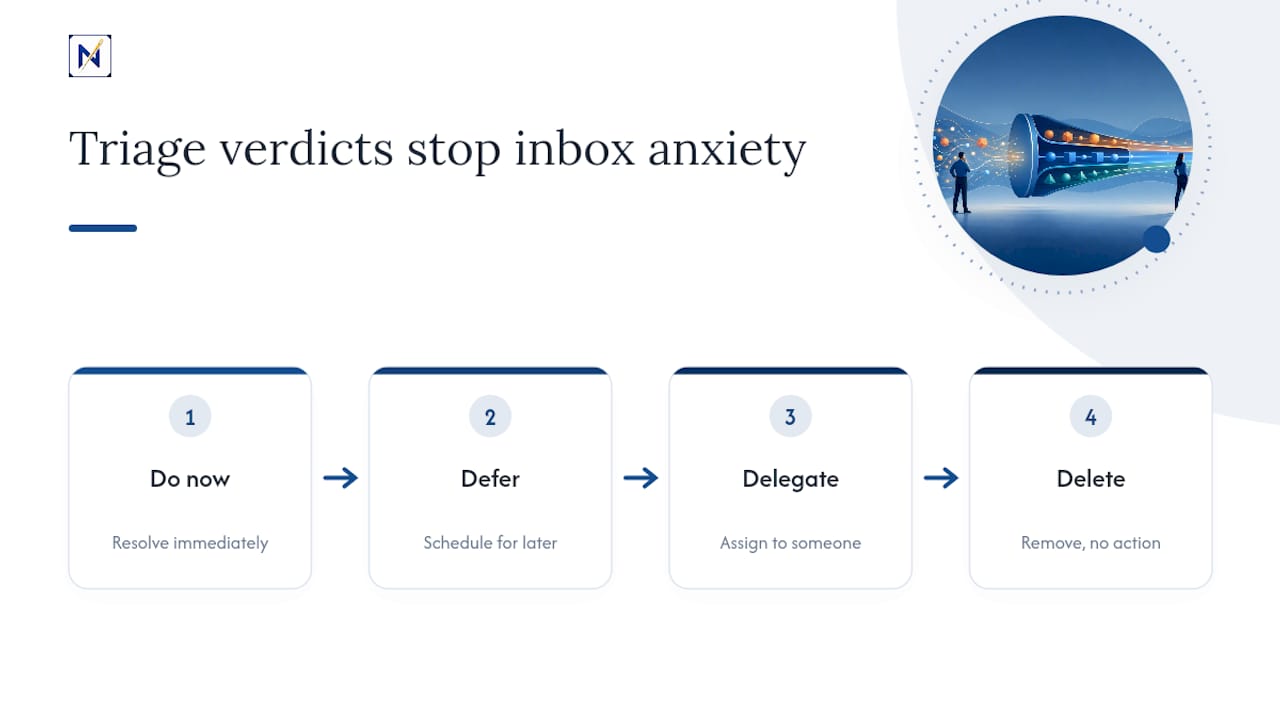
What people underestimate is how much of “inbox anxiety” is really just unresolved triage. A message doesn’t need to be answered to stop bothering you, it needs a verdict. Do now, defer, delegate, delete. The two-minute rule and the batch sweep aren’t productivity tricks, they’re a way of telling your brain the decision has already been made, so it can stop rehearsing the message every time you open your inbox.
Where I’d push back on the conventional wisdom: most people over-invest in inbox zero as an aesthetic goal and under-invest in consequence detection as a skill. An empty inbox with a missed contract deadline buried three folders deep is worse than a full inbox where every essential thread is flagged and accounted for. Sort for consequence first. Tidiness is a side effect, not the goal.
— Glen Bover
theNeedle Turns Triage Into a Background Process
This kind of tool is built for the exact habit this article walks through, minus the manual sweep. Instead of you reading every message to judge its consequence, it connects to major email providers and ranks incoming mail by what happens if you ignore it: overdue replies, financial alerts, deadlines, and opportunities like refunds or credits get surfaced automatically, while newsletters and status noise stay out of your way.

For freelancers juggling several inboxes, or anyone managing attention challenges, that one-at-a-time, consequence-ranked view replaces the constant mental sorting the triage method demands and scales it across every account you connect. You still make the final call on each message; the tool just makes sure the right one is in front of you first. If you want to see how it handles your own inbox, try theNeedle live and let it run its first sweep against your real backlog.
Selected Research and Practical Resources
For deeper reading on the ideas covered here: the Frontiers in Psychology study on email load, the email triage system framework, and theNeedle’s own notes on information overload.
Sources
- Drowning in emails: investigating email classes and work stressors as antecedents of high email load and implications for well-being
- An Email Triage System for Busy Professionals