Cut 117 Emails a Day: Consequence First Email Triage for Professionals

Run one fast morning sweep that sorts every message into Do (if it takes two minutes or less), Defer, Delegate, or Delete, then process the Do pile immediately and repeat the sweep two or three times a day. That single habit, built on a quick decision rule, scheduled batches, and a reliable follow-up system, solves most inbox overload. It matters because the average worker now gets 117 emails a day, and theNeedle’s research treats that volume as the reason prioritization, not more folders, is the fix.
TL;DR:
- Handling 117 emails daily with a quick triage process reduces mental overload and improves focus by minimizing constant interruptions and task switching.
- Applying the 4-D framework and batching emails into scheduled sessions prevents disorganized inboxes and enhances productivity across different volume levels.
- Using filters to automatically route low-priority messages and automating follow-ups with snooze or labels streamlines inbox management and avoids backlog buildup.
- Incorporating AI tools for message classification, priority scoring, and drafting early drafts can assist but require careful tuning and human oversight to avoid misclassification.
- Building a consistent triage routine and tracking specific metrics like outside checks and response times helps refine habits and ensures the system effectively reduces overload.
Table of Contents
- Why Email Triage Matters for Productivity and Wellbeing
- Proven Triage Techniques and How to Apply Each One
- How AI and Automation Change Triage
- Building a Daily Cadence That Actually Sticks
- Your Two-Week Triage Setup Checklist
- Author Perspective: Why Consequence-First Triage Wins
- theNeedle: Consequence-First Triage, Built In
- Sources
Why Email Triage Matters for Productivity and Wellbeing
Every unread message is a small, unresolved decision. Multiply that by 117 a day, and your brain is running a background process of “should I deal with this now?” hundreds of times before lunch. That mental tax is measurable, not just a feeling.
Harvard Business Review’s analysis of email habits found that constant checking fragments attention and drives up the real cost of task switching. Every time you jump from a spreadsheet to your inbox and back, you pay a recovery tax in focus, and batching messages into set windows reduces that cost by shrinking the number of times you make that jump.
A quick number worth sitting with: the average professional handles 117 emails daily, according to figures theNeedle cites from its own product research. Treat that as your baseline. If you are opening your inbox frequently each day to whittle that number down, you are multiplying interruptions instead of managing them.
The cognitive cost runs deeper than lost minutes. Psychology researchers who study digital interruptions have linked frequent context switching to reduced sustained attention and weaker task performance, a pattern that shows up whether the interruption is a notification, a coworker, or your own habit of refreshing the inbox. A 2024 review in Frontiers in Psychology connects that fragmentation to the kind of shallow, reactive work that leaves you busy but not productive.
There’s also a wellbeing dimension that rarely gets its due. Wharton Executive Education’s work on burnout points to persistent task backlog and constant interruption as core drivers of exhaustion, not just heavy workload on its own. An inbox that never empties functions like a backlog that never closes. Triage breaks that cycle by giving you a repeatable way to clear the noise and see what’s actually consequential: the deadline that’s slipping, the invoice that needs a signature, the client waiting on a reply. Fewer missed deadlines, calmer mornings, and predictable response windows are the practical payoff.
Proven Triage Techniques and How to Apply Each One
There’s no single “right” method here. What works is matching a decision framework to your volume, then locking in the habits that make it stick. Below are the techniques worth adopting, in the order most people should learn them.
1. The 4‑D framework (or OHIO, if you prefer the acronym)
Every email you open gets exactly one verdict, decided in seconds, never revisited:
- Do it now if it takes two minutes or less. This overlaps with the classic 2-minute rule, and it’s the single biggest inbox-clearer available to you.
- Defer it if it needs real work later. Move it to a “Later” label or task manager, and give it a due date or reminder, not just a mental note.
- Delegate it if someone else should own it. Forward with context immediately rather than letting it sit while you decide.
- Delete (or archive) it if it needs nothing from you. Be ruthless here. A newsletter you’ll never read again is not a “maybe.”
OHIO stands for Only Handle It Once, and it describes the same discipline from a different angle: the moment you open an email, you commit to one of those four verdicts and you don’t reopen it to “think about it more” later. Research on one-pass triage systems borrowed from emergency medicine shows this single-pass approach cuts processing time significantly compared to the habit of skimming a message three or four times before acting on it.
2. The 2-minute rule, applied correctly
The rule is simple: if a reply or action takes two minutes or less, do it the instant you see it, during your triage pass, not after. The reason this matters more than it sounds: small, ignored tasks compound. A one-line reply you postpone becomes three follow-up emails and an apology two weeks later. Applying the 2-minute rule during triage, rather than as a separate task later, is what keeps your Defer pile from becoming a landfill.
3. Batch processing and time-boxing
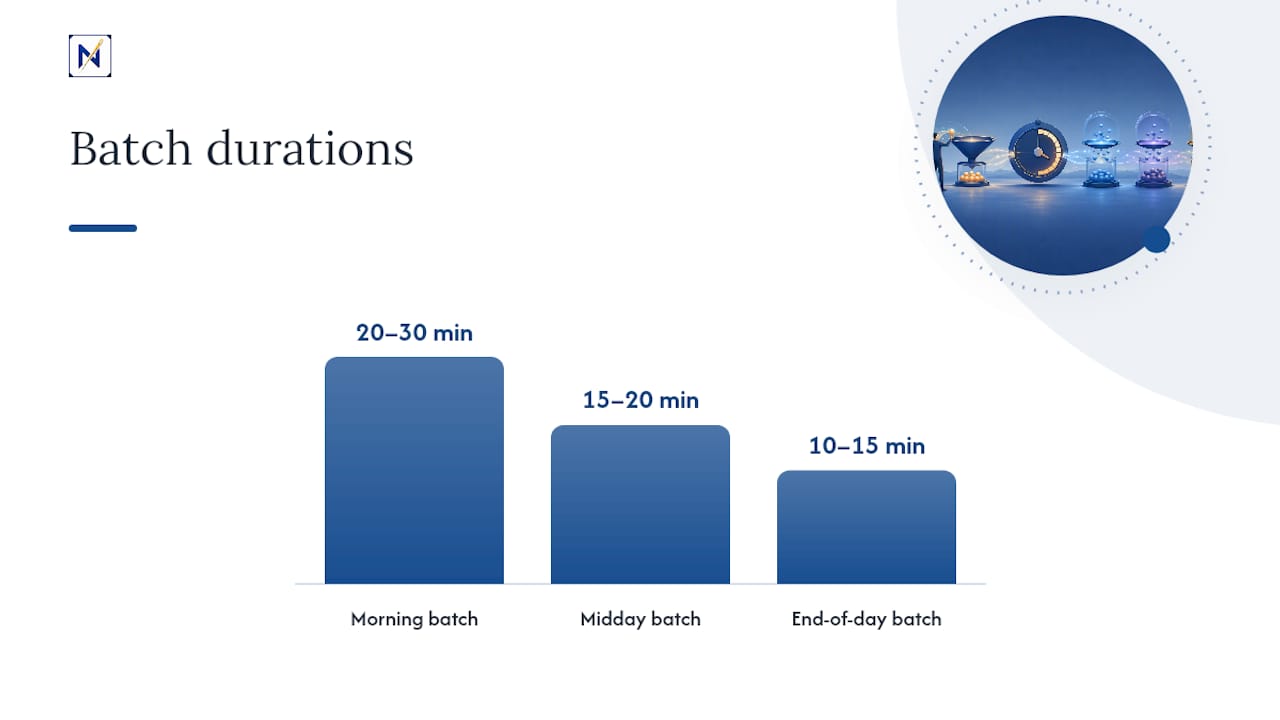
Checking email continuously is the single most expensive habit in this list, in terms of attention lost to switching. Batching fixes it by giving your inbox specific appointments instead of open-ended access.
A workable cadence for most roles:
- Morning batch (20 to 30 minutes): triage everything that arrived overnight, handle Do items, defer or delegate the rest.
- Midday batch (15 to 20 minutes): catch anything urgent that landed since morning, respond to time-sensitive threads.
- End-of-day batch (10 to 15 minutes): clear the inbox before logging off so tomorrow starts clean, not backlogged.
Close the inbox tab between batches. Turn off new-mail notifications entirely. The HBR analysis on email habits is blunt about this: the productivity gain from batching comes specifically from reducing how often you switch context, not from reading faster once you’re in the inbox.
4. Filters and rules that reduce noise before you see it
Good filtering means fewer decisions during triage, not more folders to check. Set up sender-based rules that route newsletters, automated notifications, and low-priority mailing lists straight to a labeled folder you check once a week, not your primary inbox. Build a VIP list, manually or through your mail client’s priority settings, for the handful of senders (your manager, key clients, your accountant) whose messages should never wait for a batch. Subject-line rules can catch recurring patterns too: invoices, receipts, and calendar invites often follow predictable formats worth automating.
5. Touch-it-once and aggressive archiving
Once you’ve assigned a verdict, don’t reopen the email to reconsider it. If you’ve archived it, it’s gone from your working view; trust your search function to retrieve it if you ever need it again. A useful rule: archive anything you’re not actively waiting on or acting on, and keep only true reference material (contracts, confirmations you’ll need later) in a dedicated folder rather than your main inbox. An inbox with 4,000 unread messages isn’t organization; it’s just a longer list to scroll past.
6. Snooze and follow-up tracking
Deferred items die quietly if you don’t track them. Use your mail client’s snooze feature to bring an email back into view on the day you actually plan to act on it, not just “sometime soon.” For anything you’re waiting on from someone else, log it in a calendar task or a simple “Waiting” label with a follow-up date. Without this step, Defer becomes a synonym for forgotten.
Matching the method to your role
| Volume | Best-fit method |
|---|---|
| 30 to 60 emails/day | OHIO alone, checked twice daily |
| 60 to 120 emails/day | 4‑D plus structured batching |
| 120+ emails/day | Strict batching, automated filters, and delegation |
Pro Tip: When you delegate, write the forward in under fifteen seconds: one line of context, the specific action you need, and a due date. “Can you handle this? Client needs pricing by Thursday, details below” takes longer to skip than to send, and it saves the recipient from reading the entire thread to figure out what you want.
How AI and Automation Change Triage
Automation has moved past simple spam filters. Modern tools can classify incoming messages, score them by priority, flag VIP senders, and even draft replies before you’ve opened the thread. Superhuman’s writeup on triage describes this as a shift toward AI-native inboxes, where smart sorting and drafting happen automatically rather than through manual rule-building.
Here’s what automation reliably does well right now:
- Classifies messages by type (invoice, newsletter, client request, internal memo)
- Scores priority based on sender, keywords, and deadline language
- Drafts suggested replies for common request types
- Flags VIP senders so their messages never land in a batch folder
- Routes recurring message types to the right label or task list automatically
The limits matter just as much as the capabilities. AI triage can misclassify a genuinely urgent message as routine, especially from a new contact it hasn’t learned yet, and its reasoning for a given priority score isn’t always transparent. Privacy and permission settings deserve real scrutiny before you connect any tool to a work inbox. Products in this space, Hourglass AI’s triage feature among them, are explicit that drafts should stay drafts. Never let automation send on your behalf without a human reviewing the message first.
A sane rollout looks like this: start with classification and priority scoring only, audit a week of its drafts before trusting any of them, tune the priority thresholds as you see false positives, and keep a running exceptions list of senders or subject lines the system consistently gets wrong.
Pro Tip: Give any triage tool a two-week trial period before fully trusting its scoring. Track how many “urgent” flags turned out to be noise and how many real deadlines it missed. That ratio tells you whether to loosen or tighten its thresholds.
Building a Daily Cadence That Actually Sticks
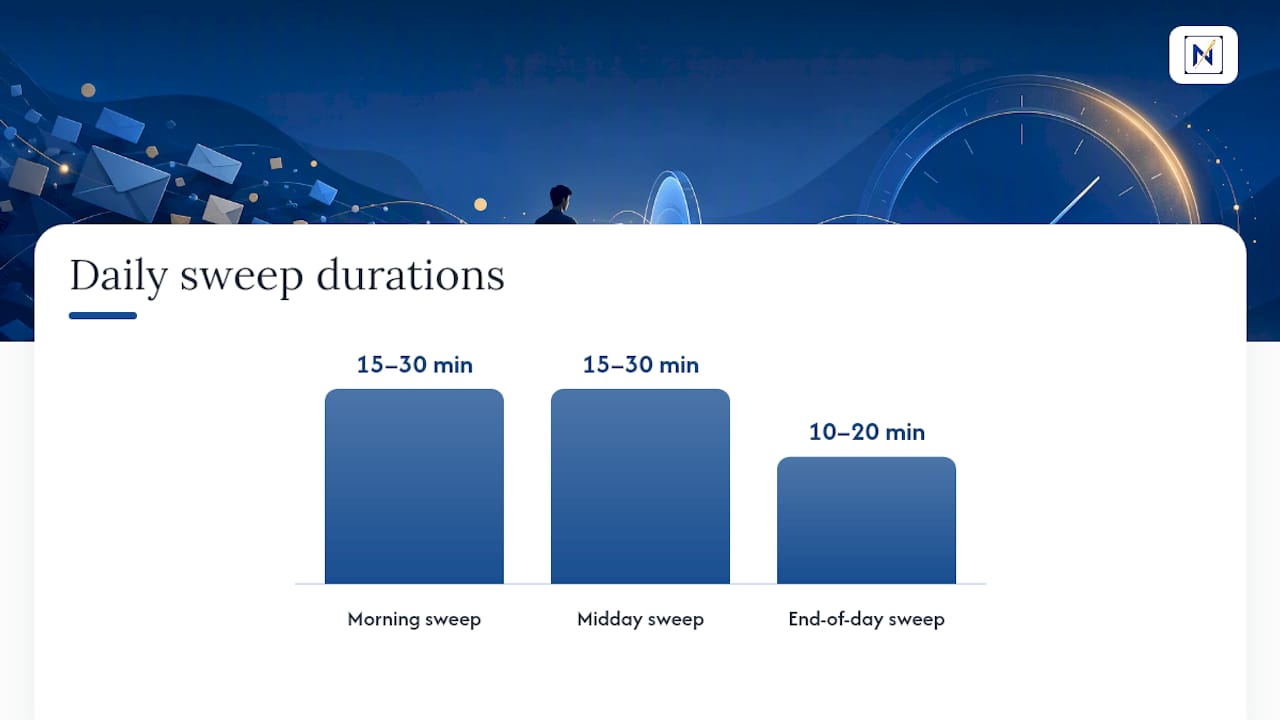
A method only works if it survives contact with a real Tuesday. Here’s the cadence that holds up across most roles, broken into three sweeps:
Morning sweep (15 to 30 minutes). Triage everything from overnight. Assign a verdict to every message: Do, Defer, Delegate, or Delete. Clear all Do items before moving to anything else on your calendar.
Midday sweep (15 to 30 minutes). Catch what’s landed since morning. Handle anything time-sensitive. Resist the urge to check outside this window; that’s exactly the context switching the research on interruptions warns against.
End-of-day sweep (10 to 20 minutes). Empty the inbox down to only what’s genuinely deferred or delegated. Confirm every deferred item has a follow-up date attached.
Choosing a method depends mostly on volume:
- Low volume (30 to 60 emails a day): OHIO or a simple Inbox Zero habit, checked twice, is enough.
- Medium volume (60 to 120 a day): Pair the 4‑D framework with the three-sweep batching cadence above.
- High volume (120 or more a day): Strict batching plus automated filters plus active delegation. At this volume, manual triage alone will not hold.
For labels, keep it simple: Action, Waiting, Later, and Archive covers nearly every use case without turning your sidebar into its own project. Review the Waiting and Later labels once a week to catch anything that’s quietly stalled.
theNeedle’s own approach reflects this same principle at a product level: instead of sorting by folder or sender, it ranks messages by consequence. Deadlines, financial alerts, and relationship-critical threads rise to the top regardless of which inbox they landed in. For readers who’d rather have that ranking done automatically than build it by hand, the live demo shows how that works in practice.
Pro Tip: Track one metric for two weeks before judging any method: how many times you check your inbox outside your scheduled sweeps. If that number isn’t dropping, the cadence isn’t the problem, the notifications are.
Your Two-Week Triage Setup Checklist
You can build this entire system in one sitting. Here’s the order that works:
- Create four labels: Action, Waiting, Later, Archive. Delete or ignore any folder structure more complicated than that.
- Run one full triage pass on your current inbox, applying the 4‑D verdict to every unread message until it’s at zero or close to it.
- Commit to the two-week trial: three sweeps a day, no checking outside those windows, snooze or calendar-track everything you defer.
While you run the trial, watch three numbers: how many times you interrupt yourself to check email outside your sweeps, how long priority messages sit before you reply, and a simple gut-check rating of how calm your mornings feel on a scale of one to five. If interruptions haven’t dropped and your reply lag on genuinely urgent messages hasn’t improved after two weeks, adjust the cadence before abandoning the method entirely, most failures come from skipping sweeps, not from the framework itself.
Author Perspective: Why Consequence-First Triage Wins
Most inbox advice treats every email as equal until proven otherwise, sort by date, sort by sender, sort by whatever arrived last. That’s backwards. The email that costs you money or damages a relationship if ignored deserves to surface first, regardless of when it arrived or how loud its subject line is. Volume-based sorting optimizes for the wrong variable entirely.
The honest limitation here: triage won’t fix a role where the sheer number of stakeholders requiring direct replies exceeds what any individual can process, no framework changes that math. What it does change is whether the two or three messages that actually matter each day get buried under forty that don’t. That’s a solvable problem, and it’s the one worth solving first.
I’d also push back gently on the idea that better filters alone fix overload. Filters reduce noise; they don’t rank consequence. A filing system with perfect folders can still bury a contract deadline under a dozen perfectly sorted newsletters. The frameworks in this piece work because they force a decision, not just a destination, for every message.
Try the routine for two weeks before deciding it doesn’t fit your role. Most people quit triage systems in week one, right before the habit becomes automatic.
— Glen Bover
theNeedle: Consequence-First Triage, Built In
theNeedle is the shortcut for readers who’ve read this far and thought, “I know the framework, I just don’t want to run it manually every day.” Instead of sorting by sender or date, it connects to Gmail, Outlook, Microsoft, Yahoo, and iCloud and ranks messages by what they’ll cost you if ignored: a missed deadline, an unclaimed refund, a client thread going quiet.

It flags overdue and high-priority messages automatically, catches replies you forgot you owed someone, tracks opportunities like credits and refunds before they expire, and includes a built-in unsubscribe for senders who won’t take a hint. The one-at-a-time focus view is built with ADHD-friendly design in mind, so you’re never facing a wall of 117 messages at once, just the one that actually needs you right now.
This fits busy professionals and freelancers managing more than one inbox who want the consequence-ranking layer without building it by hand. Start with the live demo to see how your own inbox looks once it’s sorted by what actually matters, not what arrived most recently.
Sources
- How to spend way less time on email every day — HBR
- Frontiers in Psychology — interruptions and attention (2024)