117–126 Emails Daily: 2026 Email Overload Statistics for Professionals

Those three figures, pulled from telemetry and industry surveys rather than guesswork, add up to a quiet but real drain on productivity and mental bandwidth. The full breakdown below shows where the numbers come from, why they vary, and what they actually mean for someone drowning in their own inbox.
TL;DR:
- Average time spent on email is about 28% of the workweek, with interruptions costing roughly 23 minutes to regain concentration after each alert.
- AI-assisted tools can reduce time spent on sorting and triage but do not significantly lower overall inbox volume or the frequency of checking outside work hours.
- The real productivity loss comes from fragmented attention, with workers self-interrupting around 74 times daily, leading to estimated double-digit percentage decreases in focus.
- To mitigate overload, professionals should block dedicated email times, triage aggressively, and track their own inbox metrics for more actionable insights.
Table of Contents
- Email Overload Statistics: The Numbers at a Glance
- How Many Emails Do People Really Get Per Day?
- How Much of the Workweek Does Email Actually Eat?
- What Does Email Overload Cost a Company in Dollars?
- Is Email Overload Actually Causing Burnout?
- Do Executives and Sales Teams Get More Email Than Everyone Else?
- Can AI Tools Really Fix Email Overload?
- Why Do Email Statistics Vary So Much Between Studies?
- The Bottom Line on Email Overload
- What the Statistics Miss About Living Inside an Inbox
- A Different Way to Handle the Emails That Actually Matter
- Sources
- FAQ
Email Overload Statistics: The Numbers at a Glance
Before you get into the nuance, here is the quiet cost laid out plainly. These are the figures that show up most often across telemetry reports and industry surveys, and they set the scale of the problem before you get into why it happens.
- Global email volume: roughly 392 to 424 billion emails sent daily worldwide in 2025 and 2026 projections.
- Per-user daily volume: 117 to 126 emails per business user per day, with role-based estimates ranging from 82 to 120.
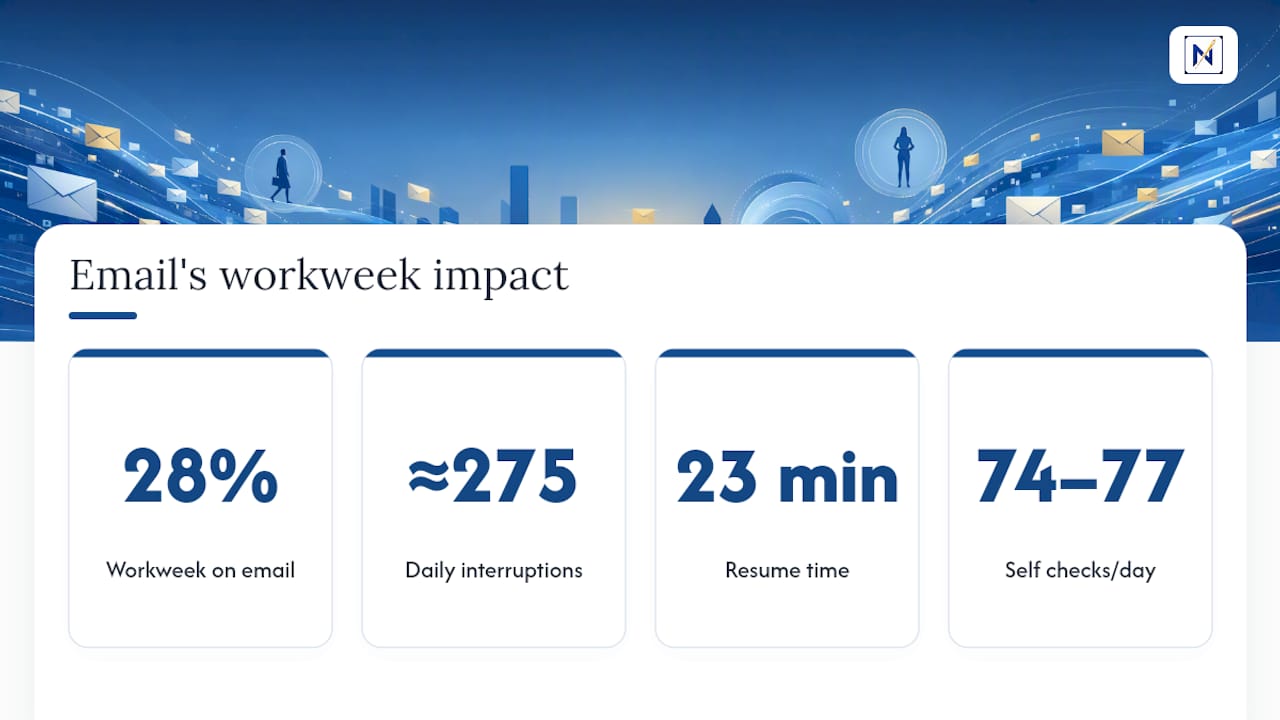
- Workweek share: interaction workers spend about 28% of their workweek reading and answering email, a benchmark that has held up for years.
- Interruption frequency: Microsoft telemetry logs around 275 notification pings per workday.
- Refocus cost: it takes about 23 minutes to fully regain concentration after an interruption.
- After-hours checking: 40% of workers check email before 6 AM, and 29% are still active at 10 PM.
- Perceived overload: 42% of professionals describe their inbox as “out of control”.
- Top stressor status: 70% name email as their leading workplace stressor.
- Response-time gap: average elapsed reply time runs about 12 hours 55 minutes, though in-office reply time is closer to 4 hours.
Statistic snapshot: if you multiply 275 daily interruptions by even a fraction of that 23-minute refocus penalty, you get a workday where sustained attention is structurally almost impossible. That is the mechanism behind every other number in this article.
How Many Emails Do People Really Get Per Day?
The honest answer is: it depends on which dataset you trust, and most of the disagreement comes down to who got sampled. CMDK’s aggregation of Radicati and telemetry-based sources puts the global total at 392 to 424 billion emails sent daily in 2025 and 2026, with business users averaging 117 to 126 emails per day. Clean Email’s 2026 industry synthesis reports a slightly wider band, 82 to 120 emails daily, because it segments by job function instead of averaging across every inbox type.
Three factors explain most of the gap between studies:
- Sampling source: telemetry pulled from Outlook or Gmail server logs counts every delivered message, including newsletters and automated alerts, while survey-based estimates often ask people to self-report and undercount routine noise.
- Distribution skew: a small share of heavy users, often executives and sales staff, receive several hundred emails daily and pull the average upward, while the median office worker sees meaningfully fewer.
- Account stacking: most professionals now juggle two or more active accounts (work, personal, a side project), so “per person” volume and “per inbox” volume are not the same measurement, even in the same study.
Spam filtering also matters more than most people realize. The billions of daily emails counted at the server level are not what lands in a visible inbox. Filters strip out a large share before a human ever sees a subject line, which means the 117 to 126 figure already reflects filtered, “survived” mail rather than raw traffic. Growth projections through 2026 point in one direction only: up, driven by automated transactional messages, marketing platforms, and the sheer number of tools now capable of firing off a notification email.
How Much of the Workweek Does Email Actually Eat?
The most durable figure in this entire field is the McKinsey Global Institute estimate that interaction workers spend about 28% of their workweek on email. That number has circulated for over a decade, and while the underlying study predates current telemetry tools, newer data keeps landing in the same neighborhood, which is part of why it has stuck.
Heavy users, particularly those in client-facing or leadership roles, report figures well above that average, sometimes exceeding 3 hours daily once you count mobile checking outside standard hours.
Interruption data point: Microsoft’s Work Trend Index telemetry logs approximately 275 notification interruptions during a typical workday window, spread across email, chat, and collaboration tools. Email alone accounts for a substantial share of that volume.
The deeper cost is not the minutes spent reading messages. It is the attention tax documented in Gloria Mark’s UC Irvine research, which finds it takes roughly 23 minutes to fully return to a prior task after an interruption. Follow-up studies from the same lab log 74 to 77 self-initiated screen checks per day, meaning workers are frequently interrupting themselves before an external notification even arrives.
Stack the arithmetic and the picture gets uncomfortable fast: even a conservative estimate of productivity loss from fragmented attention runs into double-digit percentages of the workday, though exact loss figures vary by methodology and should be read as directional rather than precise.
What Does Email Overload Cost a Company in Dollars?
Time lost to email eventually shows up on a balance sheet, even when nobody labels it that way. For a $70,000 salary, that is close to $19,600 in time value spent inside an inbox, before accounting for the refocus penalty layered on top.
Miscommunication compounds the bill. Survey-style research on workplace communication (the kind Grammarly and Harris Poll-style studies have popularized in past years) has repeatedly tied unclear or mishandled email exchanges to measurable losses in time, rework, and missed deadlines, though the exact dollar figures cited across these studies vary widely by company size and industry and should be treated as illustrative rather than universal.
Fraud adds a sharper edge. Business Email Compromise, where attackers impersonate a vendor or executive to redirect payments, remains one of the costliest categories of cyber fraud tracked by federal law enforcement, with losses running into the billions of dollars annually across reported cases. The overload problem and the fraud problem are connected: an inbox with hundreds of daily messages makes it easier for one convincing fake invoice to slip past a distracted reader.
A few caveats worth keeping in mind:
- Aggregated cost figures rarely account for role differences, so a blanket “cost per employee” number will overstate or understate your actual exposure.
- Localizing the math to your own team, using your own salary bands and email volume, produces a far more useful number than any industry-wide average.
- Fraud losses are asymmetric: most inboxes never see a BEC attempt, but the ones that do can lose enormous sums in a single transaction.
Is Email Overload Actually Causing Burnout?
Survey data says yes, consistently. Clean Email’s 2026 industry report finds 70% of professionals name email as their top workplace stressor, and 42% describe their inbox as “out of control.” Those are not small minorities voicing a niche complaint. That is close to half the workforce reporting a sense of losing the fight against their own message queue.
The after-hours data backs up the psychological toll with hard telemetry instead of self-report. Microsoft’s research on the “infinite workday” documents that 40% of employees check email before 6 AM, and 29% are still opening messages at 10 PM. That is not overtime in the traditional sense. It is a workday that no longer has visible edges, and it tracks closely with rising burnout self-reports across the same survey populations.
- Boundary erosion: checking email before 6 AM or after 10 PM blurs the line between “off the clock” and “on call.”
- Coping behavior: many professionals now unsubscribe aggressively or triage by ignoring entire categories of mail, a workaround that reduces subscription fatigue but does nothing for the deadline-critical messages buried in the same pile.
- Retention risk: chronic inbox stress is increasingly cited in exit interviews and burnout surveys as a contributing factor in people considering a job change.
Pro Tip: If you notice yourself checking email the moment you wake up, try delaying that first check by even 30 minutes. It will not fix the underlying volume problem, but it interrupts the habit loop before the day even starts, and that alone tends to lower the felt urgency of everything sitting in the inbox.
Do Executives and Sales Teams Get More Email Than Everyone Else?
Averages hide a lot. The 117 to 126 daily figure is a blended number, and role matters enormously in how that volume actually lands.
- Executives routinely exceed the median, both in raw volume and in hours spent, since they sit at the intersection of internal decision threads and external stakeholder communication.
- Sales and customer-facing roles deal with a heavier inbound-to-outbound imbalance, fielding constant prospect and client messages that demand fast turnaround, unlike internal-only roles with more forgiving response windows.
- Operations and support roles often juggle ticket-style volume that behaves more like a queue than a conversation, which changes how overload actually feels day to day.
- Multiple-account users, now the norm rather than the exception, experience compounded overload because triage has to happen across separate inboxes with separate norms and separate urgency signals.
The practical implication: a blanket “check email twice a day” policy that works for one department can be actively harmful for another. Interventions should be sized to the role, not applied as a company-wide mandate that ignores who is actually drowning.
Can AI Tools Really Fix Email Overload?
Adoption is real, but the results are more modest than most vendor pitches suggest. Microsoft’s own telemetry, the same dataset that documents the 275 daily interruption count, is also tracking how AI-assisted triage tools affect employee behavior, and early findings show meaningful but incomplete relief rather than a clean fix. Out-of-hours checking has not disappeared alongside rising AI adoption, which suggests the behavioral habit of checking is separate from the volume problem itself.
- Adoption is climbing across large organizations, with AI-assisted email summarization and prioritization features now standard in major platforms.
- Reported time savings from industry and vendor reports lean toward the optimistic side and deserve a skeptical read until independent, replicated data catches up.
- The Jevons effect looms large here: Clean Email’s own analysis notes that efficiency gains from automation often meet rising volume head-on, since better triage capacity can simply invite senders to send more, leaving the felt sense of overload largely unchanged.
- Signal-to-noise remains the core constraint. A tool that sorts faster does not help if it is still sorting mostly noise; the AI agent space, including approaches Myagent, is increasingly focused on this distinction rather than raw speed.
The realistic takeaway: expect AI tools to reduce time spent scanning, not to reduce the underlying volume arriving in your inbox.
Why Do Email Statistics Vary So Much Between Studies?
Three measurement types produce three different pictures. Telemetry (server and platform-level logging, like Microsoft’s Work Trend Index) captures every delivered message and every click, giving objective but platform-limited volume data. Sampled surveys (like Clean Email’s industry report) capture perceived burden and self-reported behavior, which is valuable for stress and satisfaction metrics but vulnerable to self-selection bias. Market estimates (like Radicati-style aggregations) model global totals from a mix of both, which is useful for macro trends but imprecise at the individual level.
- Telemetry answers “how much happened.” Surveys answer “how much it hurt.”
- Watch for the reporting window: a study measuring peak season traffic will report differently than one averaging a full year.
- When choosing which number applies to you, match the study type to your question. Use telemetry for planning inbox tooling, and surveys for gauging team morale.
The Bottom Line on Email Overload
Volume keeps climbing, attention fragmentation carries a real and measurable cost, and most inboxes are drowning in low-priority noise rather than high-stakes messages. Three moves flow directly from the data. First, block dedicated email windows instead of leaving your inbox open all day, cutting into the 275 daily interruption count. Second, triage aggressively so the signal-to-noise ratio improves. Third, track your own team’s numbers instead of relying on industry averages that may not reflect your role. A simple monthly benchmark, checked against these figures, tells you more than any national survey ever will.
What the Statistics Miss About Living Inside an Inbox
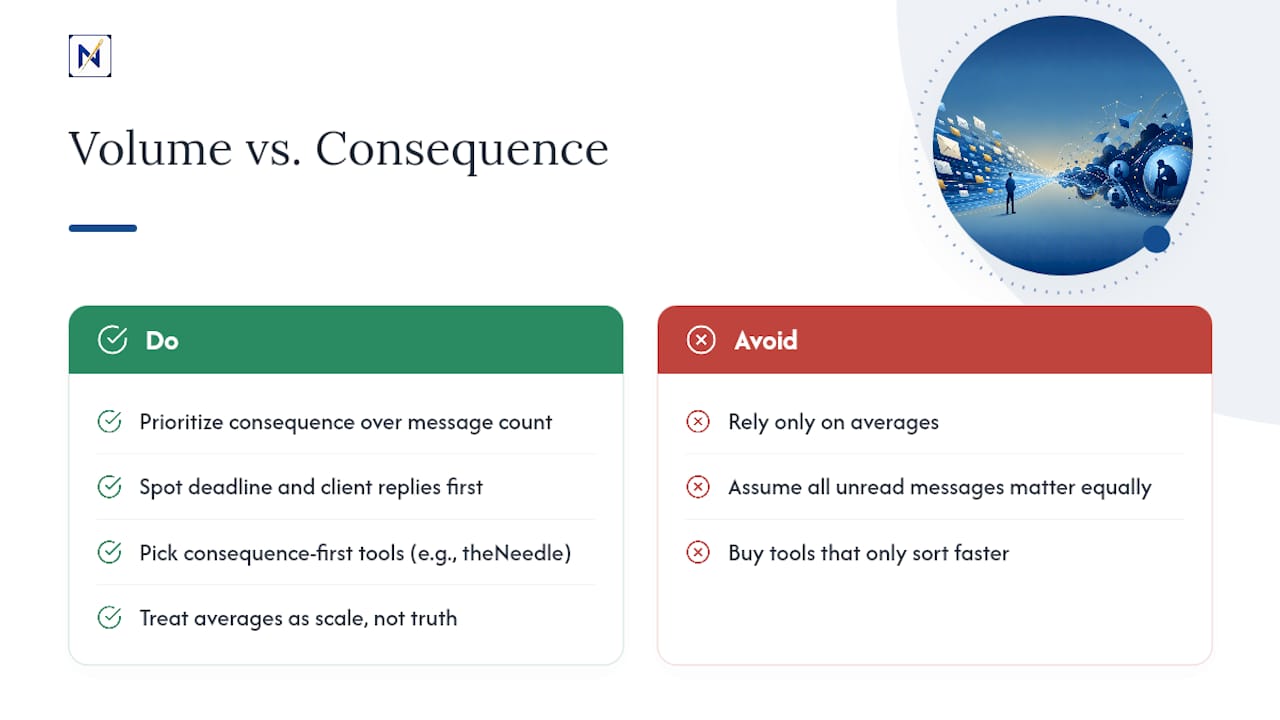
The data makes a compelling case that email overload is structural, not a personal failing. What the numbers alone cannot capture is how it feels to lose a financial deadline or a client reply inside 120 daily messages that all look equally urgent at a glance. Averages tell you the scale of the problem. They do not tell you which of tonight’s forty unread messages actually matters.
That gap between volume and consequence is the whole reason a consequence-first approach makes sense, rather than another tool that just sorts faster… For readers who want a tool built around that distinction, theNeedle is one honest option worth trying.
— Glen Bover
A Different Way to Handle the Emails That Actually Matter
theNeedle is built on a simple bet: the goal is not reading every message, it’s catching the ones with real consequences before they turn into a missed deadline or a lost refund. Instead of sorting by sender or subject line the way most inboxes do, it scans connected accounts and surfaces the emails tied to deadlines, financial alerts, unhandled replies, or opportunities like credits and refunds that are easy to bury under routine mail.

It’s built for people who feel the 42% “inbox out of control” statistic in their own daily routine:
- Busy professionals juggling multiple accounts and client threads
- Freelancers who cannot afford to miss a payment deadline or contract reply
- Anyone who benefits from ADHD-friendly, one-at-a-time focus instead of a wall of unread mail
If email overload is quietly costing you money or peace of mind, try theNeedle and see which messages it flags first. That single unhandled email might be worth more than the other 119 combined.
Sources
- Gloria Mark — CHI 2008 / interruption and attention research (UC Irvine)
- Microsoft Work Trend Index / Will AI fix work?
- Email Industry Data Report 2025–2026 (Clean Email)
- Email statistics: volume, time spent, and aggregated datasets (CMDK)
FAQ
Is Sending 40 Emails a Day a Lot?
Not by current benchmarks. The average professional receives 117 to 126 emails daily, so sending around 40 puts you well below the typical inbound volume most knowledge workers manage.
What Is the 12-Second Rule for Emails?
It is a productivity guideline suggesting you should be able to scan a subject line and decide its priority within about 12 seconds, rather than opening and rereading every message in full. Definitions of this rule vary by source, so treat it as a rough triage habit rather than a fixed standard.
What Does the 3-21-0 Rule Mean for Email?
This is an informal guideline some productivity coaches use: check email at a few set times a day and try to keep sessions focused, aiming to finish with no backlog; it is not a formally standardized rule, so treat it as one framework among several rather than an industry benchmark. It is not a formally standardized rule, so treat it as one framework among several rather than an industry benchmark.
What Is the Most Hacked Email Provider?
No single provider is definitively “the most hacked,” since breach exposure depends on user base size, security practices, and reporting rules that vary by year and jurisdiction. Large providers naturally show up in more breach headlines simply because they have more accounts to target, not necessarily weaker security.
How Can I Reduce Email Overload Without Ignoring Important Messages?
Batch your inbox checks instead of reacting to every notification, and prioritize by consequence rather than sender or subject line alone. Tools built around consequence-first triage, like theNeedle, are designed specifically to surface deadline and financial alerts so you can safely ignore the rest without missing what actually matters.