What Email Anxiety Feels Like (and the 2-Minute Fix)

Email anxiety is the dread, avoidance, or physical tension you feel when facing your inbox, often triggered by ambiguous messages, sheer volume, or fear of saying the wrong thing. If your inbox is spiking your pulse right now, try this: open your inbox, scan only the three newest messages, and give each one a one-word label. Handle it in under two minutes, defer it to a specific time block, or delete it outright.
That is the whole exercise. No sorting the other 200 unread messages. No promises to reach Inbox Zero today.
- Handle: reply now if it takes less than two minutes.
- Defer: drag it to a calendar slot later today or tomorrow.
- Delete: if it demands nothing from you, archive or trash it.
The average worker gets 117 emails a day, which is part of why this feels endless rather than occasional. Tools like theNeedle exist specifically to cut through that volume by flagging the handful of messages that actually carry consequences, so the rest of this guide will show you how to build that same triage instinct by hand.
Key Takeaways
Email anxiety eases fastest when you triage by consequence rather than volume, using short time-boxed rules instead of trying to clear every message.
| Point | Details |
|---|---|
| Start with 3 messages | Label the newest three emails as handle, defer, or delete before doing anything else. |
| Batch, don’t react | Check email in two or three scheduled windows with a timer instead of all day long. |
| Target communication clutter | Filter and unsubscribe from newsletters and broadcast emails, since they drive more perceived load than task emails. |
| Adapt for ADHD | Use one-at-a-time focus, body doubling, and externalized checklists to reduce initiation barriers. |
| Watch for red flags | Panic attacks or prolonged avoidance tied to email warrant a conversation with a mental health professional. |
| Let tools cut the noise | theNeedle surfaces the handful of consequential emails in your daily 117 so triage takes minutes, not hours. |
This article is general information, not a substitute for advice from a qualified doctor. Consult a qualified healthcare professional about your own circumstances before acting on anything here.
Table of Contents
- How to recognize email anxiety in yourself
- Why your inbox triggers so much stress
- A practical playbook for calmer email management
- Managing email anxiety with ADHD or executive-function challenges
- When to get outside help for email stress
- The research and product thinking behind these tactics
- Sources
How to recognize email anxiety in yourself
Email anxiety rarely announces itself with a label. It shows up as behavior first, feelings second, and body sensations third, often before you consciously register you are stressed at all.
- Behavioral signs. You leave the inbox tab open but avoid clicking into it. You refresh compulsively, checking for new messages without any intention of answering them. You put off a reply for days even though it would take ninety seconds.
- Emotional signs. A vague dread settles in before you even open your laptop. You feel shame about unanswered threads piling up, or you agonize over how a one-line reply might sound too curt or too eager.
- Physical signs. Your heart rate ticks up when a notification banner appears. Some people report nausea or a tight chest right before opening a message from a specific sender, especially a boss or client with a history of terse replies.
A common micro-example: you see an email subject line reading only “Following up,” and your stomach drops before you have even opened it. That reaction, out of proportion to the actual content, is the clearest tell that this is anxiety, not just a busy inbox.
Why your inbox triggers so much stress
Email overload has become a stand-in for a much bigger problem. Research on organizational stress notes that email acts as a visible symbol of overload, which means your unread count often absorbs blame that really belongs to unclear priorities, understaffing, or unrealistic deadlines set elsewhere in your organization. You fixate on the number because it is the one overload indicator you can actually see.
Communication-related emails, the newsletters, broadcast updates, and CC-heavy threads, contribute more to perceived email load than task-specific messages do, even when they demand nothing of you directly.
That finding comes from a two-study analysis published in Frontiers in Psychology, and it reframes the whole problem. You are not necessarily drowning in work. You are drowning in noise that looks like work.
117 is the number of emails the average worker receives daily, according to theNeedle’s research. Multiply that by a week and you are parsing over 800 messages, most of which require no action from you at all, yet each one still taxes your attention for a split second.
Ambiguity compounds the problem. Written messages strip out tone, facial expression, and pacing, so a terse “Please advise” can read as neutral to the sender and hostile to you. This is especially sharp for anyone prone to social anxiety, since worry about misinterpretation is a documented feature of social anxiety disorder, not a personal failing.
Then there is the interruption cost. Every notification pulls you out of focused work, and Harvard Business Review reports that switching back to deep work after an interruption can take significant time to recover, which is why a “quick check” of your inbox rarely stays quick.
A practical playbook for calmer email management
Coping with email-related stress works best as a layered system: an immediate triage rule, a daily rhythm, ongoing inbox hygiene, and a few boundary rituals that protect your attention long term.
1. Use the 3-email rule for daily triage. Each time you open your inbox, commit to fully resolving three messages before you do anything else, reply, forward, archive, or schedule. This caps the emotional labor of “deciding what to do” and gives you a finish line instead of an infinite scroll.
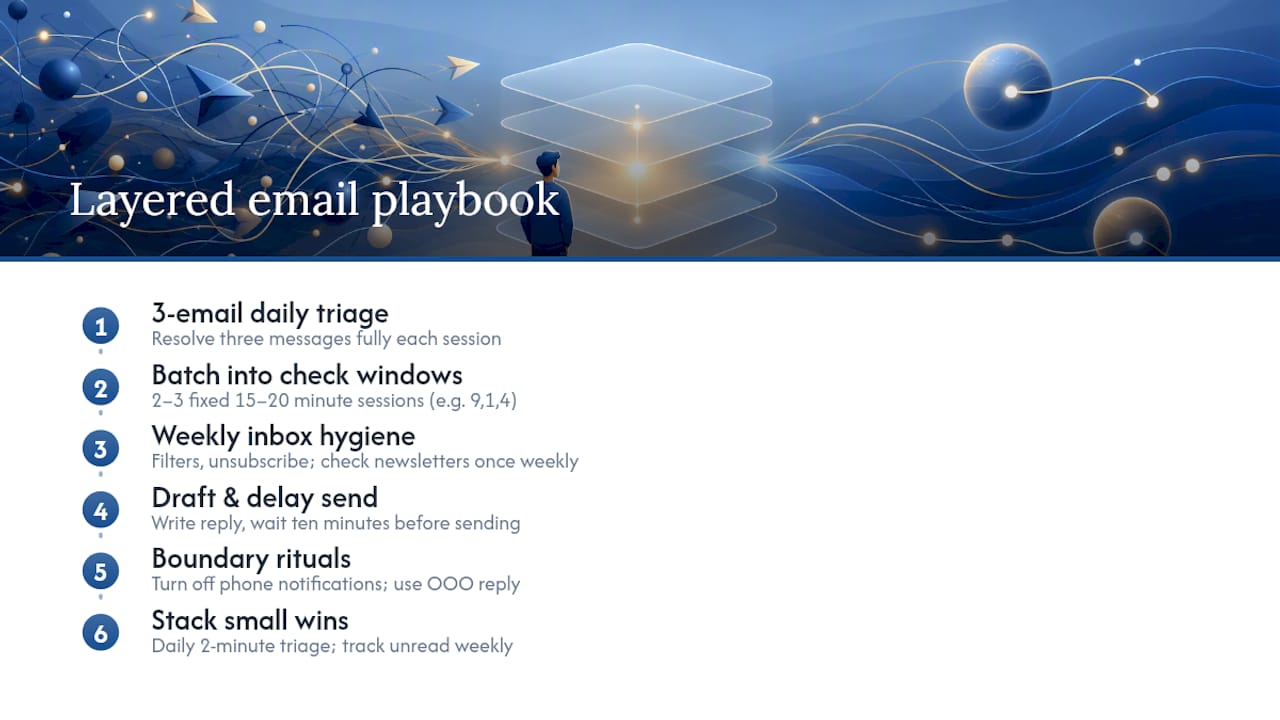
2. Batch your email into scheduled windows. Rather than reacting all day, pick two or three fixed windows, say 9 AM, 1 PM, and 4 PM, and set a 15 to 20 minute timer for each. HBR’s reporting on interruptions backs this up: batching reduces the switching costs that make email feel more draining than the actual content justifies.
3. Build inbox hygiene into a weekly habit. Set filters that route newsletters and automated alerts into a separate folder you check once a week. Unsubscribe aggressively from anything you have not opened in the last month. theNeedle’s guide to organizing your inbox walks through filter setup in more depth if you want a starting template.
4. Draft before you send, and let delay-send do the emotional work. Write your reply, then sit on it for ten minutes using a scheduled or delayed send. Cleveland Clinic’s clinicians recommend this exact pause, along with keeping replies short and asking directly for clarification instead of guessing at tone.
5. Set boundary rituals that outlast willpower. Turn off email notifications on your phone after a set hour. Use an out-of-office auto-reply even for a half-day away, stating your next check-in time explicitly. This single sentence, “I check email at 9, 1, and 4,” removes the ambiguity that fuels other people’s urgency.
6. Stack small wins instead of chasing Inbox Zero. A two-minute triage session, done daily, builds more lasting relief than one marathon cleanup followed by relapse. Track your unread count weekly rather than hourly, since obsessing over the number itself is often the stressor, not the actual content sitting behind it.
Pro Tip: Keep a sticky note or phone reminder with your own version of the 3-email rule written out. The friction of remembering “what am I supposed to do again” is often the real barrier, not the email itself.
Managing email anxiety with ADHD or executive-function challenges
ADHD adds a layer most productivity advice ignores: initiation is often harder than execution. You might know exactly how to answer a message and still stall for three days because starting feels disproportionately hard. Executive-function research points to task initiation, sustained attention, and switching between tasks as the specific friction points, not laziness or poor planning.
- Focus on one flagged email at a time instead of the full list, using a visual cue like a starred or pinned message to anchor your attention.
- Try body doubling, working alongside a friend or coworker, even silently on a video call, while you clear a batch of replies.
- Use a visible timer for each triage session so the task has a hard, predictable end point.
- Externalize decisions onto sticky notes or a simple checklist app instead of holding “what needs a reply” in your head.
theNeedle’s ADHD-focused breakdown of why seeing an email isn’t the same as handling it digs into this intention-action gap in more detail, and the one-thing-at-a-time approach offers a concrete framework for single-item focus.
When to get outside help for email stress
Coping strategies help most people, but some signs point to something that needs more than a triage system. Watch for these red flags:
- Panic attacks specifically triggered by email notifications or your inbox icon.
- Avoidance so persistent it causes missed deadlines, damaged client relationships, or disciplinary action at work.
- Anxiety that bleeds into sleep, appetite, or your ability to function outside of work hours.
If any of these sound familiar, talk to a mental health professional, and consider raising workload or communication norms with your manager or HR. A therapist can help distinguish ordinary email stress management from a broader anxiety disorder that email happens to trigger. This article offers coping strategies, not a clinical diagnosis.
The research and product thinking behind these tactics
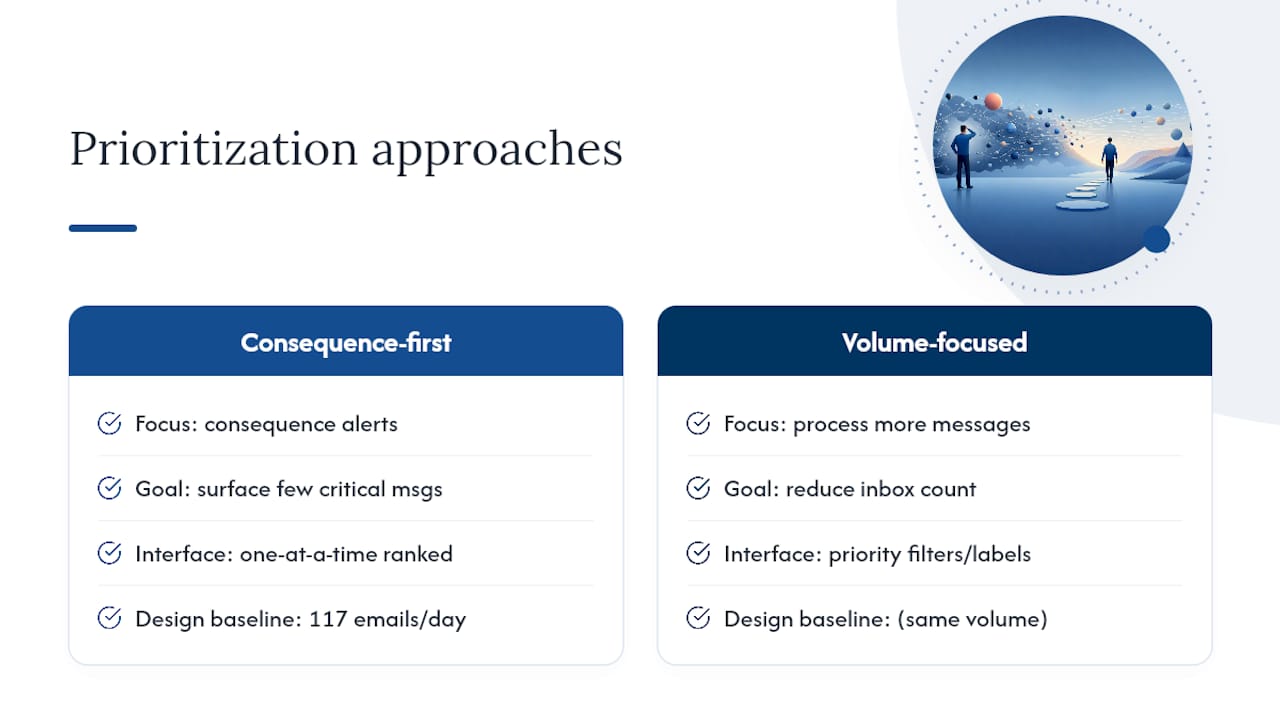
theNeedle was built around a simple observation: most inbox advice tries to help you process more email faster, when the real fix is identifying which few messages actually carry consequences, deadlines, financial alerts, or unresolved requests, and surfacing only those. That is a different problem than volume, and it is why consequence-first prioritization looks different from a typical priority inbox filter.
The 117 emails per day figure that opens this article is not an abstract statistic. It is the baseline theNeedle designed against, because sorting through that volume manually is exactly what produces the dread described earlier.
When communication-type messages dominate an inbox, aggressive filtering and unsubscribing typically reduce perceived load more than trying to answer everything ever could.
That principle, drawn from the Frontiers in Psychology analysis on email classes, is the same logic behind theNeedle’s one-at-a-time, consequence-ranked interface.
A note from Glen
Start smaller than feels sufficient. A ten-minute morning triage, just labeling handle, defer, or delete, beats an ambitious overhaul you abandon by Thursday. I’d rather you keep a clumsy ritual for a month than a perfect system for three days. Try it tomorrow morning, then adjust.
— Glen
Let theNeedle handle the triage for you
theNeedle is the alternative to sorting 117 emails a day by hand: it scans your inbox and surfaces only the messages with real consequences, a deadline, a financial alert, an unresolved request, so you stop re-reading the same 40 newsletters looking for the one thing that matters.

It connects to Gmail, Outlook, Microsoft, Yahoo, and iCloud, and flags overdue items, unhandled replies, and even forgotten opportunities like refunds or credits sitting unclaimed in old threads. The one-at-a-time focus view and built-in unsubscribe tool were designed with the same executive-function barriers covered in the ADHD section above, so you are never facing a wall of unread messages at once. If the triage tactics in this guide helped, try theNeedle’s live demo and see which of your own emails it flags first.
Sources
- Drowning in emails: investigating email classes and work stressors as antecedents of high email load and implications for well-being
- How to Deal With Email Anxiety
- Why email is so stressful, even though it’s not actually that time-consuming