117 Emails Daily? Use Do Not Disturb Email to Surface High Stakes Mail

A “do not disturb email” system doesn’t mean silencing your inbox. It means muting the low-value noise so the one message with real consequences (a deadline, a refund window, an unhandled client reply) actually reaches you. That’s consequence-based prioritization, and it’s a different discipline than a blanket quiet mode. This approach can be implemented via apps that connect to your existing inbox and perform the sorting for you.
TL;DR:
- Consequence-based email filtering prioritizes messages that pose real risks, such as deadlines, refunds, or unanswered client replies, rather than sender reputation or subject urgency.
- Building an effective workflow involves setting clear rules around concrete signals like due dates, calendar attachments, and direct recipient status, with batch processing for less critical messages.
- A short trial can verify whether consequence filtering reduces stress and improves focus, especially for individuals with high telepressure or fear of missing out.
- Reliable markers of high-consequence emails include explicit deadlines, financial alerts, calendar invites, and repeated unhandled replies, rather than subjective labels like “urgent.”
- Automated filtering apps can save setup time, surface urgent messages individually, and adapt to changing senders and deadlines more reliably than self-managed rules.
Table of Contents
- What Is Consequence-Based Email Prioritization?
- How Do You Set Up an Email Do Not Disturb Workflow?
- Does Reducing Email Notifications Actually Improve Focus?
- Which Signals Reliably Flag a High-Consequence Email?
- What I’ve Learned Watching People Set This Up Wrong
- theNeedle Handles the Filtering So You Don’t Have To
- Research and Resources Behind This Guide
- Sources
- FAQ
What Is Consequence-Based Email Prioritization?
Consequence-based prioritization ranks messages by what happens if you miss them, not by who sent them or how the subject line is worded. A basic Do Not Disturb setting is binary: everything gets through, or nothing does. Consequence-based filtering asks a sharper question for every message: does ignoring this cost you money, a deadline, or a relationship?
The signals worth ranking on are concrete. A deadline mentioned in the body. A financial alert like a refund or an overdue invoice. A direct one-on-one message sitting unanswered for days. A calendar attachment tied to a commitment you already made. These carry weight that a promotional newsletter or a company-wide announcement never will.
Research backs the mechanism behind this. Field experiments on notification batching found that blocking or grouping alerts reduces interruptions and improves performance for many knowledge workers, though the size of the benefit depends on how much fear of missing out or telepressure a person carries. Separately, researchers studying email load found that communication-related messages, not task-related ones, drive most of the overload people report. That distinction matters for building filters: broad CCs and newsletters inflate your count, but they rarely carry consequences.
The average worker receives 117 emails a day, according to theNeedle’s internal data. At that volume, treating every message as equally worth an alert guarantees you’ll eventually miss the one that mattered.
Practical takeaways for building your own system:
- Rank by consequence, not sender reputation or subject-line urgency claims.
- Treat deadlines, financial terms, and unanswered direct messages as your top tier.
- Let communication-heavy mail (newsletters, broad announcements) batch automatically.
- Surface a small, trustworthy set of alerts rather than trying to filter everything perfectly.
How Do You Set Up an Email Do Not Disturb Workflow?
Building this system takes under an hour if you already know your recurring high-stakes senders and topics. Most of the work is deciding what counts as an emergency and telling people how to reach you when it happens.
Start with the boundary. Before you touch a single filter, decide what qualifies as urgent enough to interrupt you in real time, and set up a backdoor for it like SMS job alerts for job seekers, which offer an example of emergency or alternate contact channels. That might be a dedicated phone number, a Slack channel reserved for genuine emergencies, or a specific subject line tag like “URGENT: [name]” that only trusted contacts know to use. Guidance on reducing illegitimate interruptions consistently finds that once people have a real emergency channel, most “urgent” requests turn out not to be.
Here’s a working setup sequence:
- List your consequence categories. Deadlines, invoices and refunds, client replies awaiting response, calendar invites tied to commitments.
- Build rules around concrete patterns, not vague labels: subject keywords like “due” or “by [date],” sender domains from banks or vendors, presence of a calendar attachment, or a thread with three or more unanswered messages.
- Route matches to a highlighted or pinned view, separate from your regular inbox, so they’re visible without needing a push notification for every one.
- Batch everything else. Let communication-heavy mail collect and check it on a schedule rather than as it arrives.
- Set your cadence. Critical, consequence-tagged items can stay near real-time with a highlight (not a push buzz for every one); everything else gets checked three times a day, for example morning, midday, and end of day.
- Write a short auto-reply if you’re stepping away for longer stretches, noting your check-in schedule and the emergency channel.
A hybrid lab and field study on notification management found that pairing a priority allow-list with batched releases and scheduled focus blocks cut notification volume roughly in half while improving stress markers like heart rate variability.
Pro Tip: Don’t build your allow-list around job titles or company names alone. Pair sender identity with a behavioral signal, like an unanswered thread or a calendar attachment, so a low-stakes email from your boss doesn’t get the same treatment as a real deadline.
Does Reducing Email Notifications Actually Improve Focus?
Yes, but not universally, and knowing the exceptions is what separates a system that sticks from one you abandon in a week. The same field research on notification blocking found consistent gains in performance and reduced strain, but the effect size shrank for people with high fear of missing out or high telepressure, the anxious compulsion to respond to messages immediately even when there’s no real urgency.
That variability is worth taking seriously before you commit to a full overhaul. Run a short trial instead of a permanent switch.
- Day one: keep your normal notification setup and note your stress level, how often you check email, and how many times you lose your place in a task.
- Day two and three: switch to consequence filtering plus your emergency channel, and track the same three things.
- Compare: fewer resumption lags and steadier focus during work blocks are the signs it’s working; rising anxiety about missing something is a sign you need a better emergency channel, not less filtering.
If you manage a team, the fix isn’t only technical. Telepressure often comes from unwritten norms, like an expectation that everyone replies within minutes regardless of the hour. Setting explicit team response windows (same-day for most requests, real-time only through the emergency channel) does more to reduce that anxiety than any individual’s notification settings ever will.
Which Signals Reliably Flag a High-Consequence Email?
The mistake most people make is trusting subjective markers like a sender-flagged “high priority” tag or the word “urgent” typed into a subject line by habit. Those are self-reported and easy to abuse. Reliable signals are structural instead.
- Explicit deadlines: phrases like “due” or “by [date]” paired with a specific day.
- Financial language: “refund,” “invoice,” “payment overdue,” especially from a recognized biller or vendor domain.
- Calendar attachments or ICS invites: these tie the message to a commitment already on your schedule.
- Direct recipient status: you’re in the To: field, not buried in a long CC chain.
- Repeated unhandled replies: a thread where someone has followed up two or three times without a response from you.
- Escalating threads: additional people getting looped in as a conversation drags on.
Research on email load backs this structural approach: task-related signals, not sender-declared urgency, are what actually correlate with overload risk. A subject line that says “high priority” tells you what the sender wants you to believe. A calendar attachment or an overdue invoice tells you what’s objectively true.
What I’ve Learned Watching People Set This Up Wrong
The single fastest way to break a consequence-based system is building filters too broadly, tagging anything with “urgent” or “ASAP” as high priority, which just recreates the old noise under a new label. The second most common mistake: skipping the emergency channel. Without one, people quietly widen their filters again within a week because they’re afraid of missing something real.
Run the three-day trial before changing anything permanently. It’s the fastest way to see whether your filters catch what matters or just make you feel better about ignoring your inbox.
— Glen Bover
theNeedle Handles the Filtering So You Don’t Have To
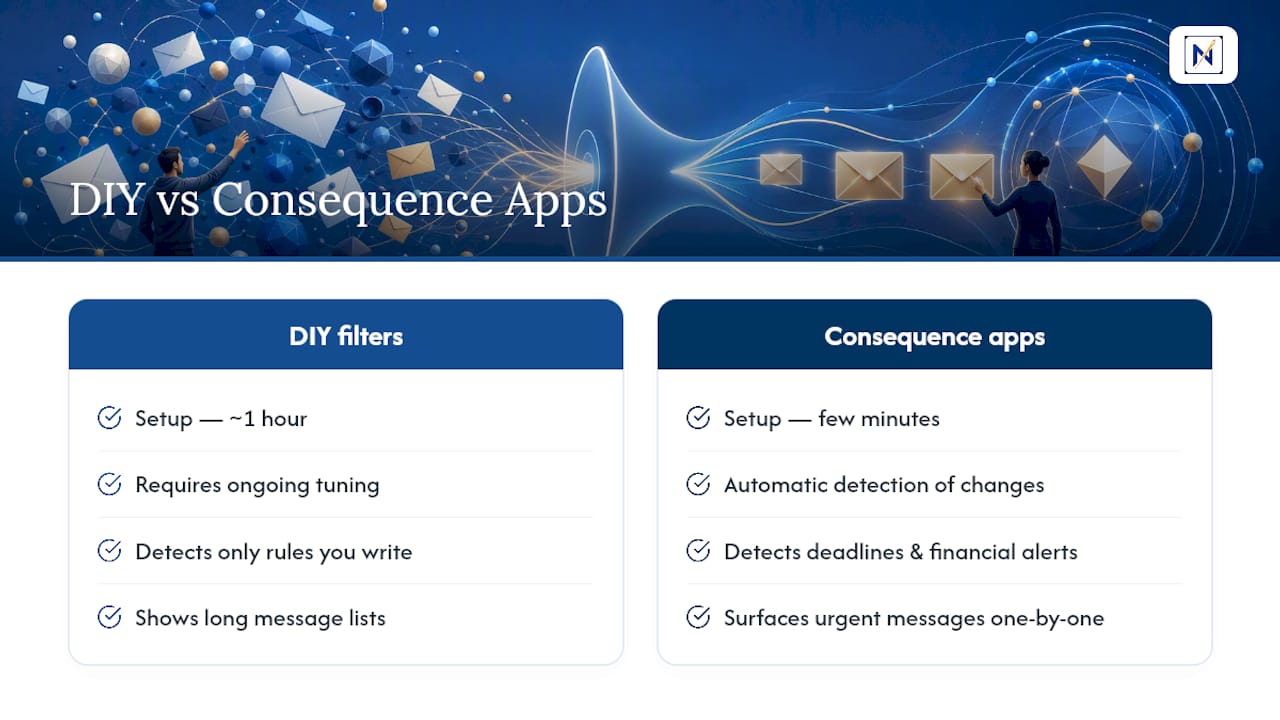
Building your own consequence filters works, but it takes ongoing tuning as your senders and deadlines change. There are apps designed to connect to Gmail, Outlook, Microsoft, Yahoo, or iCloud that automatically detect deadlines, financial alerts, overdue replies, and other high-consequence messages without requiring you to write rules.

Such apps can surface overdue and urgent messages one at a time instead of presenting a long list, aiming to reduce overwhelm. They may also track opportunities like credits and refunds, and include built-in unsubscribe tools to manage communication-heavy clutter.
Setup can take just a few minutes compared to the hour required for a DIY filter system, and some offer free trials to let you test their effectiveness before committing. Try the live version of theNeedle and see which of your last week’s emails it would have flagged for you.
Research and Resources Behind This Guide
This guide draws on field research into notification batching and cognitive load, studies distinguishing communication-related from task-related email overload, and theNeedle’s own data on daily email volume. For further reading on inbox structure and reducing information overload, see theNeedle’s guide to organizing your inbox and its breakdown of the cost of information overload.
Sources
- Effects of task interruptions caused by notifications from communication applications on strain and performance - PMC
- Managing Digital Notifications and Stress: Evidence from a Hybrid Laboratory and Field Study on Cognitive Load, HRV, and Well-being
FAQ
What Does “Do Not Disturb Email” Mean in Practice?
It means muting low-value alerts while surfacing messages tied to real consequences, like deadlines, financial alerts, or unanswered client replies, rather than blocking all notifications equally.
How Is This Different From My Phone’s Do Not Disturb Mode?
Standard Do Not Disturb is binary: everything is silenced or nothing is. Consequence-based prioritization, the approach theNeedle uses, actively identifies which specific messages matter and lets those through while batching the rest.
How Often Should I Check Batched Email?
Three times a day works well for most schedules, such as morning, midday, and end of day, while consequence-tagged messages stay visible in near real time through a highlighted view.
What Counts as a High-Consequence Email?
Reliable signals include explicit deadlines, financial terms like refunds or overdue invoices, calendar attachments, direct-recipient status, and threads with repeated unanswered replies, not just a subjective “urgent” label in the subject line.
Does Reducing Notifications Actually Help Productivity?
Field research shows notification batching improves performance and reduces strain for many people, though results vary based on individual fear of missing out and telepressure, which is why a short personal trial matters more than blanket advice.