The Deadline Emails Hiding in Your Inbox Right Now

Deadline emails are the incoming messages that carry a due date or a consequence attached to it, and the single move that changes your outcomes is turning on consequence-first triage instead of reading your inbox chronologically. The average worker receives 117 emails a day, and buried in that pile are the two or three that actually matter this week. Purpose-built tools like Theneedle exist specifically to pull those out for you.
Here’s what to do in the next five minutes:
- Turn on consequence-first prioritization in whatever email tool you use, or manually flag any message containing a date, dollar amount, or the word “deadline.”
- Set one rule: any email from a client, a court, a lender, or an employer with a due date gets a label and a calendar entry before you close the tab.
Key Takeaways
Consequence-first triage works because it ranks emails by what you’d lose by ignoring them, not by how recently they arrived.
| Point | Details |
|---|---|
| Define the target | A deadline email is any incoming message tied to a due date or consequence, not an outgoing reminder. |
| Know the stakes | Missing key emails has driven real regulatory enforcement and multi-million-dollar compliance exposure. |
| Watch four signals | Sender relationship, explicit deadline language, thread escalation, and your own response history drive detection. |
| Audit and correct weekly | A short weekly correction session for three to four weeks meaningfully improves triage accuracy. |
| Try a purpose-built tool | Theneedle applies consequence-first ranking across major providers with a short personalization period and a free trial. |
Table of Contents
- What Counts as a Deadline Email?
- Why Deadline Emails Matter for Your Bottom Line
- How Triage Systems Spot a Deadline Buried in Your Inbox
- Building a Weekly Workflow That Actually Catches Deadlines
- Fixing a Triage System That’s Missing the Wrong Things
- Writing Deadline Emails People Actually Notice and Act On
- Deadline Email Templates Worth Adapting
- How to Follow Up When You Don’t Hear Back
- Documenting Deadline Emails for Compliance and Liability
- How Theneedle Surfaces the Emails You Can’t Afford to Miss
- Sources
What Counts as a Deadline Email?
A deadline email, in the sense that matters here, is any incoming message that requires you to act by a specific time or accept a specific consequence for inaction. That includes a client’s contract renewal notice, a court filing deadline, an insurance claim window, a job offer expiration, or a vendor invoice with a late fee attached. It does not include your own outgoing reminders to other people. This article is about the messages landing in your inbox that you’re at risk of missing, not the ones you send.
Why Deadline Emails Matter for Your Bottom Line
The math is not subtle. At 117 emails a day, even a disciplined reader spends a chunk of the workday just scanning subject lines, and keeping your inbox open while you work fragments your attention badly enough to eat into real productive time. Somewhere in that scroll sits the message that actually costs you money if you miss it.
The financial exposure is real and documented. Organizations that can’t produce a critical email when asked face multi-million-dollar compliance and litigation risk, and regulators have shown they’ll enforce that risk. The SEC has pursued major enforcement actions tied directly to records and email handling failures.
For professionals in law, healthcare, and finance, the stakes go further. Missing a time-sensitive client communication can rise to an ethical or professional duty violation, not just an inconvenience.
The pattern shows up everywhere once you look for it:
- A signed offer expires because the acceptance email sat unread for three days.
- A lender’s document request deadline passes, triggering a rate change or a denied application.
- A client’s urgent scope amendment gets buried under fourteen newsletter digests.
How Triage Systems Spot a Deadline Buried in Your Inbox
Detecting a deadline email isn’t about scanning for the word “deadline.” Modern triage systems combine several signals at once to score how consequential a message actually is.
Pro Tip: If your current filter only searches for urgency keywords like “urgent” or “ASAP,” it’s missing most real deadlines. A lender rarely writes “urgent.” They write “your response is due by the 15th,” which is a completely different pattern to detect.
The core signals that AI email triage systems combine include:
- Sender relationship — a message from a client, employer, or institution you’ve replied to before carries more weight than a cold outreach.
- Explicit deadline language — dates, dollar figures, and phrases like “must respond by” or “expires on” get weighted heavily, even when they’re phrased casually.
- Thread escalation — a second or third follow-up on the same subject line signals rising urgency, especially if tone shifts.
- Past response behavior — if you’ve historically replied to a sender within hours, a delay from them gets flagged differently than a delay from someone you rarely engage.
Keyword-only filters fail because real deadlines rarely announce themselves. A landlord doesn’t write “URGENT DEADLINE.” They write “please confirm by Friday or we’ll proceed with the listed applicant.”
That’s why effective systems run two models in parallel: a global baseline trained on general urgency patterns, and a personalized model that learns your specific senders and habits over roughly two to four weeks. During that window, the system watches what you open, what you ignore, and what you eventually scramble to answer late. It uses that pattern to build a score.
Once tuned, a good system does more than just flag new mail. It proactively resurfaces items you flagged as important but never acted on, quietly digests newsletters and low-priority threads into a batch you can skim later, and rescores anything that’s crossed its stated deadline as overdue rather than letting it fade into the archive.
Building a Weekly Workflow That Actually Catches Deadlines
Start with a quick audit. Spend some dedicated time sorting two weeks of incoming mail into several buckets: Urgent Client, Awaiting Action, Financial/Legal, FYI Only, and Junk. This gives your triage system, or your own judgment, a stable structure to build from, an approach supported by practical AI triage guides as the fastest path to accuracy.
From there, configure four things:
- Priority labels matching your audit buckets, applied consistently.
- Routing rules that send financial and legal mail to a dedicated folder you check daily, no exceptions.
- Calendar and task creation the moment a deadline email lands, not when you finally read it.
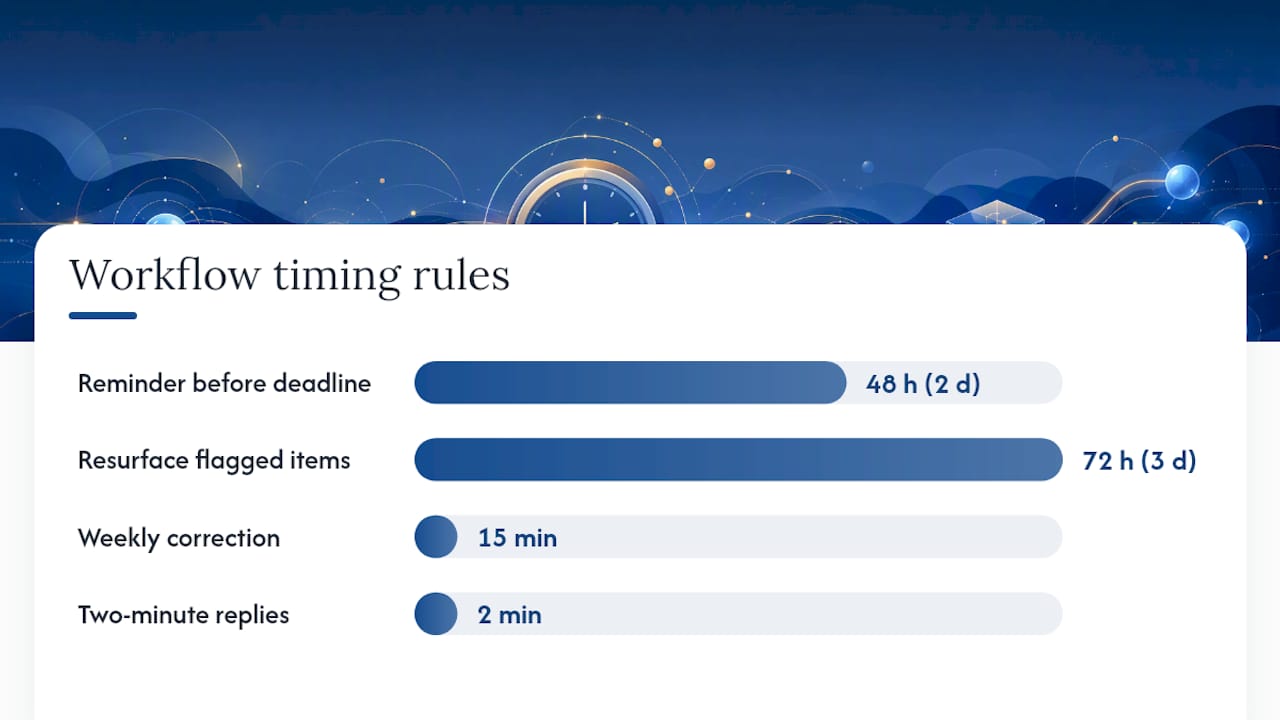
- Immediate reminders set for 48 hours before any hard deadline, not the day of.
Daily and weekly habits matter as much as setup. Professional advice on avoiding missed correspondence consistently recommends dedicated processing blocks and a two-minute rule: if a reply takes under two minutes, do it immediately; if it’s complex, create a calendar task for it rather than leaving it in the inbox to re-read five times.
Structure your week around this:
- One focused inbox session daily, ideally at a consistent time, where you clear the Urgent and Financial/Legal buckets completely.
- A proactive resurfacing check, either automated or manual, for anything flagged three or more days ago with no action taken.
- A 15-minute weekly correction session where you retag anything the system got wrong.
If you’re juggling client work across multiple inboxes, this is also where a virtual assistant or a shared client portal earns its cost. Someone else can catch what your own attention slips past. For the mechanics of connecting triage results to your calendar and task list, organizing your inbox around this kind of system is worth doing once, properly, rather than patching it weekly.
Fixing a Triage System That’s Missing the Wrong Things
No system gets it right immediately, and the fixes are usually small.
Give corrective feedback consistently. When you retag a misclassified email, do it the same day, and check weekly for three to four weeks to see whether accuracy improves. A 15-minute weekly correction habit measurably speeds up model accuracy compared to occasional, sporadic corrections.
Watch for a specific bias: personalized models learn from your own behavior, which means a system can quietly learn to bury emails from a sender you habitually ignore, even when that sender occasionally sends something critical. If you have a client or department you tend to deprioritize out of habit, audit that sender’s messages separately every few weeks.
Pro Tip: Measure false negatives and false positives separately. A system with almost no false positives can still be dangerous if it’s missing the two emails a year that actually matter from a specific contract type. Low noise isn’t the same as high safety.
A few more checks worth building into your routine:
- Review your spam and junk folder weekly during high-risk periods, like tax season or contract renewal windows.
- Confirm your “missed” or “other” folder isn’t silently swallowing first-time senders with real business.
- For mission-critical relationships, consider routing critical messages to an assistant or a secure portal as a backup channel rather than relying on a single inbox.
Writing Deadline Emails People Actually Notice and Act On
Detecting deadline emails on the receiving end is half the equation. The other half is writing ones that don’t get buried in someone else’s inbox, especially when you’re the one setting the deadline for a client, vendor, or collaborator.
Start with the subject line. “Following up” gets ignored. “Response needed by Friday, March 20” gets opened. Put the deadline itself in the subject line whenever the message is genuinely time-sensitive, not for routine requests where that would read as manufactured urgency.
In the body, state the deadline once, clearly, in the first two sentences. Don’t bury it in paragraph three after three sentences of pleasantries. Use a specific date and time, including time zone if you’re working across regions. “By end of week” is vague and invites a different interpretation than yours. “By 5:00 PM ET on Thursday, March 19” leaves no room for confusion.
Make the request actionable. Tell the recipient exactly what you need from them, not just that time is running out. “Please confirm receipt and send the signed form by Thursday” works. “This is time sensitive, please advise” doesn’t tell anyone what to do.
State the consequence plainly if there is one. If a missed deadline means a lost discount, a canceled appointment, or a forfeited slot, say so in one sentence. This isn’t about pressure tactics. It’s about giving the recipient the same information you’d want if the roles were reversed, so they can weigh it against their own priorities honestly.
Deadline Email Templates Worth Adapting
A few structures cover most situations. Adjust the specifics, but keep the shape.
For a payment or document deadline:
Subject: Payment due Friday, March 20, invoice #4471
“Hi [Name], this is a reminder that invoice #4471 for $[amount] is due Friday, March 20. Please let me know if you’ve already submitted payment, or if you need the invoice resent. A late fee of [amount] applies after the due date.”
For an internal approval request:
Subject: Need your sign-off by Wednesday to hit the launch date
“Hi [Name], I need your approval on the attached draft by end of day Wednesday to keep us on track for the March 25 launch. If you have edits, please send them by tomorrow so there’s time to incorporate them before the deadline.”
For a client decision with a real expiration:
Subject: Offer expires Monday, please confirm by then
“Hi [Name], this offer is available through Monday, March 23. If we don’t hear back by then, we’ll need to release the slot to the next client on the list. Let me know if you have any questions before then.”
Each version leads with the date, states the ask, and names the consequence without dramatizing it.
How to Follow Up When You Don’t Hear Back
Silence after a deadline email doesn’t always mean the recipient is ignoring you. It often means your message got buried under their own 117 emails. The fix is a structured follow-up, not a louder one.
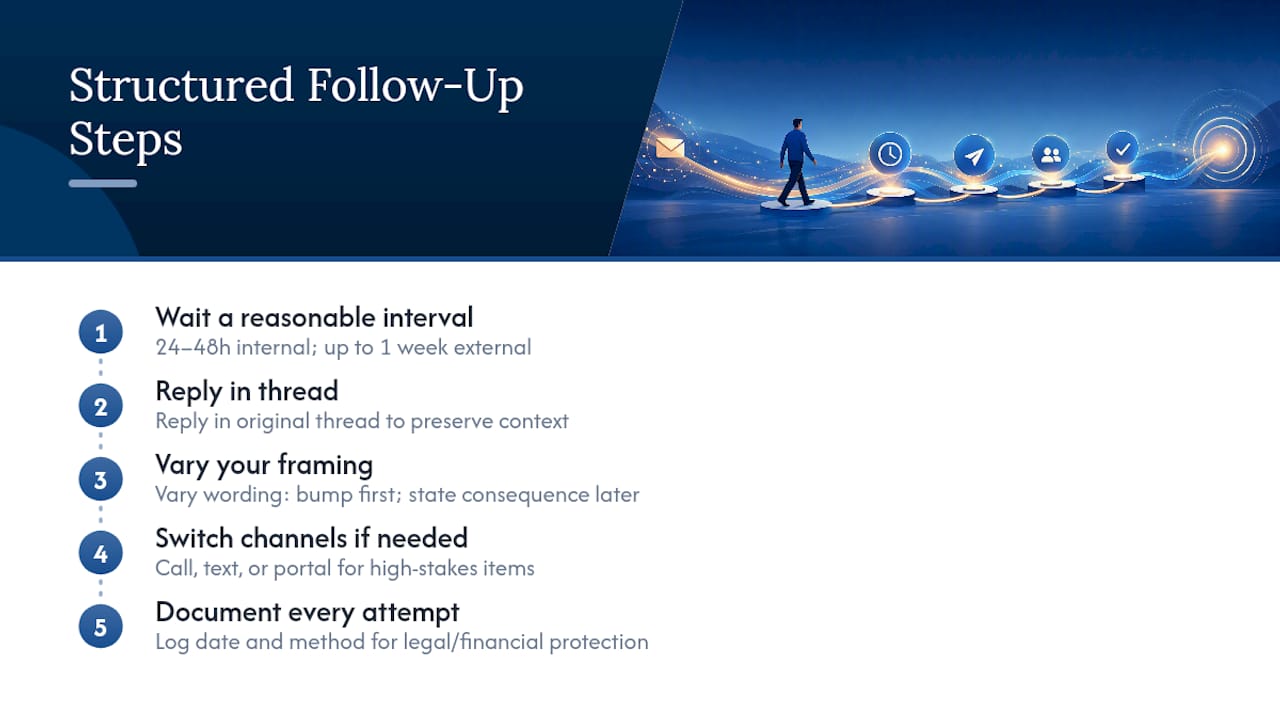
Wait a reasonable interval before the first follow-up, generally 24 to 48 hours for internal requests and up to a week for external ones, unless the original deadline itself is closer than that. Reply directly to the original thread rather than starting a new email. This preserves context and makes it obvious you’re following up on something specific, not sending a fresh request.
Change the framing slightly on each follow-up rather than repeating the same message. The first follow-up can be a simple bump: “Just making sure this didn’t get lost, still need your response by [date].” A second follow-up, if the deadline is close, should state the consequence more directly: “I haven’t heard back, and I need to move forward without your input by [date] if I don’t hear from you.”
If email genuinely isn’t working and the stakes are high, switch channels. A phone call, a text, or a message through a client portal often breaks through where a third email won’t. This is also where enrolling in SMS reminders for time-critical items can catch someone who has simply stopped checking their inbox during a busy week.
Document each follow-up attempt, especially for anything with financial or legal weight. A simple note of the date and method you used to reach someone protects you if the missed deadline later becomes a dispute.
Documenting Deadline Emails for Compliance and Liability
The legal exposure around missed or undocumented deadline communications is not theoretical. Regulatory bodies have pursued real enforcement actions tied to records and email handling failures, and the gap that creates that exposure is usually not the initial email. It’s the failure to capture, classify, and retrieve it later when someone asks for proof.
If you work in a field where a missed deadline could trigger a client complaint, a regulatory inquiry, or litigation, treat your deadline emails as records, not just messages. That means keeping them retrievable, not deleting or archiving them into a folder you never search. It also means, when a deadline is genuinely high-stakes, sending a brief confirmation reply that restates the deadline and the action you’re taking. This creates a timestamped record on both sides without adding meaningful friction to the exchange.
For recurring high-stakes deadlines, such as recruiting cycles, licensing renewals, or contract windows, a calendarized external source can help you cross-check your own tracking. A detailed deadline calendar for a specific industry, for instance, shows how many discrete dates a single process can generate, and why relying on memory alone tends to fail.
Professional guidance in fields like law explicitly recommends limiting the number of communication channels you rely on for critical matters and building in redundancy, whether that’s an assistant who monitors a shared inbox or a client portal that logs every exchange. The goal isn’t paranoia. It’s making sure that if a deadline email ever becomes the center of a dispute, you have more than your memory to point to.
Consequence-First Triage in Practice
What surprises most people isn’t the volume of email. It’s how quietly a real deadline can slip past a good filter simply because the sender used ordinary language. I’ve seen the pattern repeat: a landlord’s plainly worded “please confirm by Friday” gets treated like routine correspondence, while a spam newsletter with the word “urgent” in the subject line gets flagged.
The fix isn’t more filtering. It’s weighting consequence over vocabulary, and still glancing through your full inbox every week or two, because no model catches everything.
— Glen
How Theneedle Surfaces the Emails You Can’t Afford to Miss
Theneedle exists for exactly the problem this article walks through: not less email, but fewer missed consequences. It connects to Gmail, Outlook, Microsoft, Yahoo, and iCloud, then ranks incoming mail by what happens if you ignore it, not by when it arrived.

Setup takes a few minutes, and the personalization period runs a few weeks, allowing the system to learn which senders and patterns matter most to you, as the system learns which senders and deadline patterns matter most to you. During that stretch it also surfaces unhandled replies and tracked opportunities like credits or refunds you might otherwise let expire, and its one-at-a-time focus mode is built for anyone who finds a crowded inbox genuinely hard to think through. You can see the consequence-first ranking in action on the live product preview, or start a free trial directly at Theneedle and let it sort your next batch of 117 emails before you do.
Sources
- Email overload solutions (RescueTime blog)
- How Missing Emails Can Cost Companies Millions | CIO Insight
- Is a Missed Email a Breach of Ethical Duty? - California Lawyers Association
- AI Email Triage: How Machines Prioritize | Brainpage