ADHD Email Management for Adults: Two Pass System and 15 Minute Reset

Adopt an action-first, two-pass triage system and set a recurring inbox window instead of checking all day. Right now, set a 15-minute timer and archive everything older than 30 days. With the average worker fielding numerous emails daily, volume is the enemy, not your willpower, and a tool like theNeedle can help surface the handful that actually carry consequences.
TL;DR:
- Prioritize messages by consequence using automated tools like theNeedle to surface deadlines, financial alerts, and unhandled replies without reading all emails.
- Use a two-pass system with scheduled windows for triage and action, limiting decision fatigue and task switching for ADHD brains.
- Archive all emails older than 30 days in one step to reduce backlog and psychological weight, then focus on processing only recent messages.
- Keep labels simple with action, waiting, reference, and low-priority categories, automating sorting with filters to minimize decision points.
- Set explicit boundaries and timetables for email checking, turning off notifications and using autoresponders to prevent emotional overwhelm and avoidance.
Table of Contents
- Why ADHD Makes Email Management Harder Than It Looks
- A Step-by-Step ADHD-Friendly Email System You Can Start Today
- Setting Up an Inbox That Removes Decisions Before You Make Them
- Tools and Workflows That Support the Two-Pass System
- Mindset and Boundary Tactics That Make the System Sustainable
- Turning Long, Confusing Emails Into Clear To-Dos With AI
- Why theNeedle Built Its Approach Around Consequence, Not Volume
- Cutting the Flow Before It Reaches You
- Beating the Email Avoidance Spiral
- Resetting After an Email Overwhelm Episode
- Adjusting the System for Your Specific ADHD Profile
- Weekly Email Schedules That Actually Hold Up
- Mistakes That Quietly Undo an ADHD Email System
- My Take: Start Small, Not Perfect
- Try theNeedle for Consequence-Based Prioritization
- Sources
Why ADHD Makes Email Management Harder Than It Looks
Email feels simple to everyone else, which is exactly why it wrecks confidence when it doesn’t feel simple to you. It’s not a discipline problem. It’s an executive function problem, and email happens to hit every weak spot at once.
Every message in your inbox demands a tiny decision: reply now, later, never, or delegate. String together 100 of those decisions and you get decision fatigue before lunch, a well-documented drain on the same mental resources ADHD brains already ration carefully. Working memory adds another layer of friction. If you open an email, get pulled away for ten seconds, and come back, you may have already lost the thread of what you were about to do with it. That’s not forgetfulness in the everyday sense. It’s a working memory limit doing exactly what research on ADHD and executive function says it does.
Then there’s time blindness, the tendency to misjudge how long something will take or how much time has actually passed. A “quick check” of the inbox can swallow 40 minutes, and you won’t feel it happening. Time blindness in ADHD often shows up exactly this way: not as laziness, but as a broken internal clock around low-stimulation tasks.
Email also plays a dirty trick with dopamine. Each new message is a tiny variable reward, sometimes good news, sometimes nothing, occasionally a problem. That unpredictability is what keeps you refreshing.
This produces two opposite but equally common patterns:
- Compulsive checking, where the inbox becomes a slot machine you can’t walk away from.
- Total avoidance, where the unread count climbs into the hundreds because opening the app feels like opening a trapdoor.
Long-standing guidance for adults with ADHD points to the same root cause behind both patterns: there’s no structure telling the brain when email is “on” and when it’s safely “off.” Build that structure, and both compulsive checking and avoidance tend to ease.
A Step-by-Step ADHD-Friendly Email System You Can Start Today
Start with a reset, not a reorganization. Archiving everything older than 30 days in one move clears the psychological weight of a backlog without deleting anything. Archived mail stays searchable. You’re not losing information, you’re losing the visual reminder that you’re behind.
With a clean slate, the daily system runs on two-pass processing, a structure that separates fast decisions from focused work so your brain never has to do both at once.
- Pass one: triage. Skim the inbox and sort every message using the Four D’s: Delete, Do, Delegate, or Defer. Anything answerable in under two minutes gets done immediately (the two-minute rule). Everything else gets tagged and moved on. You are not writing replies in this pass. You are sorting.
- Pass two: action. During a scheduled block, work only through what triage flagged as “Do” or “Defer-now.” No new inbound checking during this block. It’s execution time, not discovery time.
This split matters more for ADHD brains than it sounds. Mixing “decide what this is” with “write the response” forces constant task-switching, and separating quick decisions from deeper work prevents the repeated re-reading that eats so much of the day.
A sample daily rhythm:
| Time block | What happens |
|---|---|
| Morning (10 to 15 minutes) | Triage pass only. Sort overnight mail with the Four D’s. |
| Midday (20 to 30 minutes) | Action pass. Answer flagged items, close out two-minute tasks. |
| End of day (10 minutes) | Final triage sweep. Nothing new opens after this without a real reason. |
Three windows a day, none longer than 30 minutes, beats an open tab you glance at 40 times.
For the backlog itself, run a sprint instead of trying to hit inbox zero in one sitting. Pick 20 minutes, set a visible timer, and process the oldest unarchived batch first, since those are usually the ones generating the most guilt. Track progress by unread count or by folder size, whichever number actually moves you. Two or three sprints over a week will usually clear what months of avoidance built up.
Pro Tip: Do your triage pass standing up or with a five-minute timer visible on screen. The physical cue signals “this is sorting, not writing,” which keeps you from accidentally drafting a reply during a phase meant to take 90 seconds.
Setting Up an Inbox That Removes Decisions Before You Make Them
A cluttered label system creates more decisions, not fewer. The fix is an inbox built around action, not projects or topics, because action categories stay stable while project folders multiply endlessly and eventually cause the same folder paralysis they were meant to prevent. This pattern is repeatedly flagged by email organization research.
Keep the taxonomy to a handful of labels:
- Action — anything requiring a real response from you.
- Waiting — sent, awaiting a reply from someone else.
- Reference — receipts, confirmations, anything you might search for later but never need to act on.
- Read or Newsletters — lower-priority content that doesn’t belong in your active view at all.
Filters do the sorting work automatically so triage doesn’t have to. Set a rule that routes anything from a mailing list, newsletter, or automated sender straight to “Read,” skipping the inbox entirely. Most email clients let you build this from any message’s sender menu in under 30 seconds. Combine it with a serious unsubscribe pass. If a sender has landed in “Read” for three straight weeks without you opening it, unsubscribe. You were never going to read it.
Templates cut the second-biggest time cost: drafting the same reply from scratch. Save short, reusable responses for the messages you get weekly: a scheduling reply, a “got it, will follow up by Friday” acknowledgment, a polite decline. Pair templates with snooze, which hides a message until a specific date instead of leaving it visible and nagging at you. Snoozing something to Monday morning is a legitimate strategy, not procrastination, as long as you actually process it Monday.
Tools and Workflows That Support the Two-Pass System
The right tool removes a decision; the wrong tool just adds another inbox to check. Match the tool to the specific friction point rather than collecting apps.
- Filters and rules solve volume. They keep low-value mail from ever reaching your active view.
- Templates and snippets solve drafting time, turning a five-minute reply into a 30-second one.
- Task integrations (forward-to-task tools built into Gmail, Outlook, or task apps) solve the “seen isn’t handled” gap, the moment where you read something important, mentally file it as done, and then never actually act on it.
- Prioritizers like theNeedle solve the hardest problem of all: knowing which of 117 daily messages actually has a deadline or financial consequence attached, without reading all 117.
- LLM assistants solve comprehension load on long, messy email threads.
A practical integration example: forward a task-bearing email to your task manager, let it auto-create a calendar block for the actual work, and set a follow-up reminder for three days later in case nobody replies. That single workflow replaces three manual steps you’d otherwise forget under time blindness.
LLMs deserve a specific caveat here, covered in depth later: they’re excellent at summarizing a wall of text into bullet points, but they occasionally invent details that were never in the original message. Treat every AI summary as a draft, not a verdict.
Mindset and Boundary Tactics That Make the System Sustainable
Systems fail when the emotional pressure around email stays the same even after the mechanics improve. Reducing that pressure is its own separate skill.
Clinical perspectives on ADHD, including Kathleen Nadeau’s work on boundaries and emotional load, emphasize a simple principle: your inbox should never be the thing setting your daily agenda. An autoresponder that states your actual response window, even something as plain as “I check email twice daily and reply within one business day,” resets expectations before anyone has a reason to be frustrated.
Short replies are not rude. A one-line answer that solves the sender’s question is more useful to them than a three-paragraph reply you delay for a week because it felt like it needed more.
- Turn off notification badges and pop-ups; a visible unread count is a compulsion trigger, not useful information.
- Publish your response window once, in your signature or an autoresponder, so people stop expecting instant replies.
- Give yourself explicit permission to send short, template-based responses without apologizing for their length.
- Treat your scheduled email blocks as “office hours” and defend them the way you’d defend a meeting.
Pro Tip: Write your autoresponder to name a specific check-in time (“I check email at 10 AM and 3 PM”) instead of a vague promise (“I’ll get back to you soon”). Specific times reduce follow-up nagging far more than vague reassurance does.
Turning Long, Confusing Emails Into Clear To-Dos With AI
Long threads are where ADHD email management usually collapses. A 12-reply chain with three people weighing in is genuinely hard for anyone to parse, and it’s a natural place to hand comprehension work to an AI assistant, provided you verify what comes back.
Use a prompt structured like this:
That structure matters because including the original email alongside the AI’s output is the single easiest way to catch a mistake before it becomes your mistake.
Run a short verification pass every time:
- Confirm every deadline the AI listed actually appears in the original text, not just implied by tone.
- Check that assigned owners match who actually said “I’ll handle this,” not who was simply mentioned.
- Treat the output as a draft task list, not a finished plan; adjust priority levels based on your own judgment of the sender and stakes.
- When a deadline or assignment is genuinely ambiguous, reply to the thread and ask directly rather than guessing.
One firm rule: never paste financial account details, legal case information, medical records, or anything with a Social Security number into a public LLM tool. Strip identifying details first, or use the AI only to summarize structure while you handle sensitive specifics yourself.
Why theNeedle Built Its Approach Around Consequence, Not Volume
theNeedle didn’t start from “how do we help people read more email faster.” It started from a harder question: which of the 117 emails the average worker gets daily actually matters, and which are noise dressed up as urgency?
Consequence-based prioritization surfaces messages tied to deadlines, financial alerts, unanswered replies waiting on you, and opportunities like refunds or credits, then gets out of the way for everything else. That maps directly onto the two-pass system: theNeedle effectively pre-runs your triage pass by consequence, so your own attention goes straight to what’s flagged.
The ADHD tax, the quiet cost of missed deadlines, late fees, and lapsed opportunities from unmanaged inboxes, is the exact problem this framing addresses. It’s also the throughline in Seen Isn’t Handled, which names the gap between reading a message and actually acting on it, the same gap the two-pass system and forward-to-task workflows are built to close.
- Prioritization by consequence, not sender or subject line
- Surfacing unanswered replies you’ve mentally marked “done” but haven’t sent
- Flagging financial deadlines and opportunities before they lapse
Cutting the Flow Before It Reaches You
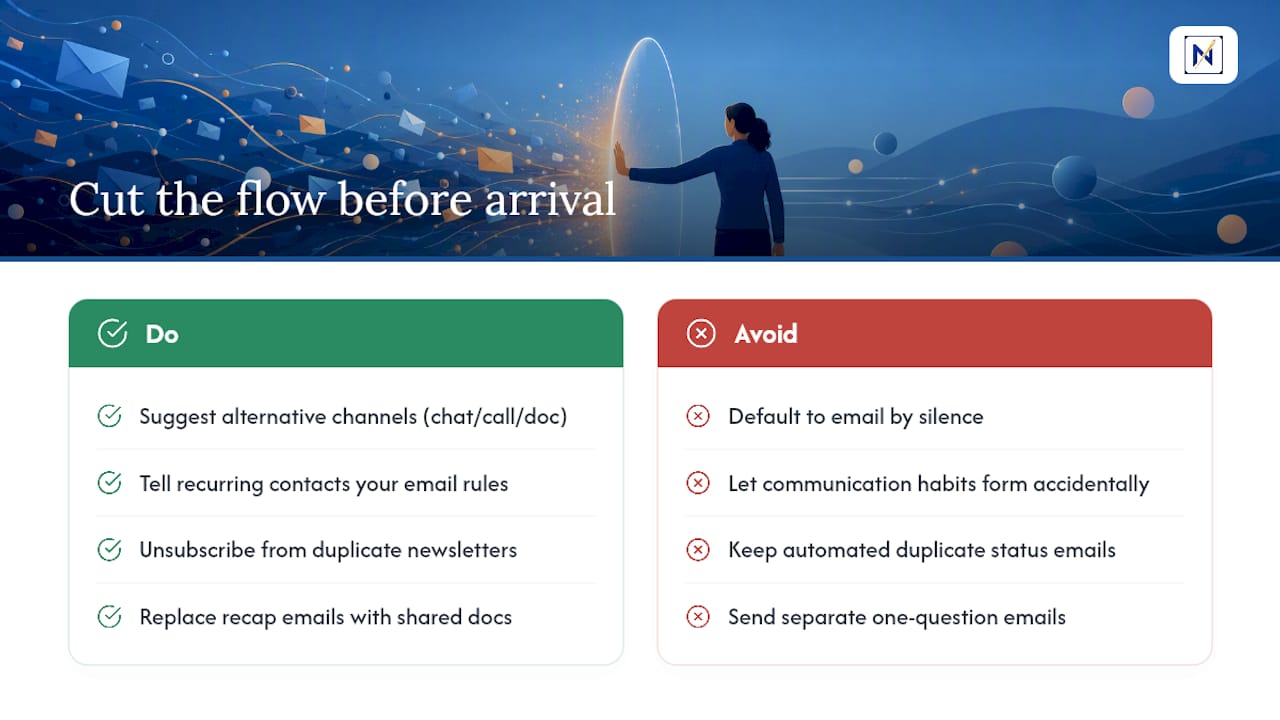
The most effective inbox strategy is the one that stops mail before it arrives. Every email you never receive is one you never have to triage.
Start with your most frequent senders, the coworkers, clients, or collaborators generating five or more messages a week. Propose a channel swap for quick back-and-forth: a shared chat thread, a two-minute call, or a shared document with comments instead of a six-reply email chain. Most people default to email because nobody suggested an alternative, not because they prefer it.
Set explicit expectations with recurring contacts rather than letting habits form by accident. A short, direct message works better than silence: “I’m moving quick questions to Slack and keeping email for anything that needs a paper trail.” That one sentence, sent once, saves you dozens of future messages.
Internal newsletters, digest emails, and automated status updates are usually the easiest volume to cut entirely. If a weekly summary duplicates information available in a dashboard you already check, unsubscribe from the email version. Ask whether meetings that generate a “recap email nobody reads” could just end with a shared doc link instead.
Batch your own outgoing email too. Every email you send tends to generate a reply, and every reply is a future inbox item. Combining three separate questions into one message to a colleague cuts your incoming volume as much as it cuts theirs.
The goal isn’t zero email. It’s making sure every message that lands in your inbox earned its spot there.
Beating the Email Avoidance Spiral
Email procrastination in ADHD rarely comes from laziness. It comes from a specific fear: opening the inbox might reveal something that requires more energy, emotional labor, or decision making than you currently have available. That fear is rational, even when the actual email turns out to be nothing.
The spiral works like this: avoidance lets the unread count climb, the climbing count makes the inbox feel more threatening, and the increased threat produces more avoidance. Breaking it requires lowering the stakes of opening the inbox at all, not building more willpower to face it.
A few tactics interrupt the spiral directly:
- Shrink the exposure. Open only the “Action” label during your triage window, not the full inbox, so you’re never staring at the entire backlog at once.
- Time-box the fear. Give yourself explicit permission to close the inbox after exactly ten minutes, even if it’s not empty. A partial triage pass beats zero triage passes.
- Name the actual worry. If you’re avoiding one specific sender or thread, that single email is almost always what’s driving the whole avoidance pattern, not the inbox in general.
- Lower the first step. “Open triage view and sort five emails” is a task you can start. “Deal with my inbox” is not, because it has no clear finish line.
The two-pass system helps here structurally: triage never requires you to write a response, which removes the exact step most procrastination clusters around.
Resetting After an Email Overwhelm Episode
Overwhelm episodes happen even with a good system, usually after travel, illness, or a stretch where life legitimately got in the way of the routine. What separates a bad week from a permanent backlog is how you recover, not whether you ever fall behind.
Skip the instinct to catch up on everything in one marathon session. That approach almost always ends in burnout partway through, which then reinforces the belief that email itself is the problem rather than the volume you let build up.
Instead, run a regroup pass before a full processing pass:
- Open the inbox once, sorted by date, and scan headers only for anything time-sensitive or from someone who needs a reply within 48 hours. Flag those and nothing else.
- Handle the flagged items in one short session, even if the rest of the inbox is still a mess.
- Archive the rest of the backlog using the same 30-day rule from the initial reset, then let the two-pass system pick up fresh from there.
This mirrors the original reset almost exactly, because that’s the point: overwhelm episodes aren’t failures of the system, they’re a signal to run the reset again. A system that requires zero recovery events isn’t realistic for anyone, ADHD or not.
Adjusting the System for Your Specific ADHD Profile
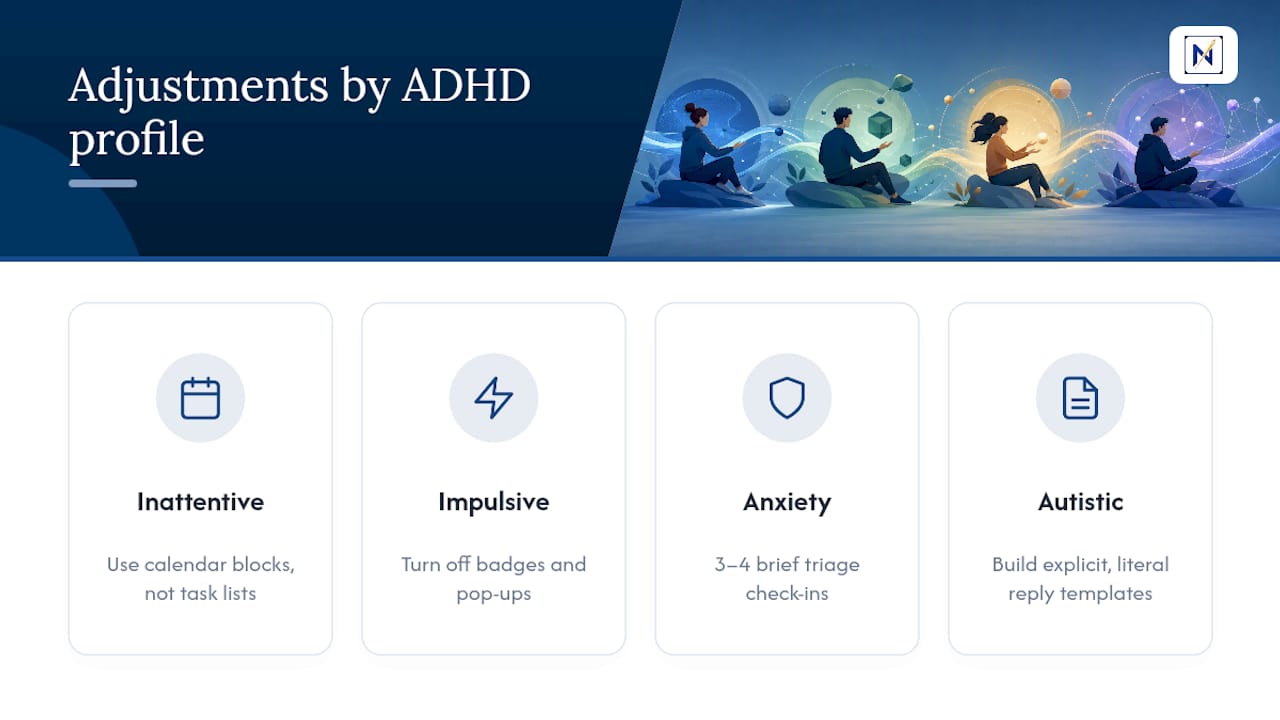
Predominantly inattentive ADHD and combined-type ADHD tend to hit different friction points in an inbox, so the same base system needs different emphasis depending on which one describes you.
If distraction and forgetting mid-task are your main pattern, lean harder on the calendar-block integration mentioned earlier. Task lists alone are easy to lose track of; a specific time slot on a visible calendar is harder to forget than an item buried in an app.
If impulsivity and compulsive checking are the dominant pattern, notification removal matters more than almost anything else in this guide. Turning off badges and pop-ups addresses the trigger directly, rather than asking you to resist a trigger that’s still active.
Co-occurring anxiety changes the calculus too. If anxiety spikes around unopened messages specifically, a shorter, more frequent triage cadence (three or four brief check-ins instead of two longer ones) can reduce the dread that builds during longer gaps, even though it runs slightly against the “fewer checks” instinct elsewhere in this system. The Four D’s stay the same. The frequency is the variable worth adjusting.
Autistic and ADHD co-occurrence often benefits from more explicit templates than this guide covers by default, since ambiguous social language in emails (“just checking in,” “when you get a chance”) can be genuinely harder to parse. Building slightly more literal, direct templates for your own replies removes that ambiguity from both ends of the conversation.
Test one adjustment at a time rather than overhauling the whole system. You’ll know within a week which variable actually mattered for you.
Weekly Email Schedules That Actually Hold Up
A schedule only works if it survives contact with a bad week, so the templates below are built around minimums, not ideals.
The Three-Window Standard (best for most people starting out): triage at 9 AM, action block at 1 PM, final triage sweep at 5 PM. Total time commitment: roughly an hour a day, split into pieces small enough that none of them trigger avoidance.
The Low-Capacity Version (for weeks when energy is genuinely low): one 15-minute triage-only session daily, no action block required. Flagged items simply wait until capacity returns. This keeps the backlog from growing even when you can’t process it yet.
The High-Volume Version (for roles with heavy client or team email): four short windows instead of three, each capped at 15 minutes, with a hard rule that no window runs long regardless of what’s left unsorted. Discipline about stopping matters more than discipline about starting here.
Whichever template you pick, keep the same underlying rule: triage and action happen in separate passes, and the schedule survives being skipped once without falling apart entirely.
Mistakes That Quietly Undo an ADHD Email System
Most inbox systems for ADHD don’t fail from lack of effort. They fail from a handful of specific, repeatable mistakes.
Building too many folders. A taxonomy with 15 project folders looks organized on day one and becomes unusable by week three, because every new email now requires a filing decision instead of a simple action label.
Treating “inbox zero” as the goal instead of the byproduct. Chasing a literal empty inbox turns triage into a stress-inducing race. The real goal is knowing that nothing important is buried, which is a very different target than zero unread.
Skipping the verification step on AI-generated task lists. An LLM summary that gets a deadline wrong is worse than no summary at all, because it creates false confidence.
Letting one bad week become a permanent abandonment. A missed triage window is a data point, not evidence the system doesn’t work.
Checking email during the action block. This collapses the two-pass structure back into one continuous, exhausting stream and undoes the entire point of separating decisions from execution.
My Take: Start Small, Not Perfect
The version of this system that fails is the one you try to run perfectly starting Monday. The version that works is the one you build in pieces over a week.
Day 1: Run the reset. Archive anything older than 30 days. Days 2 to 3: Set up your filters, your four labels, and two or three templates for your most common replies. Days 4 to 7: Actually practice the two-pass rhythm, adjust window lengths based on what your real week looks like, and expect the first few triage passes to feel clumsy.
The biggest early mistake is trying to hit zero unread by Friday. Don’t. Judge the week by whether you ran your scheduled windows, not by the number left in the inbox.
— Glen Bover
Try theNeedle for Consequence-Based Prioritization
theNeedle is the shortcut for the part of this system that takes the most judgment: figuring out which messages actually carry a deadline, a financial stake, or an unanswered obligation before you’ve read all 117 of today’s emails.

It connects to multiple email providers and surfaces overdue items, unhandled replies, and opportunities like refunds or credits automatically, so your triage pass starts already half done. The built-in unsubscribe tool handles the persistent senders you’ve been meaning to cut for months. It fits especially well if you’re a busy professional juggling more than one inbox and you can’t afford to miss a deadline buried on page three of an unread list.
If your current system already keeps you calm and on top of things, you don’t need it. If you’re still finding out about deadlines after they’ve passed, try the live preview and see what surfaces on day one.
Sources
For deeper reading on the routines and research behind this guide: ADDitude’s email tips for adults with ADHD, Tabular.email’s inbox management best practices, the ADD Resource Center’s AI action-plan workflow, and UpOrbit’s ADHD email management guide. For inbox setup specifics, see theNeedle’s guide to organizing your email inbox.
- Email tips for adults with ADHD at work — ADDitude
- Tabular
- How to turn overwhelming emails into organized action plans — ADD Resource Center
- ADHD email management — UpOrbit